useState vs. useReducer: Making the Right Choice in React
Confused between useState and useReducer? You won’t be now.
I used to reach for it useState like it was a Swiss Army knife. Smooth and easy to chop into pieces😂
Why? Because it’s familiar, it’s easy—and it just works.
Until it didn’t.
One of my React projects turned into a web of state variables. Updating one thing broke another. Debugging was like playing Jenga on a moving train. No one can stop it from falling
That’s when useReducer stepped in and saved the day.
If you’re stuck between these two hooks — or using one blindly — it’s time to make the right call, with confidence.
Read for free 👉 here
useState vs. useReducer — What’s the Actual Difference?
Let’s simplify this:
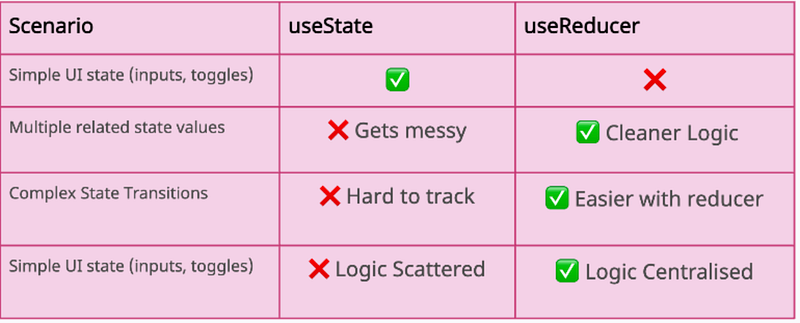
Put simply:
useState= best for basic state updatesuseReducer= best for state that has structure or rules, related states
When to Use useState (and Feel Good About It)
Stick to useState when:
- You’re managing simple form fields
- You’re toggling a modal or dropdown
- Your component doesn’t have a lot of moving parts
Example: Managing counter via useState
import React, { useState } from "react";

function Counter() {
 const [count, setCount] = useState(0);

 return (
 <div>
 <h2>Count: {count}</h2>
 <button onClick={() => setCount(count + 1)}>Increment</button>
 <button onClick={() => setCount(0)}>Reset</button>
 </div>
 );
}
When to use this?
- Basic state
- Independent updates
- No dependencies between state changes
When useReducer Starts to Shine
Reach for useReducer when:
- You’re managing a complex object (like a form with 10+ fields)
- You need to track multiple pieces of related state
- Your updates depend on previous state
- You’re tired of writing 5 different
useStatehooks in one component
It also plays beautifully with Redux-like patterns, which means easier scaling later.
Example:
import React, { useReducer } from "react";

const initialState = { count: 0 };

function reducer(state, action) {
 switch (action.type) {
 case "increment":
 return { count: state.count + 1 };
 case "decrement":
 return { count: state.count - 1 };
 case "reset":
 return { count: 0 };
 default:
 throw new Error("Unknown action");
 }
}

function CounterWithReducer() {
 const [state, dispatch] = useReducer(reducer, initialState);

 return (
 <div>
 <h2>Count: {state.count}</h2>
 <button onClick={() => dispatch({ type: "increment" })}>Increment</button>
 <button onClick={() => dispatch({ type: "decrement" })}>Decrement</button>
 <button onClick={() => dispatch({ type: "reset" })}>Reset</button>
 </div>
 );
}
Your logic moves into a reducer function = cleaner, testable, and easier to extend.
Pro Dev Insight: Why This Matters in Real Projects
When you’re shipping real products, messy state logic will slow you down more than bad UI.
useStateis great for speed… until things grow and become complex.useReducertakes 2 extra minutes to set up… but saves you hours in debugging later.
I’ve had senior developers tell me:
“Your component should be readable like a story. Not a puzzle. Where you’re searching for answers and getting confused”
It literally changed how I wrote state logic forever.
Final Thought
You don’t need to be “Team useState” or “Team useReducer.”
You need to be Team Right Tool at the Right Time.
Start small. Use useState.
When things feel tangled? Time to refactor and level up with useReducer.
Pro tip: Don’t be scared of refactoring as something will break, yes it will but refcatoring will save you a lot of time which you can spend in other things and be more productive.
Share Your Story
Do you have multiple useState hooks in your components and thinking of refactoring? I am all ears to listen to your experience of managing states, maybe you have something great to share through which everyone else can learn!!
If you like reading my articles, you can always support my writings by buying me a cup of coffee here ☕️. Let me take the hot sip and enjoy 😉
At Dev Simplified, We Value Your Feedback 📊
👉 If you like the article, please support us by clapping for this article.
👉 Have any suggestions? Let us know in the comments!