Most Developers Use ChatGPT Wrong — The Workflow That Actually Saves Me Hours
Stop treating ChatGPT like Google. Here’s a developer workflow that turns AI from a toy into a serious productivity multiplier.

Most developers are using ChatGPT like this:
“Build me a React app.”
Then they stare at the broken code, get frustrated, and conclude:
“AI isn’t there yet.”
But here’s the uncomfortable truth:
The problem usually isn’t ChatGPT. It’s the workflow.
After watching developers struggle (and wasting my own time with bad prompts), I realised something important:
The fastest developers aren’t asking AI for answers. They’re using it like a senior pair programmer.
That small mindset shift changed everything.
Instead of getting random code dumps, I started getting:
- better debugging help,
- cleaner architecture decisions,
- faster learning of unfamiliar tech,
- improved code reviews,
- and surprisingly better edge-case handling.
The difference?
I stopped using one-shot prompts.
Let me show you the workflow that actually saves hours.
Why Most Developers Waste Time With ChatGPT
Here’s the common pattern:
- Ask a vague question
- Get a vague answer
- Paste broken code
- Rage-debug
- Blame AI
Sound familiar?
The issue is that developers often treat ChatGPT like a magic code generator.
But software engineering is context-heavy.
AI performs dramatically better when you give:
- requirements,
- constraints,
- code context,
- expected behaviour,
- edge cases,
- and desired output format.
Think about it.
You wouldn’t ask a junior developer:
“Build authentication.”
And walk away.
You’d explain:
- tech stack,
- auth flow,
- security needs,
- edge cases,
- architecture expectations.
ChatGPT is no different.
The Workflow That Actually Saves Me Hours
Here’s the system:
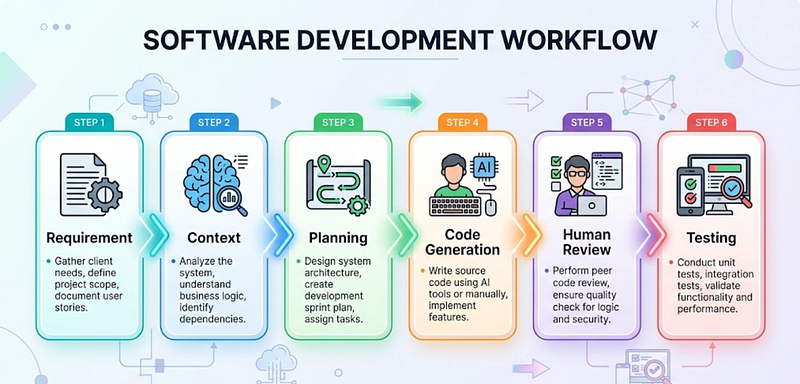
Context → Plan → Generate → Review → Refine
Simple.
But ridiculously effective.
Step 1: Give Context First (Most People Skip This)
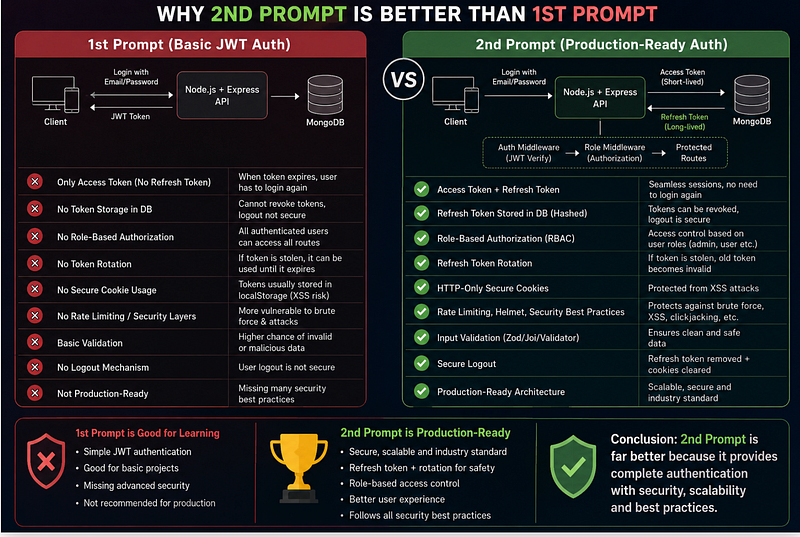
Bad prompt:
Create authentication in Node.jsBetter prompt:
I am building a Node.js + Express app.
Requirements:
- JWT authentication
- Refresh token support
- MongoDB
- Password hashing with bcrypt
- Role-based authorization
- Follow security best practices
Please first explain the architecture before generating code.
Why this works:
You’re reducing ambiguity.
The AI now understands:
- stack,
- database,
- security expectations,
- implementation style.
This alone improves output quality massively.
Common Mistake
Many developers give context after getting bad code.
That creates unnecessary back-and-forth.
Step 2: Don’t Ask for Code First — Ask for a Plan
This changed my workflow completely.
Instead of:
Build a payment systemTry:
Act as a senior backend engineer.
Before coding, break this feature into:
1. Architecture
2. API design
3. Database schema
4. Security concerns
5. Edge cases
6. Testing strategy
Then ask me clarifying questions.
Why this matters:
Bad code usually starts with bad planning.
A few minutes spent planning can save hours of rewriting.
Surprising Insight
The biggest productivity gain from ChatGPT is often thinking, not coding.
Most developers use only 20% of its value.
Workflow Visualization
Step 3: Generate Small Pieces, Not Entire Systems
This is where many developers go wrong.
Bad:
Build me an ecommerce appBetter:
Build only the product listing API.
Requirements:
- pagination
- filtering
- sorting
- MongoDB aggregation
- scalable folder structure
- production-ready error handling
Why?
Smaller chunks = better reliability.
You’ll get:
✅ cleaner code
✅ fewer hallucinations
✅ easier debugging
✅ maintainable architecture
Step 4: Use ChatGPT for Debugging Like a Senior Dev
This is probably the biggest time saver.
Instead of saying:
My code isn't workingDo this:
You are helping me debug.
Expected behavior:
User login should return JWT.
Actual behavior:
Getting 401 Unauthorized.
Tech stack:
Node.js + Express + MongoDB
Here is the code:
[paste code]
Please:
1. Identify likely causes
2. Explain root issue
3. Suggest minimal fix
4. Mention security concerns
The quality difference is huge.
Example
Bad debugging question:
Why broken?Better debugging workflow:
Expected:
["A", "A", "B"] → longest repeating substring = 3
Actual:
Returning 2
Constraints:
Sliding window solution preferred
Find logic issue only.
Do not rewrite entire code.
Notice something?
You’re forcing focused analysis.
That prevents AI from rewriting your entire project unnecessarily.
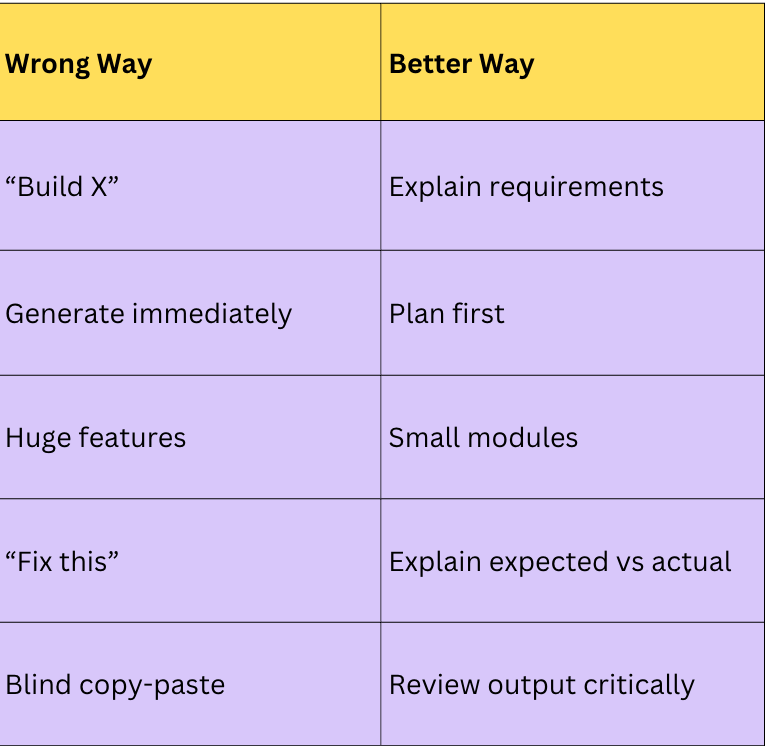
Comparison Table: Bad vs Better ChatGPT Usage
Step 5: Treat ChatGPT Like a Code Reviewer
One underrated use case:
Code reviews.
Prompt:
Review this PR like a senior engineer.
Focus on:
- performance
- readability
- scalability
- security
- edge cases
- maintainability
Do not rewrite code unless necessary.
This catches things humans miss.
Especially:
- null edge cases,
- hidden performance issues,
- bad abstractions,
- inconsistent naming,
- security mistakes.
Example Review Prompt
Explain problems using severity:
Critical
Medium
Low
Also suggest improvements.
The Biggest Mistake Developers Make
Blindly copying AI code.
Please don’t treat ChatGPT output like:
code from an intern who works fast.
Sometimes brilliant.
Sometimes dangerously confident.
Always review.
Checklist before shipping:
- Does it actually work?
- Any security risks?
- Any edge cases missing?
- Is complexity reasonable?
- Is it production-ready?
The Surprising Payoff
Here’s the unexpected thing I learned:
ChatGPT saves me more time learning than coding.
When exploring unfamiliar tech:
Instead of reading 15 blogs:
I ask:
Teach me Redis for backend interviews.
Start beginner-friendly.
Then explain:
- caching strategies
- pub/sub
- distributed locks
- real-world examples
- interview questions
Suddenly:
Learning becomes interactive.
That alone saves hours every week.
And honestly?
That’s where AI feels most powerful.
Not replacing developers.
Making good developers faster learners.
Final Takeaways
If ChatGPT feels disappointing, change the workflow.
Remember this formula:
Context → Plan → Generate → Review → Refine
The developers getting the biggest advantage from AI aren’t necessarily better coders.
They’re just asking better questions.
How are you using ChatGPT right now — as a code generator or as a thinking partner?