Vite MPA vs Library Mode: Which One Should You Choose?
A beginner-friendly guide to understanding when to build websites vs reusable packages with Vite
When you start working with modern frontend tools, one name you’ll hear often is Vite. It’s fast, flexible, and widely used for building web projects. But one thing that often confuses developers is this:
Should you use Multi-Page Application (MPA) mode or Library mode?
They may sound similar, but they solve very different problems. In this article, you’ll understand both in simple terms, see real-world examples, and learn how to pick the right one for your project.
Understanding the Core Difference
At a high level:
- MPA mode is for building websites with multiple pages
- Library mode is for building reusable code that other projects can use
Think of it like this:
- MPA = You’re building a product that users visit
- Library = You’re building a tool that developers use
What is Vite MPA Mode?
MPA stands for Multi-Page Application.
This mode is ideal when your project has multiple independent pages, such as:
- Blogs
- E-commerce websites
- Documentation portals
- Marketing websites
Each page has its own HTML file and works independently.
Key Characteristics
- Every page has a separate entry point
- Navigation causes a full-page reload
- Each page runs in its own JavaScript environment
- Great for SEO (Search Engine Optimisation)
Example Configuration
In MPA mode, you define multiple HTML files like this:
rollupOptions: {
 input: {
 main: resolve(__dirname, 'index.html'),
 nested: resolve(__dirname, 'nested/index.html')
 }
}
What Happens After Build?
- Vite generates multiple HTML files
- Each page gets its own JS and CSS bundle
- Folder structure is preserved inside the
distdirectory
Real-World Example
Imagine you’re building a job portal website:
/home/jobs/company/contact
Each page is separate and should be indexed by search engines. MPA fits perfectly here.
What is Vite Library Mode?
Library mode is completely different.
Instead of building a website, you’re building something like:
- A UI component library
- A utility package
- A plugin system
This is code meant to be used inside other projects, not directly by end users.
Key Characteristics
- Outputs JavaScript bundles only (no HTML)
- Generates ESM and UMD formats
- Designed for npm publishing or CDN usage
- Supports tree-shaking (only the used code gets included)
Example Configuration
build: {
 lib: {
 entry: resolve(__dirname, 'lib/main.js'),
 name: 'MyLib',
 fileName: 'my-lib'
 }
}
What Happens After Build?
- You get:
my-lib.mjs(modern JavaScript)my-lib.umd.js(browser-compatible)- These files can be published or shared
Real-World Example
Let’s say you build a custom button component system for React.
Instead of copying code across projects, you:
- Package it as a library
- Publish it
- Reuse it across apps
Performance & Loading Behaviour
MPA Mode
- Loads only what each page needs
- Uses code-splitting automatically
- Shared code is cached across pages
👉 Result: Faster page-specific loading
Library Mode
- Optimised for consumer applications
- Supports tree-shaking
- Can preserve module structure for better optimisation
👉 Result: Smaller bundle size when used in other apps
Dependency Handling
This is where things get interesting.
In MPA Mode
- Dependencies (like React) are bundled inside your app
- Less risk of version conflicts
- Simpler setup
In Library Mode
You don’t bundle major dependencies.
Instead, you mark them as external:
rollupOptions: {
 external: ['react'],
 output: {
 globals: {
 react: 'React'
 }
 }
}
👉 Why?
Because the app using your library will already have React installed.
Environment Variables Difference
import.meta.env.*→ replaced during build (static)process.env.*→ stays dynamic (can change at runtime)
Library mode keeps things flexible so developers using your package can control behaviour.
Deployment Differences
MPA Deployment
- Outputs a
distfolder with HTML files - Needs a server like:
- Nginx
- IIS
- Used for hosting websites
Library Mode Deployment
- Published to:
- npm
- CDNs
- No server needed for routing
- Focus is on distribution, not hosting
Maintenance Considerations
MPA Mode
- Easier to update page-by-page
- Less strict about versioning
- Debugging is straightforward
Library Mode
- Requires version control (SemVer)
- Breaking changes affect all users
- Needs careful testing and documentation
Quick Comparison
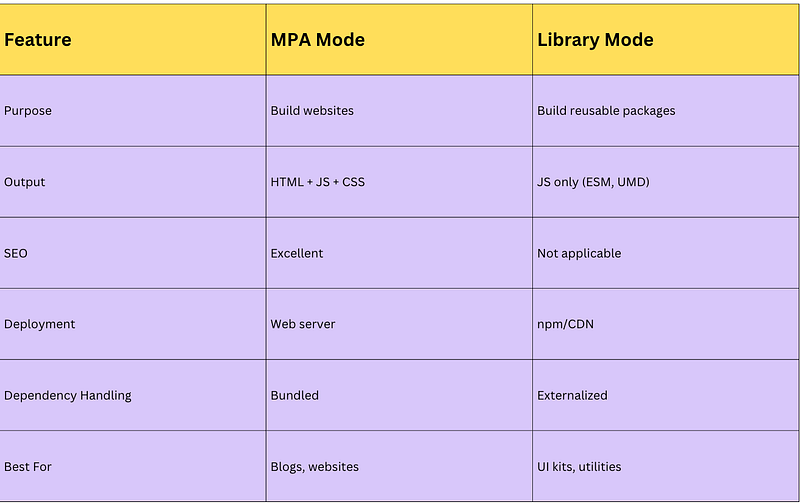
When Should You Use What?
Choose MPA Mode if:
- You’re building a website
- SEO matters
- You have multiple pages
Choose Library Mode if:
- You’re building reusable code
- Other developers will use your package
- You want clean, optimized bundles
Final Thoughts
Both modes in Vite are powerful — but they’re built for different goals.
- MPA focuses on delivering content to users
- Library mode focuses on distributing code to developers
Many real-world teams actually use both:
- MPA for their website
- Library mode for their internal component systems