Kubernetes Still Intimidates Me — But I Finally Found a Way In
Pathway to learn Kubernetes, I wish someone gave me earlier
Let’s Be Real: Kubernetes Sounds Confusing as Hell
I’ve been a developer for years. I’ve shipped production apps, dealt with deployment pipelines, and even written a few “infra as code” scripts. But whenever someone mentioned Kubernetes?
I nodded like I understood.
I didn’t. At all.
And honestly? That used to make me feel like a fake, and I mostly felt overwhelmed while learning it. However, in this article, I will explain it straightforwardly.
Why Is Kubernetes So Overwhelming?
Kubernetes isn’t just “a tool” — it’s a whole universe. And when you start exploring it, it throws alien terms at you faster than your brain can buffer:
- Pods
- ReplicaSets
- StatefulSets
- Deployments
- Services
- Ingress
- ConfigMaps
- VolumeMounts
And then suddenly you’re editing 400 lines of YAML and hoping nothing breaks in production because you’re doing it and taking god’s name 😂
The problem? Everyone explains Kubernetes through the lens of someone who already knows it but today I am going to make it easier for you, also sharing some insightful resources that can help you, quickly grasp it.
Let’s Start with the Most Important Unit: The Pod
Think of a Pod as a tiny box that runs your code in Kubernetes. A small box that contains your code and running server.
Here’s why Pods are the most essential thing to understand:
- A Pod is the smallest deployable unit in Kubernetes.
- It can run one or more containers (usually one).
- Pods don’t live forever — they’re designed to be short-lived and disposable.
If you deploy anything in Kubernetes — your frontend, backend, database — it lives inside a Pod.
So if you understand Pods → you’re already 50% there.
Your Pathway to Kubernetes (Without Going Crazy)
Here’s the order I wish someone gave me before I tried to learn Kubernetes:
Understand the Flow (Start Here)
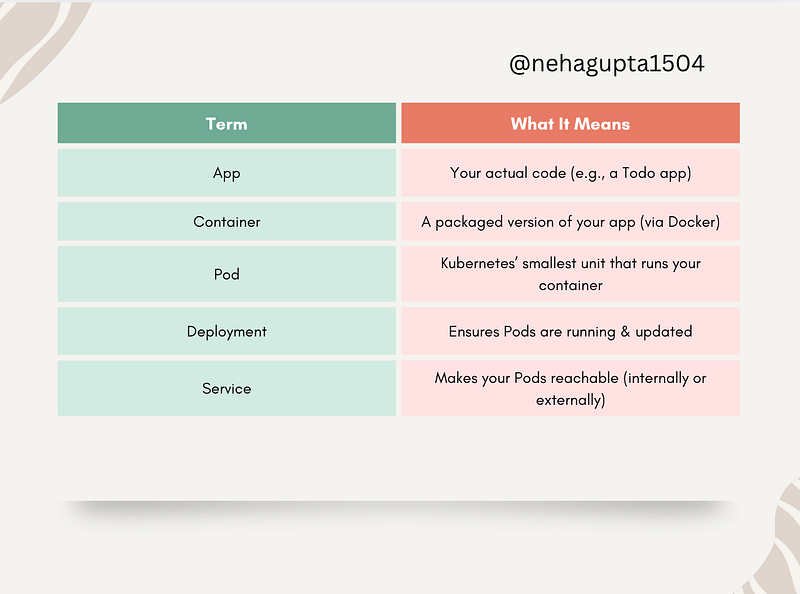
App → Container → Pod → Deployment → Service
Just that. Don’t go beyond these 5 words until these make sense together.
Let’s Break Down the Flow (Using a Todo App)
Imagine you built a simple Todo app using Node.js and Express.
- App — Your source code.
For example:app.js, which handles your todo routes (GET,POST, etc.). - Container — Think of this as a box that runs your app.
You write aDockerfileBundle your Node.js app inside it, and now it’s portable.
FROM node:18
WORKDIR /app
COPY . .
RUN npm install
CMD ["node", "app.js"]
3. Pod — Here’s the first Kubernetes concept. A Pod is the smallest deployable unit in Kubernetes — it wraps around your container. You don’t deploy containers directly in Kubernetes — you deploy Pods that run containers
Tip: Most Pods run a single container, but they can hold multiple (like a sidecar for logs).
4. Deployment — You don’t want to manually manage Pods. A Deployment automates this: it ensures the right number of Pods are always running.
Want 3 replicas of your app?
Update your Deployment, and Kubernetes spins them up or down as needed.
5. Service — Your Pods get random IPs, and they restart often. That’s chaos. A Service gives you a stable way to reach your Pods, like a fixed phone number. You can expose your app internally (ClusterIP) or externally (LoadBalancer/NodePort).
Kubernetes From The Ground Up
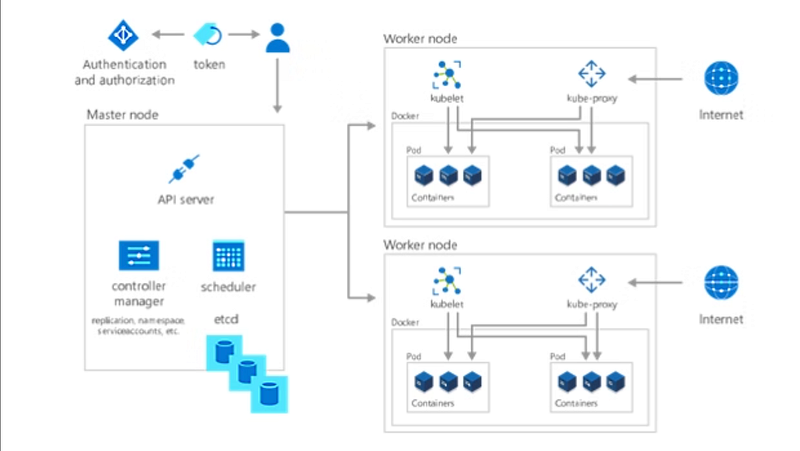
One of the series that has been very helpful while learning it is “Kubernetes from the ground up” by Kamal.
In his blog series, he has mentioned how all the Kubernetes components work with each other all the time: “kubelet, API server, scheduler”. I think it’s very easy to understand when presented like this. Here are some of the posts from his series.
- Part 1: the kubelet
- Part 2: the API server
- Part 3: the scheduler
TL;DR:
What’s One Thing That Confused You About Kubernetes?
Comment on it below — let’s build a no-judgment cheat sheet for anyone learning it now.
At Dev Simplified, We Value Your Feedback 📊
👉 Follow us to not miss any updates.
👉 Have any suggestions? Let us know in the comments!