Day-7 of Becoming an AI Developer: Want to Learn AI? Start With These 20 Terms First
From RAG and Vector Databases to Tokens and Hallucinations — a beginner-friendly guide every developer needs to stop feeling lost in AI conversations.
From Building AI Apps to Actually Understanding AI
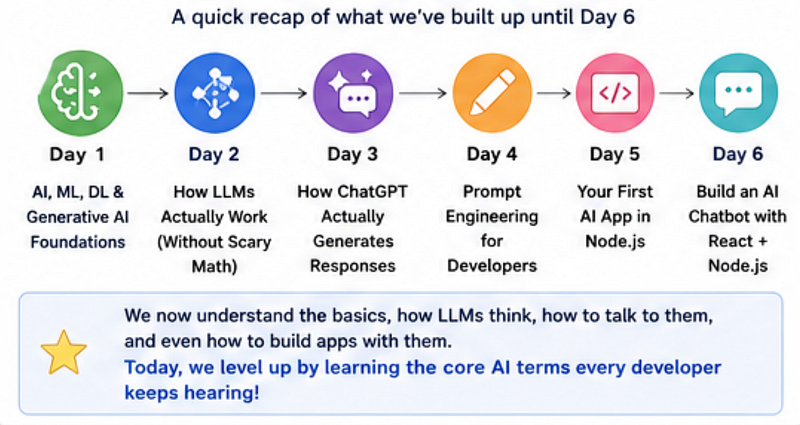
If you’ve been following this series, we’ve already covered a lot.
In the previous days, you learned:
- How AI applications actually work,
- How to build your first AI app,
- how LLMs respond to prompts,
- and how tools like Ollama fit into real developer workflows.
If you have missed going through previous articles, I recommend going and reading them first to have a better understanding of today’s article.
But at some point, every developer hits the same wall.
You start reading AI tutorials, engineering blogs, or YouTube videos and suddenly see terms like:
“Use RAG to reduce hallucinations.”
“Store embeddings in a vector database.”
“Inference latency is too high.”
And you realise:
You can build things… but you don’t fully understand the language yet.
That’s exactly what Day 7 is about.
Because here’s the truth:
Learning AI gets much easier once the jargon stops feeling intimidating.
Today, we’ll break down 20 AI terms developers keep hearing — in plain English, with practical examples, code snippets, and real-world context.
And more importantly:
By the end of this article, you’ll finally understand how these terms connect in real AI systems.
That foundation will make the next phase of this series — building smarter, production-ready AI applications — much easier.
Why Learning AI Terms Actually Matters
Here’s the thing:
You don’t need a PhD in Machine Learning to build AI products.
But you do need to understand the language.
Because once you understand terms like:
- Tokens
- Inference
- RAG
- Embeddings
- Vector Database
- Hallucinations
You’ll suddenly understand:
- AI tutorials faster
- LLM architecture discussions
- Technical documentation
- AI engineering interviews
- Real production workflows
Think of this article as your developer-friendly AI dictionary.
The 20 AI Terms Every Developer Should Know
1. Inference
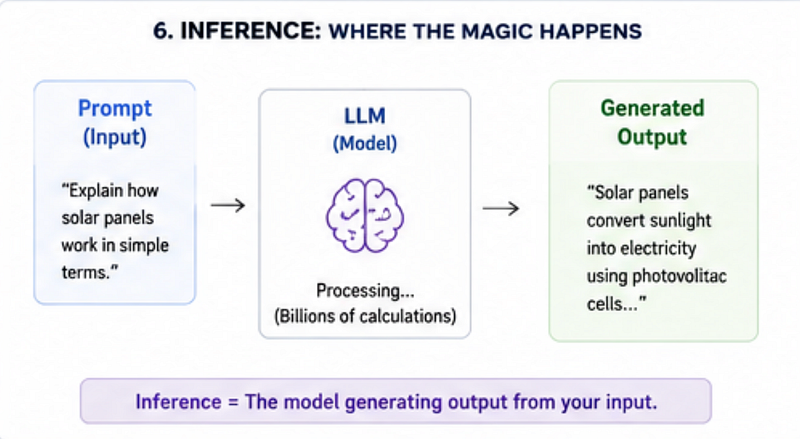
Inference simply means:
Using a trained AI model to generate an answer.
When ChatGPT answers your prompt, that’s inference.
When an image model creates an image, that’s inference.
Example:
const response = await openai.chat.completions.create({
 model: 'gpt-4.1-mini',
 messages: [{ role: 'user', content: 'Explain JWT simply' }]
});

console.log(response.choices[0].message.content);
Here, the model is performing inference.
Common mistake developers make:
People confuse training with inference.
You are usually not training models. You are using already-trained models.
2. Tokens
AI models don’t read text like humans.
They read tokens.
A token is usually:
- a word,
- part of a word,
- punctuation,
- or symbol.
Example:
"I love JavaScript"Could become:
["I", "love", "Java", "Script"]Why does this matter?
Because:
More tokens = higher cost + slower response.
Practical tip: Keep prompts concise. Large prompts increase latency.
3. RAG (Retrieval-Augmented Generation)
RAG is one of the most important concepts developers should understand.
Instead of asking the AI to rely only on training data, you give it extra knowledge at runtime.
Example:
Imagine building a company chatbot.
Without RAG:
The model guesses answers.
With RAG:
The chatbot searches your company's docs first.
Then generates a grounded answer.
Workflow:
- User asks a question
- Search relevant data
- Retrieve documents
- Send context to LLM
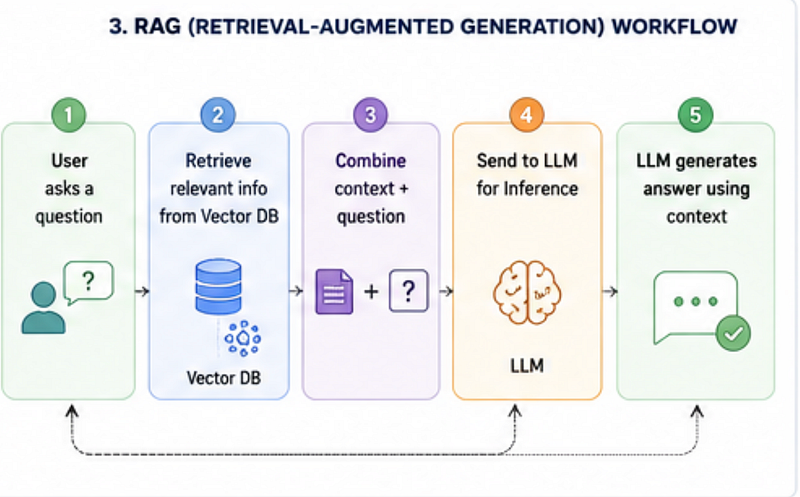
- Generate answer
Basic RAG example:
const context = await searchDocuments(userQuestion);

const prompt = `
Context: ${context}

Question: ${userQuestion}
`;

const response = await llm.generate(prompt);
Why developers love RAG:
- More accurate responses
- Less hallucination
- Company-specific knowledge
- Better enterprise AI apps
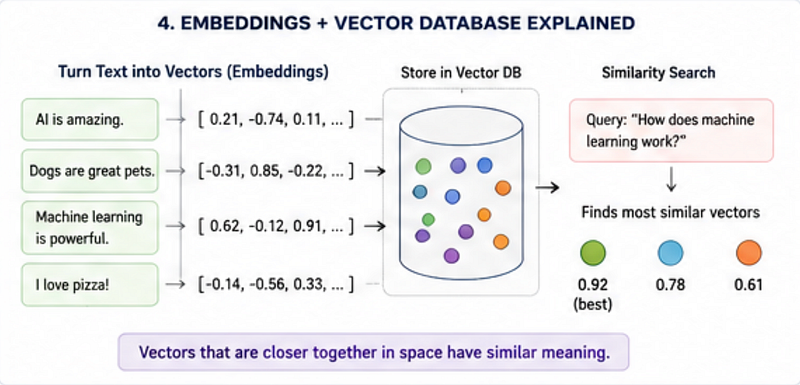
4. Vector Database
A vector database stores embeddings.
Don’t worry — that sounds more complicated than it is.
Imagine storing meaning instead of keywords.
Instead of searching:
react performance optimizationAI searches based on semantic similarity.
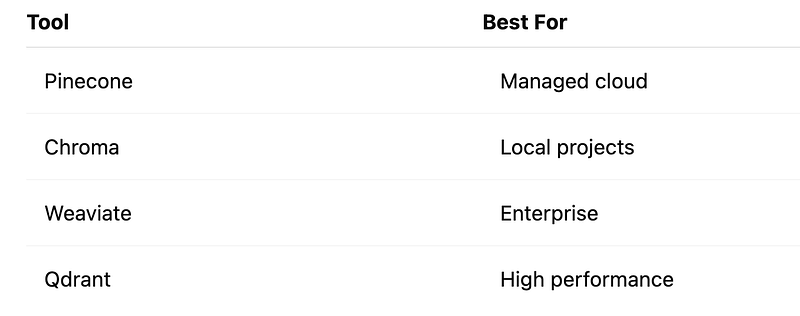
Popular vector databases:
5. Hallucinations
One of the funniest — and most dangerous — AI terms.
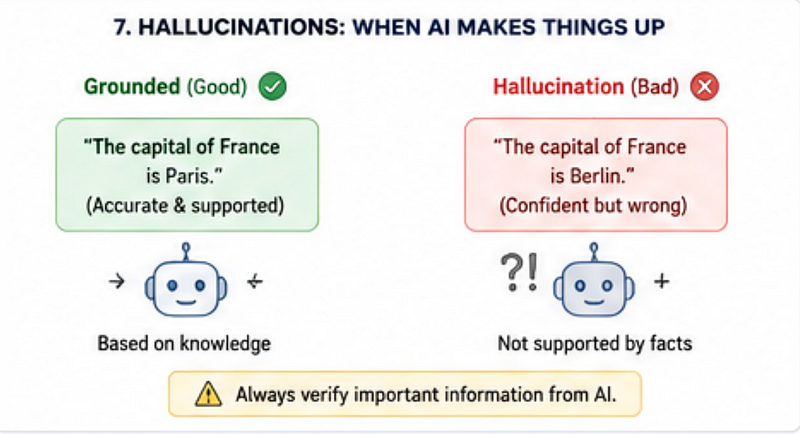
Hallucination means:
The model confidently gives a wrong answer.
Example:
AI invents a fake API.
Or references documentation that doesn’t exist.
How to reduce hallucinations:
✅ Use RAG ✅ Add system prompts ✅ Validate outputs ✅ Use grounding
Never trust AI-generated code blindly.
That one habit alone can save hours of debugging.
6. Embeddings
Embeddings convert text into numbers that represent meaning.
This helps AI understand similarity.
Example:
"React"
"Frontend Framework"
Will be semantically close.
These powers:
- semantic search
- recommendations
- document retrieval
- RAG systems
7. Context Window
The amount of information a model can remember in one request.
Think of it as AI memory.
Too much input?
Older context gets dropped.
8. Fine-Tuning
Training a model on specialised data.
Useful when prompts alone aren’t enough.
But surprisingly, Many teams should use RAG before fine-tuning.
That’s cheaper and easier.
9. Prompt Engineering
Writing better prompts for better outputs.
Bad prompt:
Write codeBetter prompt:
Create a production-ready React auth form using TypeScript.
Add validation and loading states.
Specific prompts win.
10. Temperature
Controls randomness.
Lower temperature:
- predictable
- factual
Higher temperature:
- creative
- diverse
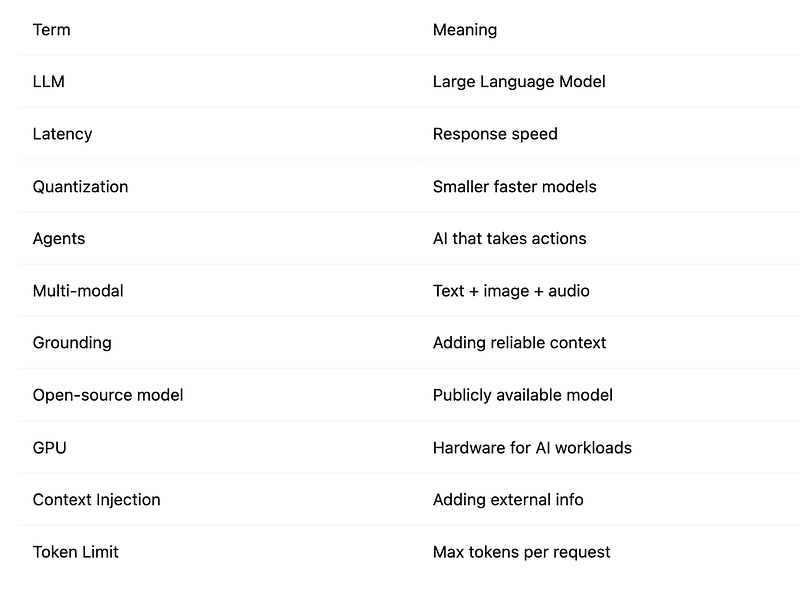
11–20 Quick AI Terms You Should Know
Mini Project: Build a Simple AI PDF Chatbot
Want to connect these terms?
Try this beginner mini project:
Goal
Build a chatbot that answers questions from your PDF notes.
Workflow
- Upload PDF
- Split content into chunks
- Create embeddings
- Store in vector DB
- Search relevant chunks
- Send to LLM using RAG
- Generate answer
Example logic:
const embedding = await createEmbedding(text);
await vectorDB.store(embedding);
const context = await vectorDB.search(question);
const answer = await llm.generate(context);
This tiny project teaches:
- inference
- tokens
- embeddings
- vector DB
- hallucinations
- RAG
All in one build.
🚀 Transitioning into AI as a developer?
I’m building a practical 30-day roadmap to help developers move into AI — step by step, without random tutorials or confusion.
👉 Follow this series so you don’t miss the next day.
👉 Bookmark this article — you’ll want to revisit it.
👉 What’s the biggest thing confusing you about AI right now? Drop it in the comments — I may cover it next.