Day 23 of becoming an AI developer: How AI Systems Are Actually Designed in Production
The architecture behind reliable AI apps, RAG systems, agents, guardrails, evals, and the boring engineering that makes AI usable in real products
You should learn production AI system design because calling an LLM API is not the hard part.
The hard part starts after the demo works.
Your chatbot answers one PDF correctly. Your AI agent creates one perfect task. Your coding assistant explains one bug beautifully. Then a real user uploads a messy document, asks a vague question, pastes malicious text, expects citations, and wants the answer in under three seconds.
That is when the simple architecture breaks.
At first, I assumed production AI apps were mostly about better prompts. After building a few AI workflows, I realized something else: good AI systems are mostly backend systems with an LLM placed carefully inside them.
Not at the center of everything.
Inside boundaries.
If you would like to learn AI with us, make sure to save this series. It’s free and available to everyone on Medium
Zero to AI Expert in 30 Days
The Prototype That Looks Correct But Fails Quietly
Most AI apps start like this:
app.post("/ask", async (req, res) => {
 const userQuestion = req.body.question;
 const answer = await llm.generate(`
 Answer this question:
 ${userQuestion}
 `);
 res.json({ answer });
});
This works for a demo.
But in production, this code has too many hidden assumptions:
- The user input is safe.
- The model understands your product rules.
- The answer format will be predictable.
- The model will not invent missing details.
- The response can be trusted directly.
- Cost and latency will stay acceptable.
None of these are guaranteed.
This is where production design begins.
The Real Shape of a Production AI System
A production AI system usually has more layers than beginners expect.
Not because developers like complexity.
Because each layer protects the product from a different failure.
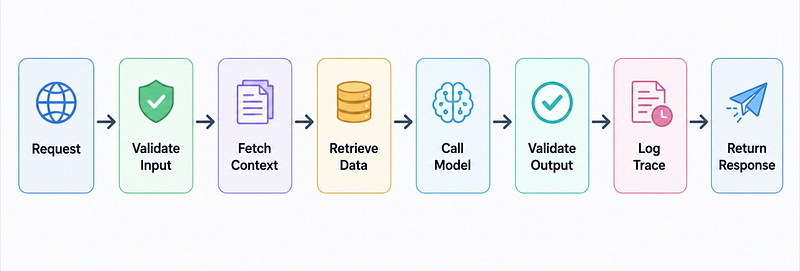
A practical production AI flow looks like this:
- User sends a request.
- API validates input.
- System checks permissions.
- Context is built from trusted data.
- Retrieval fetches relevant documents.
- LLM generates an answer.
- Output is checked against schema or rules.
- Logs and traces are stored.
- Final response is returned.
The model is only one step.
That small realisation changes how you design everything.
Why Prompting Alone Is Not Enough
Prompts are useful, but prompts are not security boundaries.
This is a common mistake.
A developer writes:
You are a helpful assistant.
Never reveal private information.
Only answer from the provided context.
Then they pass user content, PDF text, tool results, and system instructions into the same conversation.
The problem is simple: the model receives all of it as text.
So in production, you should separate responsibilities outside the model wherever possible.
For example:
const inputSchema = z.object({
 question: z.string().min(5).max(500),
 documentId: z.string(),
});

app.post("/ask", async (req, res) => {
 const parsed = inputSchema.safeParse(req.body);
 if (!parsed.success) {
 return res.status(400).json({ error: "Invalid request" });
 }
 const { question, documentId } = parsed.data;
 const hasAccess = await checkDocumentAccess(req.user.id, documentId);
 if (!hasAccess) {
 return res.status(403).json({ error: "Access denied" });
 }
 const context = await retrieveRelevantChunks(documentId, question);
 const answer = await generateAnswer(question, context);
 res.json(answer);
});
This code matters because the model is no longer deciding who has access.
Your backend decides that.
The LLM only answers after the system has already created a safe, narrow working area.
Context Engineering Is More Important Than Prompt Decoration
In RAG systems, most beginners focus on the final prompt.
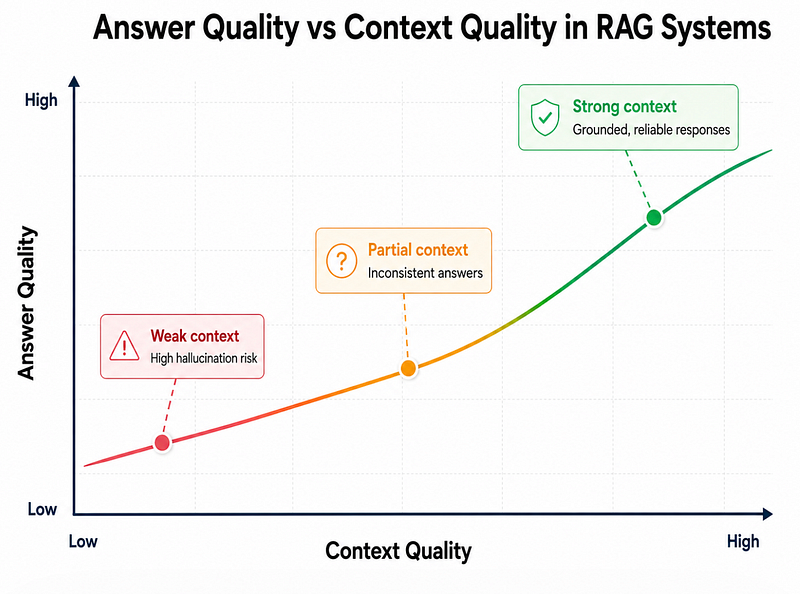
But the real quality often depends on what reaches the prompt.
A bad retrieval pipeline gives the model weak context. Then the model tries to be helpful and fills the gaps.
That is where hallucinations start.
A better RAG flow is boring but reliable:
async function answerFromDocs(question, documentId) {
 const queryEmbedding = await createEmbedding(question);
 const chunks = await vectorDb.search({
 documentId,
 embedding: queryEmbedding,
 topK: 5,
 });
 if (chunks.length === 0) {
 return {
 answer: "I could not find enough context to answer this.",
 citations: [],
 };
 }
 return llm.generate({
 question,
 context: chunks.map(c => ({
 id: c.id,
 text: c.text,
 })),
 requiredFormat: {
 answer: "string",
 citations: ["chunk_id"],
 },
 });
}
The important part is not just vector search.
The important part is refusing when context is weak.
Most tutorials stop at “retrieve chunks and ask the LLM.” In real systems, you also need confidence checks, citation checks, and fallback behavior.
Tools Make AI Powerful, But Also Risky
Once an AI system can call tools, the architecture changes.
A chatbot that only writes text can be wrong.
An agent that sends emails, updates databases, or creates tickets can cause real damage.
So tool calling needs strict contracts.
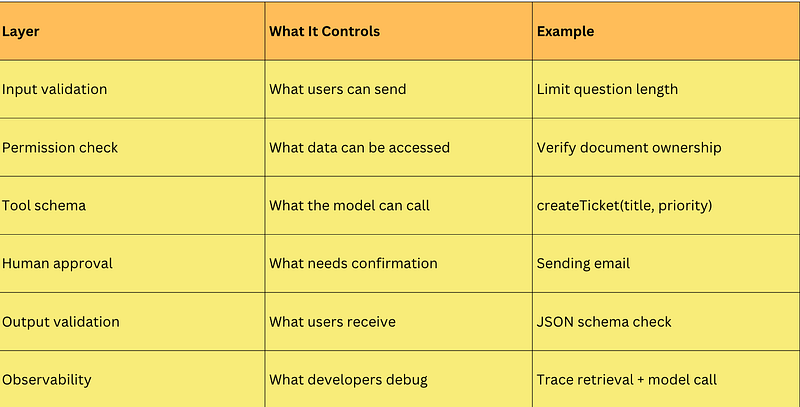
Here is a safer pattern:
const allowedTools = {
 createSupportTicket: async ({ title, priority }) => {
 if (!["low", "medium", "high"].includes(priority)) {
 throw new Error("Invalid priority");
 }
 return db.tickets.create({ title, priority });
 },
};
The model may choose the tool.
But the backend must still validate the arguments.
Never assume the model’s tool call is correct just because it is structured.
The Mistake I Made With Evals
At first, I tested AI features manually.
I asked ten questions, checked the answers, changed the prompt, and repeated.
It felt practical.
It was also unreliable.
The problem is that AI systems are variable. A prompt change that improves one case can quietly break another. A model upgrade can improve tone but reduce citation accuracy. A retrieval tweak can make answers faster but less grounded.
Production AI needs evals.
Not only unit tests.
Evals.
A simple eval dataset can start like this:
const evalCases = [
 {
 question: "What is the refund policy?",
 expectedCitation: "refund_policy_v3",
 mustMention: ["7 days", "original payment method"],
 },
 {
 question: "Can I delete another user's project?",
 expectedBehavior: "refuse",
 },
];
This is not fancy.
But it gives you a baseline.
Without evals, you are guessing.
The Surprising Payoff
The surprising part is that production AI systems become more reliable when you make the model do less.
That sounds backwards.
But it makes sense.
- Let the database handle truth.
- Let the backend handle permissions.
- Let schemas handle structure.
- Let evals handle regression.
- Let logs explain failures.
- Let the model handle language, reasoning, summarization, and flexible interpretation.
The more responsibility you move into deterministic code, the more trustworthy the AI layer becomes.
Reflection: What Changed After Understanding This
Once I understood production AI architecture, I stopped thinking of AI apps as “prompt-based apps.”
I started thinking of them as decision pipelines.
That changed how I built things.
I became more careful about what context I passed to the model. I started treating retrieved documents as untrusted until checked. I stopped giving agents broad permissions. I began logging prompts, retrieved chunks, tool calls, latency, and failures.
The biggest lesson was simple: AI quality is not only a model problem.
It is a system design problem.
Final Takeaways
If you are building AI systems for real users, focus on the architecture around the model.
Start with these steps:
- Validate every input.
- Keep permission checks outside the LLM.
- Use RAG only when you can verify retrieved context.
- Prefer structured outputs for predictable responses.
- Add guardrails before and after model calls.
- Log traces for debugging.
- Build evals before changing prompts or models.
- Use agents only when a workflow truly needs autonomy.
The best production AI systems do not blindly trust the model.
They guide it, constrain it, observe it, and test it.
That is what turns an impressive demo into a product developers can actually maintain.
What part of your AI app is still relying too much on the prompt?
If you would like to learn AI with us, make sure to save this series. It’s free and available to everyone on Medium
Zero to AI Expert in 30 Days
Missed the previous articles?
Read here: Build a Resume Analyser Using AI
Read here: Build an MCP Server in Node.js
Upcoming
- Day 23: Fine-Tuning vs Prompt Engineering
From Dev Simplified
- 👏 Enjoyed the article? Don’t forget to leave a clap.
- 💬 Have thoughts or questions? Share them in the comments.
- ✍️ Want to write for Dev Simplified? Drop a personal note on any Dev Simplified story with your draft link.