Day 21 of Becoming an AI Developer: AI Workflows That Save Me Hours as a Developer
Practical AI workflows for planning, coding agents, PR reviews, debugging, tests, and production guardrails
Most developers are not losing time because they type slowly.
They lose time switching between five different modes of work.
One minute you are reading a bug report. Then you are tracing old code. Then writing a fix. Then checking tests. Then explaining your PR. Then reviewing someone else’s changes. Then updating docs because the feature behavior changed.
AI becomes useful only when it fits into this messy developer loop.
Not as a chatbot.
As a workflow layer.
When I first started using AI for coding, I mostly used it for snippets. “Write this function.” “Explain this error.” “Create this API.” It helped, but not enough to change my day.
The bigger shift happened when I stopped asking AI for answers and started giving it controlled jobs.
If you would like to learn AI with us, make sure to save this series. It’s free and available to everyone on Medium
Zero to AI Expert in 30 Days
Workflow 1: Turn GitHub Issues Into Implementation Plans
A vague issue is dangerous.
“Add resume upload support” sounds simple until you ask the real questions:
- What file types are allowed?
- Where is the file stored?
- Is upload linked to a user account?
- What happens if parsing fails?
- Do we need virus scanning?
- Should old uploads be replaced or versioned?
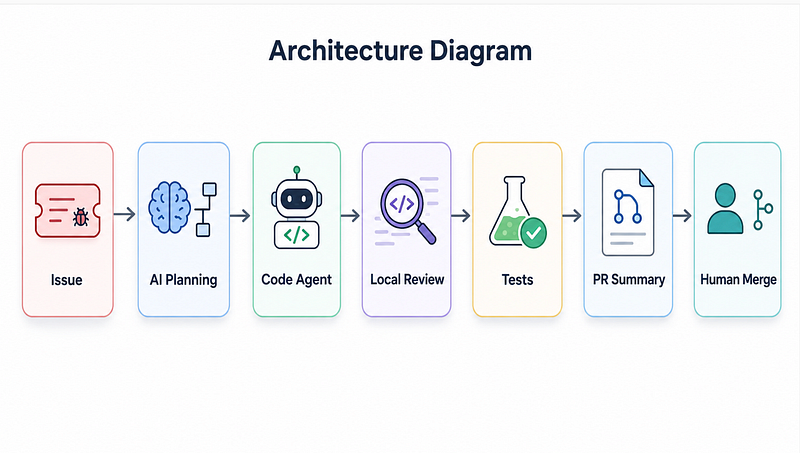
Before touching code, I use AI to convert the issue into an execution plan.
Read this feature request like a senior full-stack engineer.

Feature:
Users should upload resumes and get AI feedback.
Create:
1. Clarifying assumptions
2. API design
3. Database changes
4. Frontend states
5. Failure cases
6. Security concerns
7. Implementation checklist
8. Test cases
The goal is not to accept everything.
The goal is to expose hidden work early.
Why this saves time
Most rework happens because the first version solved only the happy path.
AI is good at expanding the surface area of a task. You still decide what matters.
Workflow 2: Repo-Aware Coding Instead of Random Snippet Generation
Snippet generation is basic.
Repo-aware coding is different.
Instead of asking:
Create a login API in Express.A better workflow is:
Inspect the existing auth pattern in this codebase.
Follow the current folder structure, error handling style, middleware pattern, and response format.
Then add refresh token support with minimal changes.
That one instruction changes the output.
AI should not invent a new architecture every time it touches your project.
It should follow your existing system.
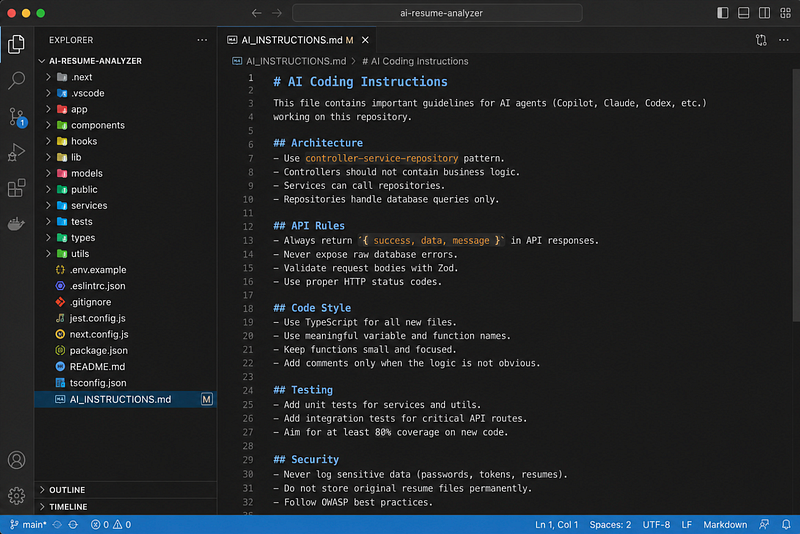
A useful project instruction file can look like this:
# AI Coding Instructions
## Architecture
- Use controller-service-repository pattern.
- Controllers should not contain business logic.
- Services can call repositories.
- Repositories handle database queries only.
## API Rules
- Always return `{ success, data, message }`.
- Never expose raw database errors.
- Validate request bodies with Zod.
## Testing
- Add unit tests for services.
- Add integration tests for critical API routes.
## Restrictions
- Do not modify authentication middleware without approval.
- Do not add new dependencies unless required.
This is a small detail, but it makes a huge difference.
Without constraints, AI optimises for completing the prompt.
With constraints, AI starts fitting into your engineering standards.
Workflow 3: Use AI Agents for Small Pull Requests, Not Huge Refactors
Here is the mistake I see developers making.
They give AI a massive task:
Refactor the whole dashboard and improve performance.That is too broad.
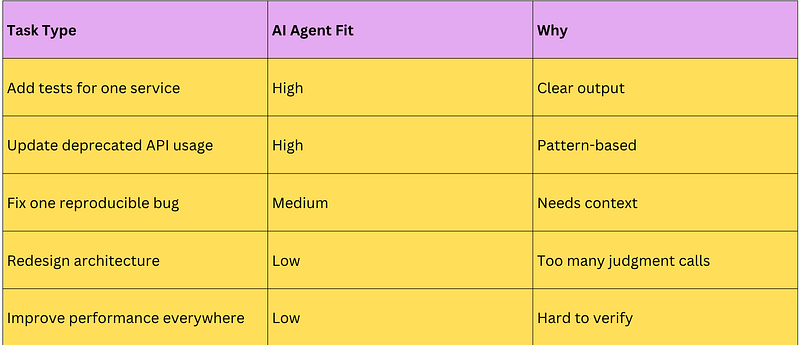
A better agent task is narrow and reviewable:
Find all places where the dashboard fetches user stats directly.
Move that logic into useUserStats().
Do not change UI behavior.
Add tests for loading, success, and error states.
Open a PR with a summary of changed files.
This works better because the task has boundaries.
Good AI-agent tasks usually have:
- Clear start and end
- Small file scope
- Testable behavior
- No vague design decisions
- Easy review surface
Bad AI-agent tasks usually have:
- “Improve”
- “Optimize”
- “Clean up”
- “Make better”
- “Refactor everything”
Those words sound harmless, but they create messy changes.
Workflow 4: Make AI Write the PR Summary Before You Review
This feels small, but it saves real time.
After code changes, ask AI:
Create a PR summary with:
1. What changed
2. Why it changed
3. Files reviewers should check carefully
4. Test coverage
5. Risks or follow-up work
Example output format:
## What changed
- Added `useUserStats()` hook
- Moved dashboard stats fetching out of component
- Added loading and error test cases

## Why
Dashboard logic was duplicated across two components.
## Review focus
- `hooks/useUserStats.ts`
- `DashboardStats.test.tsx`
## Risk
API response shape is unchanged, but loading behavior should be verified manually.
This improves review quality because the reviewer does not need to reverse-engineer your intention.
But do not let AI hide uncertainty.
A good PR summary should mention risk.
A suspicious PR summary says everything is fine.
Workflow 5: Build an AI Debugging Packet
When debugging, most people paste only the error.
That gives weak results.
I create a debugging packet.
Debug this issue.
Error:
Cannot read properties of undefined reading 'map'
Expected:
Dashboard should show user projects.
Actual:
Page crashes after login.
Recent changes:
Moved projects API from /api/projects to /api/v2/projects.
Relevant code:
[paste component + API function + sample response]
Give:
1. Most likely root cause
2. Debugging steps
3. Minimal fix
4. Regression test
The important part is the sample response.
// Component expects this
const projects = response.data.projects;
// API now returns this
{
 "success": true,
 "data": [
 { "id": 1, "name": "AI Resume Analyzer" }
 ]
}
The bug is not React.
The bug is contract drift.
AI becomes much better when you give it the contract, not just the stack trace.
Workflow 6: Ask AI to Generate Regression Tests From the Bug
A bug fix without a regression test is just a temporary apology.
Once the issue is found, ask:
Write a regression test that fails before this fix and passes after it.
Keep the test focused on the API response shape mismatch.
Example:
import { normalizeProjectsResponse } from "./normalizeProjectsResponse";
test("normalizes v2 projects response", () => {
 const apiResponse = {
 success: true,
 data: [{ id: 1, name: "AI Resume Analyzer" }],
 };
 expect(normalizeProjectsResponse(apiResponse)).toEqual([
 { id: 1, name: "AI Resume Analyzer" },
 ]);
});
And the fix:
export function normalizeProjectsResponse(response) {
 if (Array.isArray(response.data)) {
 return response.data;
 }
 if (Array.isArray(response.data?.projects)) {
 return response.data.projects;
 }
 return [];
}
This is where AI saves more than typing time.
It helps close the loop.
Bug → Cause → Fix → Test.
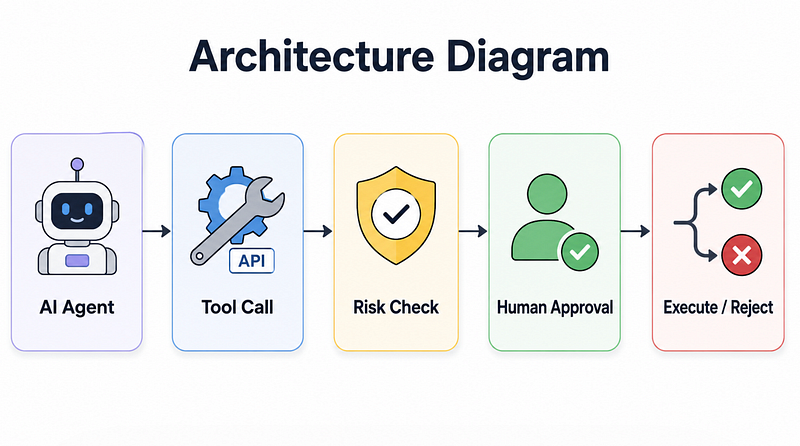
Workflow 7: Add Human Approval Before Risky AI Actions
AI should not directly do everything.
For example, these actions need approval:
- Deleting files
- Running database migrations
- Updating environment variables
- Executing SQL
- Changing auth logic
- Modifying payment code
- Installing new dependencies
A simple safety pattern:
const riskyActions = [
 "delete_file",
 "run_sql",
 "modify_auth",
 "install_package",
 "run_migration",
];
function requiresApproval(actionName) {
 return riskyActions.includes(actionName);
}
async function executeToolCall(toolCall) {
 if (requiresApproval(toolCall.name)) {
 return {
 status: "WAITING_FOR_APPROVAL",
 action: toolCall.name,
 args: toolCall.args,
 };
 }
 return runTool(toolCall);
}
This is not just for big companies.
Even solo developers need guardrails.
The faster the agent works, the more important approval becomes.
Workflow 8: Use AI for “Context Compression”
Long projects create context overload.
You forget why a decision was made. AI forgets what you told it earlier. New sessions lose important details.
So I maintain a project context file:
# Project Context
## Product
AI Resume Analyzer for developers.
## Tech Stack
Next.js, Node.js, MongoDB, OpenAI API.
## Current Architecture
Frontend uploads resume.
Backend extracts text.
AI service generates feedback.
Results stored per user.
## Important Decisions
- Do not store original resume permanently.
- Store extracted text only for 24 hours.
- All AI feedback must be linked to authenticated users.
## Current Problems
- Resume parsing fails on scanned PDFs.
- Feedback generation is slow for long resumes.
Before starting a session, I pass this context.
Use this project context before suggesting changes.
Do not contradict existing decisions unless you explain why.
This reduces repeated explanation.
And honestly, it also makes you think more clearly.
The Surprising Payoff
The biggest time saving did not come from AI writing code.
It came from AI making my development process more explicit.
I had to define:
- What good code means in my project
- Which files are sensitive
- What a safe PR looks like
- What tests should prove
- When the agent must stop and ask
- What context should never be lost
That changed how I build.
AI forced better engineering hygiene.
That was unexpected.
Reflection: What Changed After Using These Workflows
Earlier, I used AI like a shortcut.
Now I use it like a controlled engineering system.
The difference is huge.
A shortcut helps once.
A workflow helps repeatedly.
The real benefit is not that AI writes faster than me. It does. But that is not the main point.
The real benefit is that AI can carry repetitive context while I focus on judgment.
Architecture decisions. Tradeoffs. Security. Product behavior. Review quality.
Those still need a developer.
Maybe even more than before.
Key Takeaways
AI workflows become useful when they are specific, bounded, and reviewable.
Use AI to:
- Convert issues into technical plans
- Follow repo-specific architecture rules
- Handle small PR-sized coding tasks
- Generate useful PR summaries
- Build debugging packets
- Create regression tests from bugs
- Add human approval for risky actions
- Maintain project context files
Do not ask AI to “build everything.”
Ask it to move one controlled part of the system forward.
That is where the hours get saved.
If you would like to learn AI with us, make sure to save this series. It’s free and available to everyone on Medium
Zero to AI Expert in 30 Days
Missed the previous articles?
Read here: Build a Resume Analyser Using AI
Read here: Build an MCP Server in Node.js
Upcoming
From Dev Simplified
- 👏 Enjoyed the article? Don’t forget to leave a clap.
- 💬 Have thoughts or questions? Share them in the comments.
- ✍️ Want to write for Dev Simplified? Drop a personal note on any Dev Simplified story with your draft link.