Day 22 of Becoming an AI Developer: “ChatGPT vs Claude vs Gemini vs Perplexity”
A practical guide to choosing the right AI tool for coding, debugging, research, architecture, and shipping real projects
Most developers use AI tools like a search bar.
Open one chatbot. Paste the problem. Hope the answer works.
I did the same in the beginning.
Then I started using AI for actual development work: debugging broken APIs, writing RAG pipelines, reviewing pull requests, comparing SDK changes, generating tests, and reading unfamiliar codebases.
That is when the difference became clear.
The question is not:
Which AI tool is best?
That question is too shallow.
The better question is:
Which tool gives me the least wrong answer for this specific stage of development?
That small change matters more than people think.
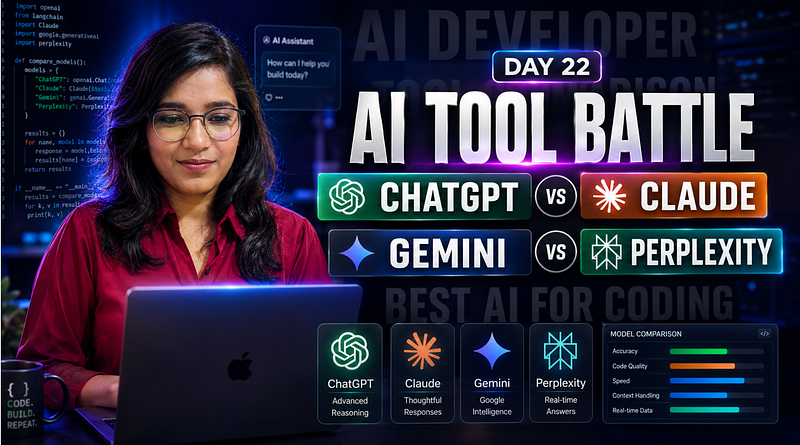
ChatGPT, Claude, Gemini, and Perplexity are not just four versions of the same assistant. They behave like four different teammates.
- One is better for planning.
- One is better inside a large codebase.
- One is stronger when the project lives inside Google’s ecosystem.
- One is better when the answer must be fresh and source-backed.
Use the wrong one, and you do not just lose time.
You ship assumptions.
If you would like to learn AI with us, make sure to save this series. It’s free and available to everyone on Medium
Zero to AI Expert in 30 Days
The Real Problem: Developers Treat Every AI Tool the Same
Here is the common workflow:
Prompt → Answer → Copy → Paste → Error → Prompt AgainIt feels productive.
But in real projects, this workflow breaks fast.
For example, imagine you are building a “Chat with PDF” app.
You ask:
Build a RAG pipeline in Node.js.You may get code like this:
const chunks = await vectorStore.similaritySearch(question);
const answer = await llm.invoke(`
 Context: ${chunks}
 Question: ${question}
`);
At first glance, fine.
- But where is the embedding step?
- Are chunks ranked properly?
- What happens when the PDF has tables?
- What if the retrieved context is irrelevant?
- Are citations returned to the user?
- Are hallucinated answers blocked?
Most AI-generated code fails not because the syntax is wrong.
It fails because the workflow was never designed properly.
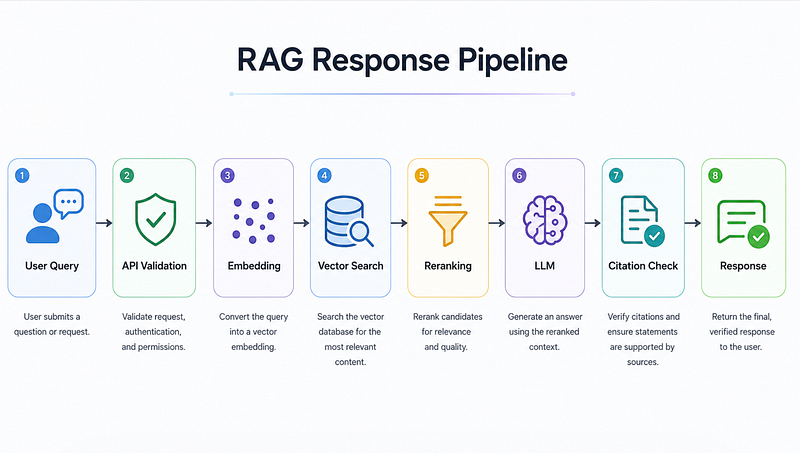
This is where choosing the right AI tool becomes a developer skill.
My Rule: Don’t Pick a Tool, Pick a Job
I now think of these tools like this:

This is not a ranking.
This is routing.
And routing is exactly how developers already think.
- You would not use Redis for every database problem.
- You would not use Kafka for every queue.
- You should not use one AI tool for every developer task.
When I Use ChatGPT
I use ChatGPT when the problem is still messy.
Not when I only need code.
When I need to think.
Example tasks:
- designing APIs
- choosing database schema
- breaking down a feature
- debugging logic
- writing implementation plans
- explaining tradeoffs
- creating test strategy
Let’s say I am building an AI code review tool.
A weak prompt would be:
Build an AI code review app.A better developer prompt:
I am building an AI code review app.
Stack:
- Next.js frontend
- Node.js backend
- GitHub API
- Postgres
- LLM for review comments
Before writing code, help me design:
1. The request flow
2. Database tables
3. GitHub webhook handling
4. Failure cases
5. Security risks
6. What should be async vs synchronous
That prompt changes the output completely.
Now the model is not just generating code.
It is helping you think through the system.
A good first output should look like this:
GitHub PR opened
→ Webhook received
→ Validate signature
→ Store PR metadata
→ Fetch changed files
→ Split diff into chunks
→ Send chunks to AI reviewer
→ Store review comments
→ Post comments back to GitHub
The important part is not the code yet.
It is the shape of the system.
Most bugs are born before code is written.
Where ChatGPT Can Go Wrong
ChatGPT is useful for reasoning, but I do not blindly trust it for fresh implementation details.
Example:
Use the latest SDK syntax for this package.This is risky if the package changed recently.
For fast-moving libraries, I first check current docs or use a web-grounded tool, then come back to ChatGPT for implementation reasoning.
My practical rule:
Fresh facts → research first
Architecture → ChatGPT
Repo changes → coding agent
This small separation avoids many bad answers.
When I Use Claude
Claude is usually my choice when I need to understand or change an existing codebase.
This is different from asking for a new function.
A real codebase has:
- old naming patterns
- hidden assumptions
- utility functions nobody documented
- tests that explain business logic
- weird edge cases
- files that should not be touched
For this kind of work, I prefer a slower prompt.
Read this codebase like a senior engineer reviewing a PR.
Do not edit files yet.
First tell me:
1. What this module does
2. Which files are risky to change
3. Which tests protect this behavior
4. Where the current bug may be coming from
5. A minimal change plan
Notice the line:
Do not edit files yet.That line matters.
AI coding agents can become too eager. They may “clean up” code that you did not ask them to touch.
Better workflow:
Analyze → Plan → Edit one file → Show diff → Run testsThis is slower than “fix everything.”
But in production code, slow and controlled is often faster.
A Better Refactoring Prompt
Bad:
Refactor this file.Better:
Refactor this file with these constraints:
- Do not change public function names
- Do not change API response shape
- Keep existing test behavior
- Only improve duplication and readability
- Show the diff before suggesting more changes
This works better because refactoring without constraints is dangerous.
A model may improve the code style and break the contract.
That is not a refactor.
That is a bug with better formatting.
When I Use Gemini
Gemini is where I go when the project is close to Google’s ecosystem.
Examples:
- Firebase Auth
- Firestore rules
- Google Cloud Run
- BigQuery
- Android
- Google Workspace APIs
- multimodal tasks involving screenshots or UI
Suppose I am reviewing Firestore rules:
rules_version = '2';
service cloud.firestore {
 match /databases/{database}/documents {
 match /users/{userId} {
 allow read, update: if request.auth != null &&
 request.auth.uid == userId;
 }
 }
}
A useful prompt:
Review these Firestore rules for a SaaS app.
Focus on:
1. Whether users can access other users' data
2. Missing create/delete rules
3. Privilege escalation risks
4. What tests I should write for these rules
This is the kind of task where ecosystem context matters.
Would I use Gemini for every backend design problem? No.
Would I use it when Firebase, Android, or Google Cloud is involved? Very likely.
That is the difference.
When I Use Perplexity
Perplexity is not my first choice for editing code.
It is my first choice for research.
Especially when the answer depends on current information.
Examples:
- Which AI model supports what today?
- Has this SDK changed recently?
- Is this npm package still maintained?
- What are the current pricing limits?
- What do the official docs recommend now?
- Which vector database supports hybrid search?
A good Perplexity-style prompt:
Research the latest official documentation for vector search options in 2026.
Compare:
- Pinecone
- Weaviate
- Qdrant
- pgvector
Focus on:
1. Hybrid search support
2. Filtering
3. TypeScript SDK maturity
4. Production deployment complexity
5. Official source links only
Then I take that research and use ChatGPT or Claude to reason through implementation.
This is the workflow:
Perplexity → current facts
ChatGPT → architecture
Claude → codebase changes
Human → final review
The surprising part?
Using Perplexity before coding often saves more time than using AI during coding.
Because wrong research creates wrong architecture.
The Developer Routing Pattern
If I were building an internal AI assistant for developers, I would not send every task to the same model.
I would route it.
Something like this:
type TaskType =
 | "research"
 | "architecture"
 | "codebase-review"
 | "google-cloud"
 | "debugging";

function chooseAssistant(task: TaskType) {
 switch (task) {
 case "research":
 return "perplexity";
 case "architecture":
 return "chatgpt";
 case "codebase-review":
 return "claude";
 case "google-cloud":
 return "gemini";
 case "debugging":
 return "chatgpt-then-claude";
 default:
 return "chatgpt";
 }
}
This looks simple, but it changes how you work.

Instead of asking:
Can AI solve this?You ask:
Which AI workflow reduces risk here?That is a much better engineering question.
My Practical Workflow for Real Projects
For a serious feature, I usually follow this sequence:
1. Research the moving parts
Use Perplexity when the answer may have changed.
Find current official docs and limitations for this SDK.2. Design the system
Use ChatGPT to turn research into architecture.
Based on these constraints, design the backend flow and identify failure cases.3. Inspect the repo
Use Claude or a coding agent to understand existing code.
Read the current implementation and tell me the safest change path.4. Make small edits
Never ask for a huge rewrite first.
Modify only this file. Keep the public API unchanged.5. Verify like a developer
Run the boring commands.
npm run lint
npm test
npm run build
AI is not a replacement for tests.
It is a faster way to reach the point where tests become meaningful.
Mistakes I See Developers Make
Mistake 1: Asking for code too early
If the design is unclear, generated code only creates fake progress.
Mistake 2: Trusting confident answers
AI can be wrong in a very clean format.
That makes it more dangerous, not less.
Mistake 3: Ignoring context limits
Large codebases need staged analysis.
Do not dump ten files and ask for magic.
Mistake 4: Using research tools for implementation
Perplexity is great for current information.
But I would not use it as my main refactoring partner.
Mistake 5: Letting agents touch too much
Small diffs are easier to review.
Large AI diffs are where bugs hide.
The Tradeoff Nobody Talks About
The more powerful these tools become, the more discipline developers need.
A beginner may use AI to avoid learning.
A strong developer uses AI to ask better questions.
There is a big difference.
For example, instead of asking:
Fix this authentication bug.Ask:
Trace this authentication flow.
Find where the user session may become invalid.
Check middleware, token expiry, refresh logic, and frontend state.
Do not edit code until you explain the likely failure path.
That prompt forces investigation before generation.
And investigation is where real debugging happens.
Reflection: What Changed After I Started Routing AI Tools
Earlier, I wanted one AI tool that could do everything.
Now I do not think that way.
The biggest improvement came when I stopped comparing tools emotionally and started comparing failure modes.
- ChatGPT may give a strong architecture but miss a latest SDK change.
- Claude may understand a repo well but needs tight edit boundaries.
- Gemini may be very useful when the work sits inside Google’s stack.
- Perplexity may save hours of research but still needs another tool for implementation planning.
That changed how I build.
I no longer ask AI to be “smart.”
I ask it to be useful at one specific stage.
That is a much better standard.
Final Takeaways
If you are a developer, do not choose between ChatGPT, Claude, Gemini, and Perplexity like you are choosing a favorite app.
Choose based on the job.
- Use ChatGPT when you need architecture, debugging logic, or implementation planning.
- Use Claude when you need to understand or refactor an existing codebase.
- Use Gemini when your work is tied to Google Cloud, Firebase, Android, or Google APIs.
- Use Perplexity when freshness, citations, and research matter.
- Use tests, docs, and code review before trusting any AI-generated output.
The real skill is not prompting anymore.
The real skill is routing.
Because in modern development, the developer who wins is not the one who uses the most AI.
It is the one who knows where each AI tool belongs in the build process.
If you would like to learn AI with us, make sure to save this series. It’s free and available to everyone on Medium
Zero to AI Expert in 30 Days
Missed the previous articles?
Read here: Build a Resume Analyser Using AI
Read here: Build an MCP Server in Node.js
Upcoming
From Dev Simplified
- 👏 Enjoyed the article? Don’t forget to leave a clap.
- 💬 Have thoughts or questions? Share them in the comments.
- ✍️ Want to write for Dev Simplified? Drop a personal note on any Dev Simplified story with your draft link.