Day 14 of Becoming an AI Developer: RAG Explained for Developers with Practical Implementation
Learn how Retrieval-Augmented Generation (RAG) works, why modern AI applications rely on it, and build a simple RAG pipeline from scratch.
If you’ve been following this AI Developer series, we’ve already covered several important building blocks:
- Prompt Engineering
- Large Language Models (LLMs)
- AI Chat Applications
- Embeddings
- Vector Databases
- Semantic Search
If you’d like to follow the complete journey and learn AI with me in 30 days, check out the full series below. Save the series to receive notifications whenever a new article is published.
Zero to AI Expert in 30 Days
Now it’s time to connect all these pieces together.
And that brings us to one of the most important concepts in modern AI engineering:
Retrieval-Augmented Generation (RAG)
The funny thing?
Most developers think the hardest part of building AI applications is choosing the right LLM.
In reality, the bigger challenge is giving the model the right information.
Because even the most powerful model cannot answer questions about documents it has never seen.
That’s exactly why RAG became the foundation of modern AI products.
The Problem With LLMs
Imagine asking ChatGPT:
“What is the refund policy mentioned in my company’s internal documentation?”
The model has no idea.
Not because it’s not intelligent.
Because it was never trained on your company’s private data.
Developers traditionally had two options:
Option 1: Fine-Tune the Model
Pros:
- Learns custom knowledge
- Useful for specialised tasks
Cons:
- Expensive
- Slow updates
- Requires training infrastructure
Option 2: Use RAG
Pros:
- No retraining needed
- Works with fresh data
- Easier to maintain
- Much cheaper
This is why most production AI applications today use RAG.
What Exactly Is RAG?
RAG stands for:
Retrieval-Augmented Generation
The idea is simple:
Instead of expecting the LLM to know everything, we first retrieve relevant information and then provide it to the model as context.
The model answers based on the retrieved information.
Architecture Diagram
┌─────────────┐
│ User │
│ Question │
└──────┬──────┘
 │
 ▼
┌─────────────┐
│ Retriever │
│ Generate │
│ Embedding │
└──────┬──────┘
 │
 ▼
┌─────────────────┐
│ Vector Database │
│ (Pinecone, │
│ Chroma, Qdrant) │
└──────┬──────────┘
 │
 │ Similarity Search
 ▼
┌─────────────────┐
│ Relevant Docs │
│ Retrieved from │
│ Knowledge Base │
└──────┬──────────┘
 │
 │ Context Injection
 ▼
┌─────────────────┐
│ LLM │
│ (GPT, Claude, │
│ Llama, Gemini) │
└──────┬──────────┘
 │
 ▼
┌─────────────────┐
│ Final Answer │
│ Context-Aware │
│ Response │
└─────────────────┘
How RAG Works
Let’s break it down step by step.
Step 1: Store Documents
Suppose we have documents like:
Document 1:
React is a JavaScript library for building user interfaces.
Document 2:
Next.js is a React framework that supports SSR and SSG.
Document 3:
RAG combines retrieval and generation.
Step 2: Generate Embeddings
Each document is converted into vectors.
const embedding = await openai.embeddings.create({
 model: "text-embedding-3-small",
 input: document
});
These vectors capture semantic meaning instead of keywords.
┌───────────────────────────┐
│ Documents │
├───────────────────────────┤
│ 📄 React is a JS library │
│ 📄 Next.js supports SSR │
│ 📄 RAG improves LLMs │
└─────────────┬─────────────┘
 │
 │ Text Input
 ▼
┌───────────────────────────┐
│ Embedding Model │
│ │
│ text-embedding-3-small │
│ BGE │
│ E5 │
│ Instructor │
└─────────────┬─────────────┘
 │
 │ Converts Meaning
 │ Into Numbers
 ▼
┌───────────────────────────┐
│ Vector Representations │
├───────────────────────────┤
│ [0.12, 0.85, 0.44, ...] │
│ [0.09, 0.81, 0.48, ...] │
│ [0.67, 0.23, 0.91, ...] │
└─────────────┬─────────────┘
 │
 ▼
 Semantic Search
 Similarity Matching
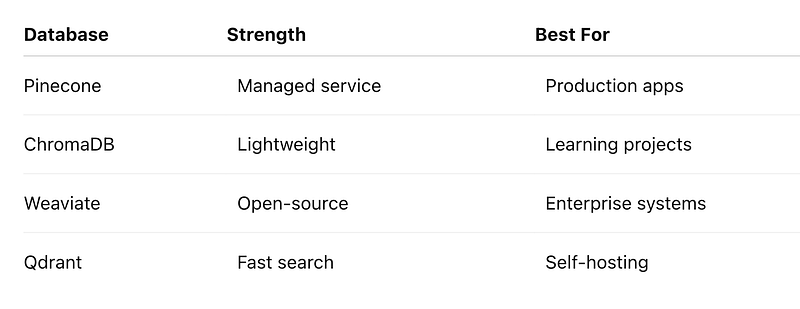
Step 3: Store in a Vector Database
The generated vectors are stored.
Step 4: User Asks a Question
Example:
What is Next.js?Generate embedding for the query:
const response = await openai.embeddings.create({
 model: "text-embedding-3-small",
 input: question
});
const queryEmbedding = response.data[0].embedding;
Step 5: Similarity Search
Find the closest vectors using the embedding generated
// Search nearest vectors
const results =
 await vectorStore.query({
 queryEmbeddings: [queryEmbedding],
 nResults: 3
 });
Output:
1. Next.js is a React framework...
2. React is a JavaScript library...
Step 6: Send Context to LLM
Now we augment the prompt.
const prompt = `
Context:
${results.join("\n")}
Question:
${question}
`;
The LLM receives relevant information before generating a response.
Flowchart of the Above Steps
┌─────────────────┐
│ User Query │
│ "What is RAG?" │
└────────┬────────┘
 │
 ▼
┌─────────────────┐
│ Generate Query │
│ Embedding │
│ [0.23, 0.81...] │
└────────┬────────┘
 │
 ▼
┌─────────────────┐
│ Similarity │
│ Search in │
│ Vector Database │
└────────┬────────┘
 │
 ▼
┌─────────────────┐
│ Retrieve Most │
│ Relevant Docs │
└────────┬────────┘
 │
 ▼
┌─────────────────┐
│ Build Prompt │
│ Context + Query │
└────────┬────────┘
 │
 ▼
┌─────────────────┐
│ LLM │
│ Processes Data │
└────────┬────────┘
 │
 ▼
┌─────────────────┐
│ Final Answer │
│ Context-Aware │
│ Response │
└─────────────────┘
Mini RAG Implementation
Let’s build a tiny RAG pipeline.
1. Install Dependencies
npm install openai chromadb2. Store Documents
const docs = [
 "React is a JavaScript library.",
 "Next.js supports Server Side Rendering.",
 "RAG combines retrieval and generation."
];
3. Create Embeddings
for (const doc of docs) {
 const embedding =
 await createEmbedding(doc);
 await collection.add({
 documents: [doc],
 embeddings: [embedding]
 });
}
What this does:
- Converts text into vectors
- Stores vectors for future search
Common mistake:
- Many beginners store raw text only.
- Without embeddings, semantic search becomes impossible.
4. Search Relevant Documents
const retrievedDocs =
 await collection.query({
 queryEmbeddings: [queryEmbedding],
 nResults: 2
 });
This retrieves the most relevant information.
5. Generate Final Response
const response =
 await openai.chat.completions.create({
 model: "gpt-4o",
 messages: [
 {
 role: "user",
 content: `
 Context:
 ${retrievedDocs}
 Question:
 ${question}
 `
 }
 ]
 });
Now the model answers using the retrieved context.
Real-World Applications of RAG
You probably use RAG-powered products every day.
Examples include:
- Chat with PDF applications
- Internal company knowledge bots
- Customer support assistants
- Documentation search tools
- Legal document assistants
- Healthcare knowledge systems
- Enterprise AI copilots
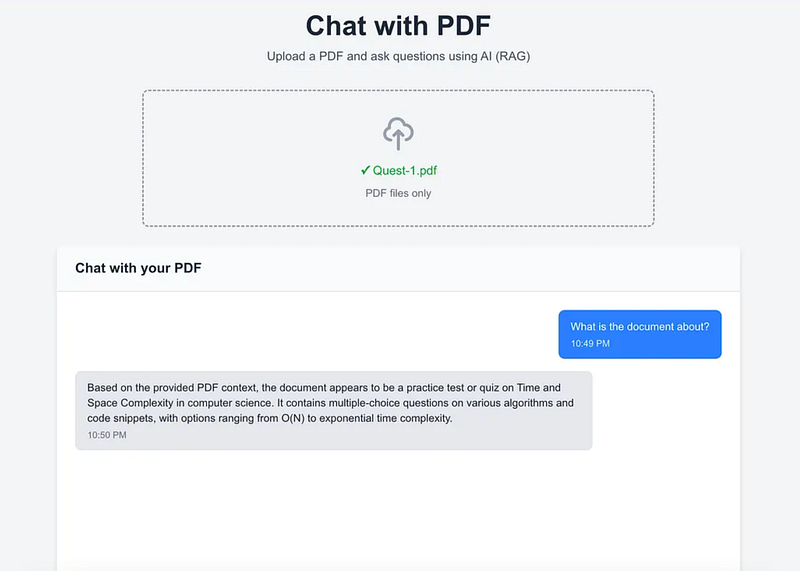
In fact, the Chat with PDF app we built earlier in this series is a practical example of RAG.
If you want to make the `Chat with PDF app` application, you can refer to this article
Common Mistakes Developers Make
1. Using Large Chunks
Bad:
5000-word document chunkBetter:
300-800 token chunksSmaller chunks usually improve retrieval accuracy.
2. Ignoring Metadata
Store metadata like:
{
 "source": "react-docs",
 "page": 5,
 "category": "frontend"
}
This makes filtering much easier later.
3. Retrieving Too Many Documents
Bad:
topK = 20Better:
topK = 3More context isn’t always better.
Too much context can actually confuse the model.
The Surprising Insight About RAG
Many developers believe:
Better AI = Bigger Model
But in production systems, the opposite is often true.
A smaller model with highly relevant retrieved context frequently outperforms a larger model with poor context.
The quality of retrieval often matters more than the size of the model.
That’s one of the biggest lessons AI engineers learn when moving from demos to real-world applications.
Why Every AI Developer Should Learn RAG
RAG sits at the intersection of:
- LLMs
- Embeddings
- Vector Databases
- Semantic Search
- Prompt Engineering
Mastering RAG allows you to build applications that:
- Use private knowledge
- Stay up to date
- Reduce hallucinations
- Scale efficiently
- Deliver production-grade AI experiences
And that’s why nearly every serious AI product today includes some form of retrieval system.
Key Takeaways
✅ LLMs cannot access your private data by default
✅ RAG retrieves relevant information before generation
✅ Embeddings power semantic search
✅ Vector databases store searchable knowledge
✅ Better retrieval often beats bigger models
✅ Most production AI applications rely on RAG
In the previous days of this series, we learned the individual building blocks. Today, we connected them into a complete AI architecture.
The next question is:
Once you’ve built a RAG system, how do you evaluate whether it’s actually retrieving the right information?
We’ll explore that in the next step of the AI Developer journey.
Missed the previous articles?
Read here: Build a Resume Analyser Using AI
Read here: Vector Databases Explained
Upcoming
🚀 Transitioning into AI as a developer?
I’m building a practical 30-day roadmap to help developers move into AI — step by step, without random tutorials or confusion.
👉 Follow this series so you don’t miss the next day.
👉 Bookmark this article — you’ll want to revisit it.
👉 What’s the biggest thing confusing you about AI right now? Drop it in the comments — I may cover it next.