Day 11 of Becoming an AI Developer: Why AI Forget Things (And What Context Windows Actually Mean)
Why ChatGPT Forgets, How Context Windows Work, and What Developers Must Know to Build Better AI Apps
Ever noticed this?
You spend 20 minutes explaining your project to ChatGPT.
You share
- Requirements.
- Architecture.
- Edge cases.
- Even bugs.
Then suddenly…
AI responds as if it forgot everything.
And your reaction is probably:
“Did this thing just lose memory?”
Not exactly.
The surprising truth is:
AI doesn’t actually “remember” conversations the way humans do.
What feels like memory is often just temporary context.
And once that context becomes too large?
Things start disappearing.
Today, on Day 11 of Becoming an AI Developer, we’ll finally understand:
- Why AI forgets things
- What context windows actually are
- Why large prompts become expensive
- How developers work around AI memory limitations
- A surprising reason why better prompts sometimes stop working
But first, let’s connect this to what we’ve already learned.
Quick Recap: What We’ve Covered So Far
In the last 10 days, we explored:
Day 9 & 10: RAG, embeddings, vector databases, and Chat with PDF architecture
At this point, one big question naturally comes up:
If AI can understand PDFs and long conversations… why does it still forget?
The answer starts with a concept called Context Window
What Is a Context Window?
Think of a context window as:
The amount of information an AI model can “see” at one time.
That includes:
- Your current message
- Previous messages
- Instructions
- System prompts
- Uploaded content
- Retrieved context (in RAG)
Everything gets packed into one limited space.
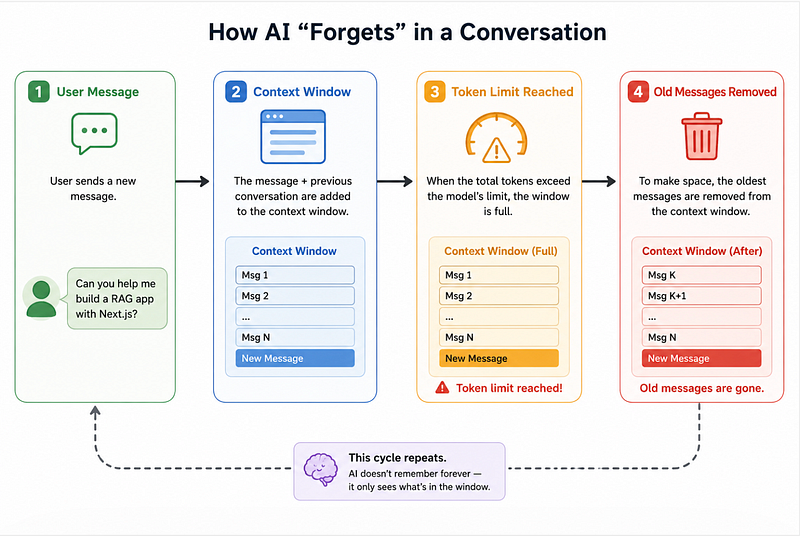
Once the limit is reached?
Older information starts getting removed.
It’s like scrolling chat history disappearing from the AI’s short-term memory.
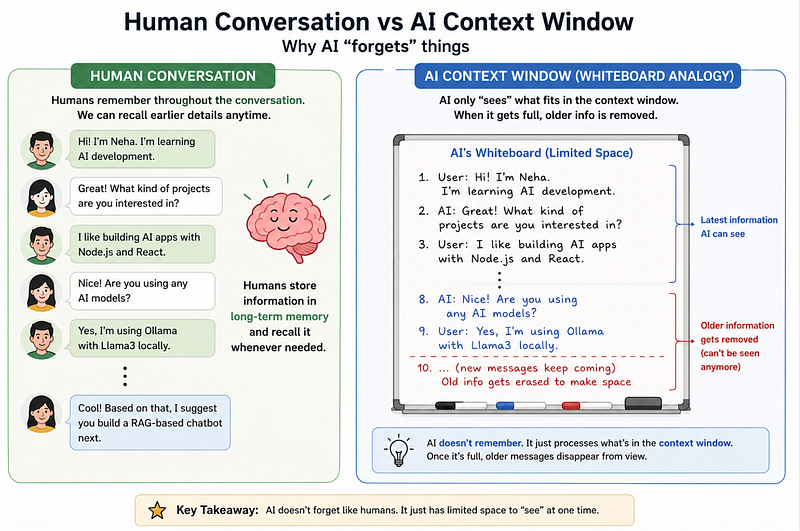
A Simple Mental Model
Imagine AI has a whiteboard.
You keep writing new things on it.
Eventually, the whiteboard gets full.
To make space, the oldest notes get erased.
That’s basically how context windows work.
Wait… What Exactly Is Being Counted?
This is where many developers get confused.
AI doesn’t count words.
It counts tokens.
And if you remember Day 2:
Tokens are small chunks of text.
Example:
“I love JavaScript”May become something like:
["I", "love", "Java", "Script"]Even punctuation counts.
Spaces matter.
Code consumes lots of tokens.
Large JSON files? Huge token usage.
Long PDFs? Very expensive.
Why Developers Accidentally Break AI Apps
Here’s a mistake many developers make:
They assume:
“If I send everything to the LLM, it will understand better.”
Actually…
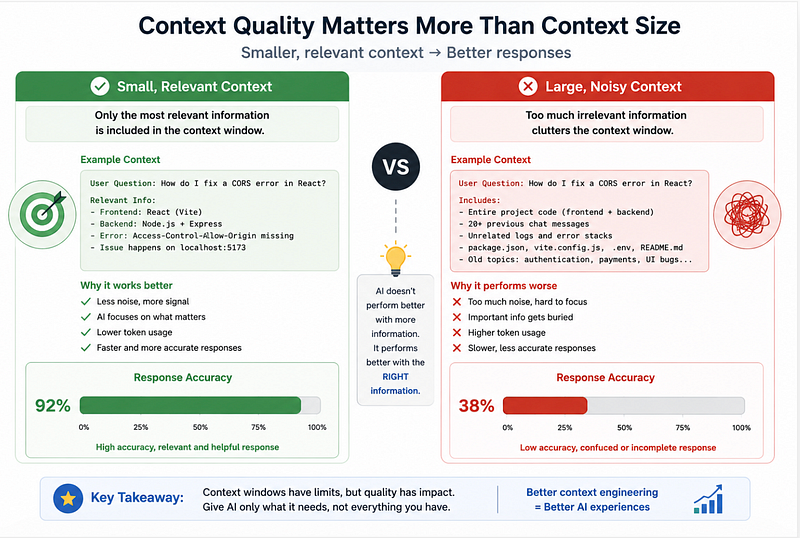
Sometimes, more context makes responses worse.
Why?
Because irrelevant information pollutes the prompt.
Imagine asking:
“Fix this React bug”
But sending:
- 50 API logs
- Old chat history
- Unrelated code
- Massive configs
The AI gets distracted.
This is called: Context Pollution
Too much irrelevant context reduces response quality.
Less can sometimes be more.
A Real Example: Why Chatbots Forget
Suppose you’re building a chatbot.
Conversation:
User:
I’m Neha, I’m learning AI development.
User (20 messages later):
Suggest my next project.
If the earlier message falls outside the context window…
The model may reply:
“Can you tell me your experience level?”
Looks annoying.
But technically, The AI literally cannot see the earlier information anymore.
It’s not forgetting.
It’s missing access.
How Developers Solve This Problem
This is where production AI systems get smarter.
Instead of sending everything…
Developers selectively send relevant context.
Option 1: Conversation Summarisation
Old chats are compressed into summaries.
Example:
Instead of sending 100 messages:
User is a full-stack developer learning AI.
Interested in Node.js, RAG, and local LLMs.
Currently building AI projects.- Much smaller.
- Much cheaper.
- Still useful.
Option 2: RAG (Retrieval-Augmented Generation)
Remember Day 9? If not, you can Read here
This is exactly why RAG exists.
Instead of forcing the AI to remember everything:
You store knowledge externally.
Then, retrieve only relevant pieces.
Architecture looks like this:
User Question
 ↓
Embedding Search
 ↓
Vector Database
 ↓
Relevant Chunks Retrieved
 ↓
LLM Response
This is why Chat PDF apps work.
The model isn’t remembering the whole PDF.
It retrieves only important sections.
Let’s See Context Windows in Code
Here’s a bad approach:
❌ Sending Everything
const response = await openai.chat.completions.create({
 model: "gpt-4",
 messages: entireChatHistory
});
Why this becomes a problem
- Expensive
- Slower
- Token overflow
- Lower-quality responses
✅ Better Approach: Keep Relevant Context
const recentMessages = messages.slice(-10);
const response = await openai.chat.completions.create({
 model: "gpt-4",
 messages: recentMessages
});
Why this works better
You reduce:
- Noise
- Cost
- Latency
And improve focus.
Common Mistake
Many beginners trim chat history blindly.
Instead: Use semantic retrieval or summaries for smarter context management.
The Surprising Payoff: Bigger Context ≠ Better AI
This surprised me when I started building AI apps.
Most developers assume:
Bigger context windows automatically mean smarter AI.
Not always.
A massive context window can still fail if:
- The important detail is buried
- Too much irrelevant text exists
- Prompt structure is messy
In real production systems:
Good context engineering often matters more than raw model size.
That’s the hidden skill many developers miss.
Prompt engineering gets attention.
But context engineering is where serious AI products become reliable.
Key Takeaways
If there’s one thing to remember from today, it’s this:
AI doesn’t truly “remember.” It reads context.
And context has limits.
Here’s your mental model:
✅ AI = prediction machine
✅ Memory = temporary context
✅ Context window = limited working space
✅ Tokens decide what fits
✅ RAG helps overcome memory limits
✅ Better context > bigger context
Tomorrow, we’ll go deeper into another important AI developer concept that makes AI applications actually feel intelligent in production.
Until then:
Have you ever seen ChatGPT suddenly forget your earlier instructions? What was the weirdest example?
Missed the previous articles?
- Read here: Build a Resume Analyser Using AI
- Read here: Architecture of Chat PDF App with AI
Upcoming
- Embeddings Explained for Developers
🚀 Transitioning into AI as a developer?
I’m building a practical 30-day roadmap to help developers move into AI — step by step, without random tutorials or confusion.
👉 Follow this series so you don’t miss the next day.
👉 Bookmark this article — you’ll want to revisit it.
👉 What’s the biggest thing confusing you about AI right now? Drop it in the comments — I may cover it next.