Day 10 of Becoming an AI Developer: I Built a Chat With PDF App Using Next.js + Ollama + RAG
A practical deep dive into building a local AI-powered PDF chatbot using Next.js, LangChain, Ollama, embeddings, vector search, and Retrieval-Augmented Generation (RAG).
Most developers build an AI app that “works”…
Until they ask one dangerous question:
“Where exactly is the AI getting this answer from?”
And suddenly, the model starts confidently inventing facts.
That’s when you realise:
ChatGPT-style prompting alone is not enough for document-based applications.
If you want users to ask questions from a PDF — resumes, research papers, legal docs, interview notes, technical documentation — you need something smarter.
You need RAG (Retrieval-Augmented Generation).
Recently, I built a Chat With PDF application using:
- Next.js App Router
- Ollama (running locally)
- LangChain
- Llama3
- nomic-embed-text
- MemoryVectorStore
- PDF parsing + chunking
And the surprising part?
The architecture is much simpler than most tutorials make it look. In the previous article, I explained architecture in complete theory. If you’re not familiar with AI at all. I recommend going and reading the previous article to have a better understanding of the application.
Architecture of Chat PDF App with AI
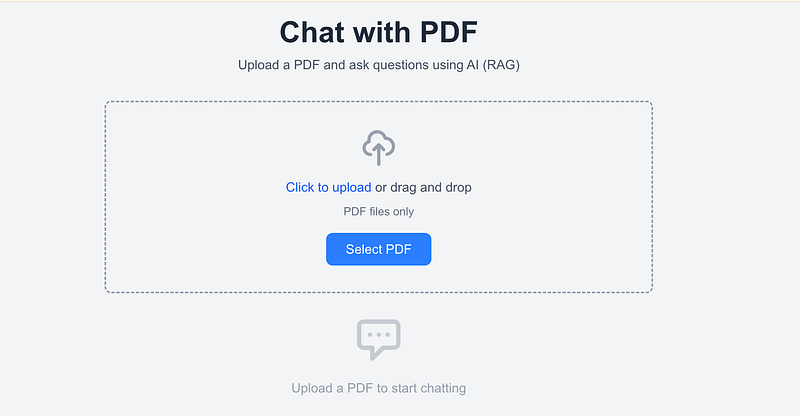
The application we’re going to make today
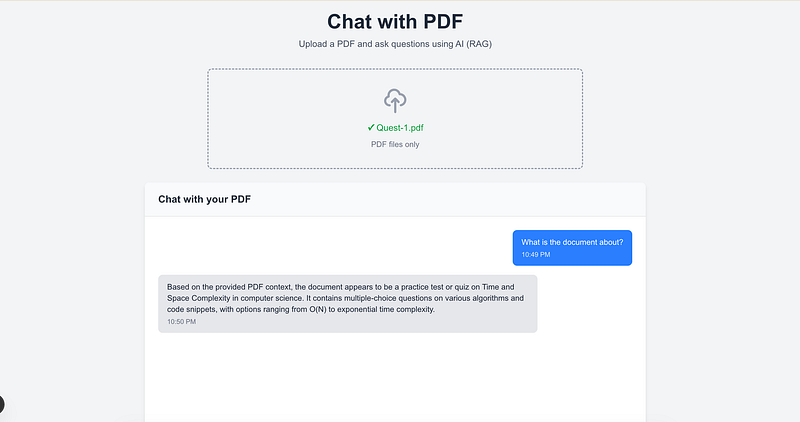
What We’re Building
The application allows users to:
- Upload a PDF
- Extract text from it
- Convert text into embeddings
- Store those embeddings in memory
- Ask questions
- Get answers strictly from the uploaded PDF
Instead of hallucinating, the model retrieves relevant document chunks first.
The Core Flow
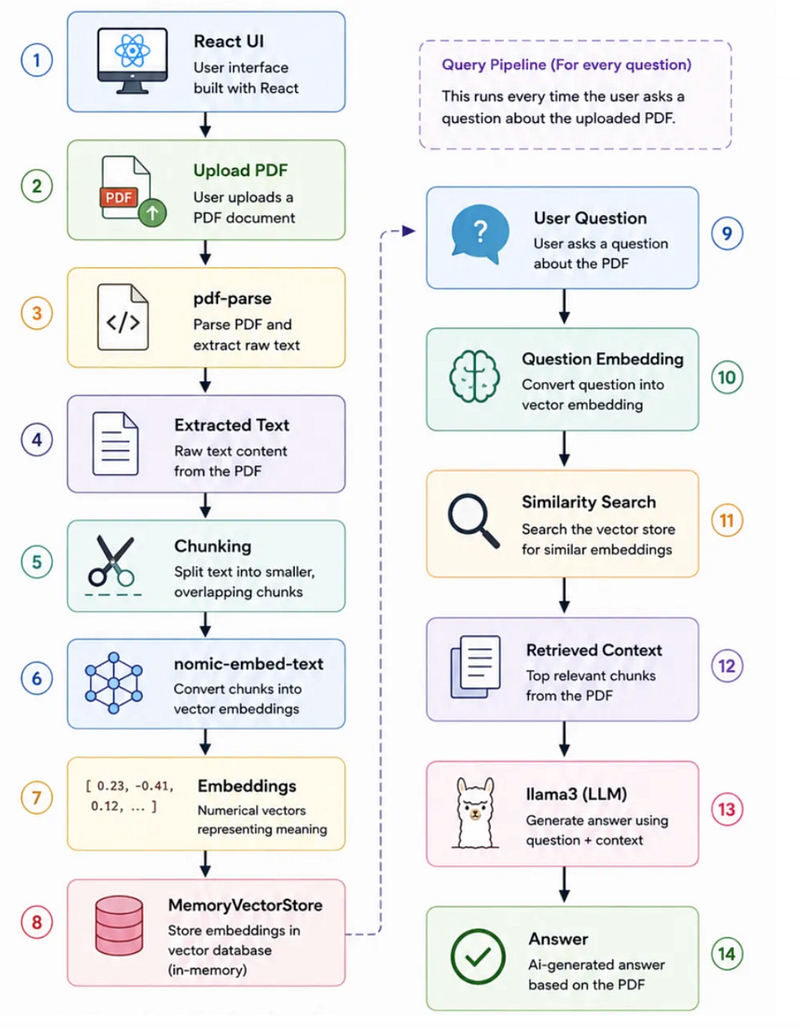
This pattern is called RAG (Retrieval-Augmented Generation).
Instead of feeding the entire PDF into the LLM (which is expensive and inefficient), we only send the most relevant pieces.
Step 1: Project Setup
First, create the Next.js app.
npx create-next-app@latest chat-with-pdf \
--typescript \
--tailwind \
--app \
--no-src-dir \
--import-alias "@/*"
Then install dependencies:
npm install langchain @langchain/community pdf-parse ollamaCreate .env.local:
OLLAMA_BASE_URL=http://localhost:11434Start Ollama:
ollama serveRun the app:
npm run devProject Structure (And Why It Matters)
Here’s the real project structure:
chat-with-pdf/
├── app/
│ ├── page.tsx
│ └── api/
│ ├── upload/
│ │ └── route.ts
│ └── chat/
│ └── route.ts
├── components/
│ ├── ChatBox.tsx
│ ├── FileUpload.tsx
│ └── Message.tsx
├── lib/
│ ├── pdf.ts
│ ├── ollama.ts
│ └── vectorStore.ts
├── types/
│ └── chat.ts
Instead of dumping everything into one file, each folder has one clear responsibility.
That makes debugging easier and scaling much cleaner.
Understanding Every File (The Important Part)
1. types/chat.ts
This file exists to define TypeScript types.
Without it, your app quickly becomes hard to maintain.
export interface Message {
 id: string;
 role: "user" | "assistant";
 content: string;
 timestamp: Date;
}
Why it matters:
- Prevents inconsistent message objects
- Improves autocomplete
- Reduces runtime bugs
Think of it as a contract for your application.
Github Code- Chat with PDF Application
2. lib/pdf.ts
This file handles:
- PDF text extraction
- Chunking logic
Extracting PDF Text
The app uses pdf-parse.
const data = await pdfParse(buffer);
return data.text;
Why?
Because LLMs cannot read PDFs directly.
They only understand plain text.
So:
PDF → Extracted Texthappens before anything AI-related.
Github Code- Chat with PDF Application
Chunking (Most Important Concept)
You cannot send a 100-page PDF directly into an LLM.
Instead, we split it into smaller chunks.
Your app uses:
const chunkSize = 1000;
const chunkOverlap = 200;
Why overlap?
Imagine this sentence gets split:
“React Server Components improve performance by…”
If chunking cuts it halfway, meaning it gets lost.
Overlap preserves context.
Chunk 1 → [1000 chars]
Chunk 2 → [200 overlap + next text]
Practical Tip:
Smaller chunks improve precision, larger chunks improve context.
There’s always a tradeoff.
3. lib/ollama.ts
This is the AI brain layer.
It configures:
Embeddings Model
export const embeddings =
new OllamaEmbeddings({
 model: "nomic-embed-text",
});
This model converts text into vectors.
Example:
"React hooks"
↓
[0.12, 0.87, 0.44, ...]
The vector captures semantic meaning.
This is what enables similarity search.
Github Code- Chat with PDF Application
LLM Model
Your app uses:
model: "llama3"for final answer generation.
But here’s the clever part:
The LLM doesn’t read the entire PDF.
It only gets the retrieved context.
const prompt = `
PDF Context:
${context}
Question: ${question}
`;
This massively reduces hallucinations.
Github Code- Chat with PDF Application
4. lib/vectorStore.ts
This file is where RAG becomes real.
It stores embeddings in:
MemoryVectorStoreWhen PDF chunks arrive:
await MemoryVectorStore.fromDocuments(
 documents,
 embeddings
);
Each chunk becomes searchable.
Example
User asks:
“What is the refund policy?”
The system searches:
similaritySearch(question, 3)and retrieves the top 3 most relevant chunks.
Not keyword matching.
Meaning matching.
That’s the magic.
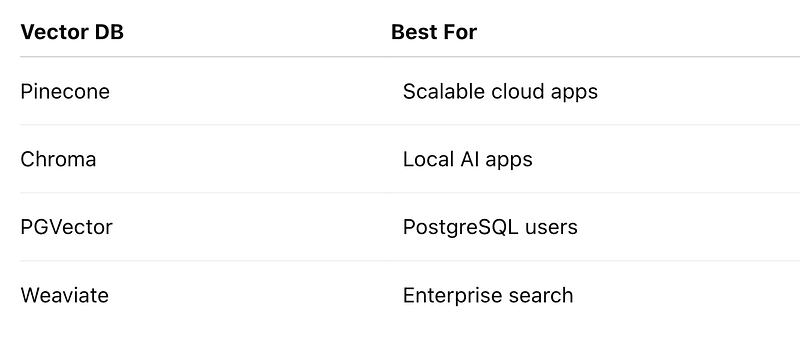
Important Limitation
Your vector store is:
in-memoryMeaning:
Restart the server = lose uploaded PDFs
Good for learning.
Not production.
For production, consider:
5. /api/upload/route.ts
This API processes PDFs.
Workflow:
Receive PDF
↓
Validate file type
↓
Extract text
↓
Chunk text
↓
Generate embeddings
↓
Store in vector DB
File Validation
if (file.type !== "application/pdf")Never trust frontend validation alone.
Always validate on the backend.
Github Code- Chat with PDF Application
Text Extraction
const text =
await extractPdfText(buffer);
Chunk Creation
const chunks = chunkText(text);Store in Vector DB
await storeInVectorStore(chunks);At this stage:
Your PDF becomes searchable.
That’s a huge transition.
6. /api/chat/route.ts
This is the real Q&A engine.
When a user asks:
“Summarize chapter 2”
The route:
Step 1 → Search Relevant Chunks
const contextChunks =
await searchVectorStore(question, 3);
Step 2 → Combine Context
contextChunks.join(
"\n\n---\n\n"
);
Step 3 → Ask Llama3
const answer =
await generateAnswer(
context,
question
);
The model gets:
Context + Questioninstead of only:
QuestionHuge difference.
7. UI Components
FileUpload.tsx
Responsible for:
- drag & drop upload
- PDF validation
- loading states
This improves UX significantly.
ChatBox.tsx
Handles:
- chat state
- sending messages
- auto scroll
- assistant responses
Interesting implementation:
(window as any)
.addAssistantMessage
This bridges responses from API → UI.
Not ideal for large apps, but perfectly fine for a learning project.
In production, consider:
- Zustand
- Context API
- Redux
- Server Actions
Github Code- Chat with PDF Application
Message.tsx
Simple but clean.
It separates:
user
assistant
messages visually.
Small UI decisions improve usability more than most developers think.
Common Mistakes Developers Make
❌ Sending Entire PDF to LLM
Expensive and inefficient.
❌ No Chunk Overlap
Breaks context.
❌ No Retrieval Step
Leads to hallucinations.
❌ No Prompt Guardrails
Your implementation wisely includes:
Do not hallucinate.
If information is not available,
say it is not found.
That single prompt line improves reliability massively.
The Surprising Payoff
Here’s what surprised me most:
The hardest part of RAG is NOT AI.
It’s data preparation.
Good chunking + clean retrieval often matters more than switching from one fancy LLM to another.
A properly chunked document with Llama3 can outperform a badly structured GPT workflow.
Most developers underestimate this.
Final Takeaways
If you want to build real-world AI applications:
Don’t start with agents.
Start with RAG.
This project teaches almost every important AI engineering concept:
✅ embeddings
✅ vector search
✅ chunking
✅ retrieval
✅ prompt grounding
✅ hallucination control
✅ local LLMs with Ollama
And once you understand this architecture, building things like:
- Resume analyzers
- Research assistants
- Internal company search
- Knowledge-base chatbots
- Documentation copilots
becomes much easier.
What would you improve in this architecture if this app had to handle 10,000 PDFs instead of one?
Missed the previous articles?
Read here: Build a Resume Analyser Using AI
Read here: Architecture of Chat PDF App with AI
Upcoming
Why AI Forget Things — Context windows explained
🚀 Transitioning into AI as a developer?
I’m building a practical 30-day roadmap to help developers move into AI — step by step, without random tutorials or confusion.
👉 Follow this series so you don’t miss the next day.
👉 Bookmark this article — you’ll want to revisit it.
👉 What’s the biggest thing confusing you about AI right now? Drop it in the comments — I may cover it next.