Part 2: AWS Cloud Practitioner Essentials
Introduction to AWS EC2 Instances, Types and Pricing Models

Remember yesterday when we talked about how cloud computing is just fancy client-server stuff under the hood?
If you haven’t read about it yet. Please read it here
Well, now imagine you opened a coffee shop.
You’re hiring people.
- Some are great at multitasking.
- Some are fast at taking orders.
- Some? Absolute artists with that latte foam.
That’s exactly how EC2 (Elastic Compute Cloud) instances work.
They’re not just “servers” — they’re roles in your app’s workflow.
☕ Your Coffee Shop = Your App
Your cashier is like a memory-optimised instance — fast, alert, and ready to juggle orders.
- Your barista is a compute-optimised instance, churning out coffee shots nonstop.
- And your latte artist? Can you guess? That’s an accelerated compute instance, handling niche yet beautiful workloads such as ML or GPU-intensive tasks.
- AWS lets you build this dream team using different EC2 instance families tailored to your app's needs.

What Are EC2 Instance Families?
Each EC2 instance type offers a different mix of:
- 🧠 CPU power
- 🧵 Memory (RAM)
- 💾 Storage
- 🌐 Networking capacity
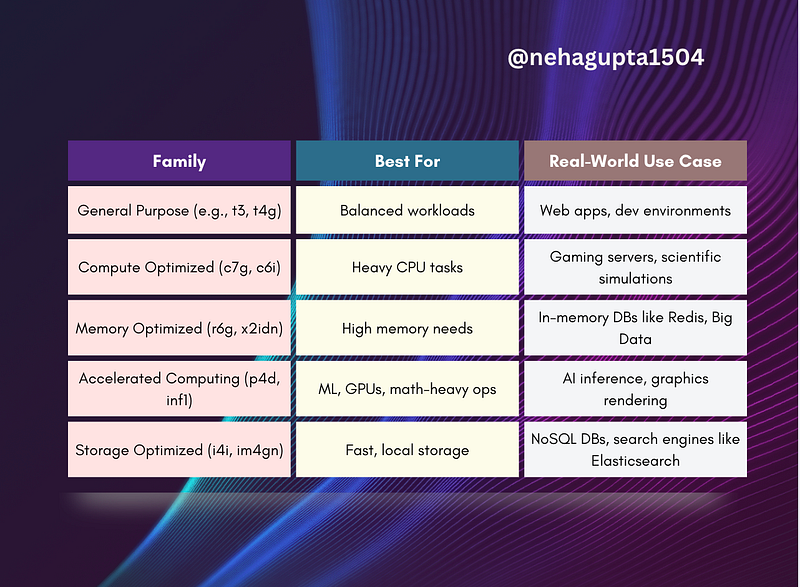
Here’s the breakdown:
Family Best For Real-World Use Case
How Much Will It Cost?
AWS pricing is like ordering coffee — there’s a basic black version, and then there’s the full oat milk extra-shot experience.
Here are your billing options (and when to use them):
1️⃣ On-Demand (a.k.a. “Just testing”)
- You pay only when the instance is running
- Ideal for experiments, demos, and short-term use
- No commitments, no headaches
🧾 Think of it like: walk-in order, pay as you go
2️⃣ Savings Plan (your “coffee subscription”)
- Commit to a consistent usage level (e.g., $0.50/hr)
- Save up to 72%
- Works across EC2, Fargate, and Lambda
🧾 Good for teams with steady usage over 1 or 3 years
3️⃣ Reserved Instances (like booking a coffee table every day)
- Commit to a 1 or 3-year term
- Up to 75% cheaper than On-Demand
- Great for predictable traffic apps
🧾 Pay all upfront / partial / no upfront — totally flexible
4️⃣ Spot Instances (coffee, but only if there’s leftover milk)
- Use AWS’s extra, unused compute power
- Up to 90% cheaper, but…
- AWS can kick you off with 2 mins’ notice
🧾 Best for batch jobs, testing, or processes that can restart
5️⃣ Dedicated Hosts (VIP lounge)
- Physical server only you can use
- Used when you need regulatory compliance or software licenses
🧾 Most expensive, most isolated, least shared
Real Example: Building a Simple App with EC2
Let’s say you’re deploying a To-Do List app with a Node.js backend.
- Frontend? You might use a static S3 bucket or React on Vite.
- Backend? EC2 General Purpose instance (
t3.micro) for handling API requests. - Database? Host on RDS or use EC2 with a Storage-Optimised instance.
- Analytics in future? Add an Accelerated instance with GPU for ML.
That’s how a simple app scales into an intelligent one — with EC2 letting you plug in team members as needed.
Try This Today
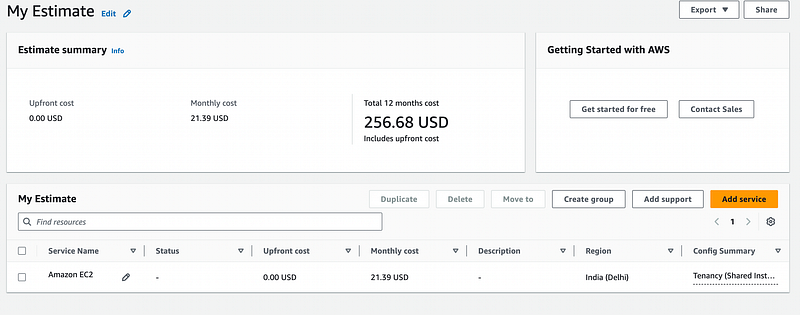
- Head over to https://calculator.aws/
- Estimate the cost of a
t3.microinstance running 24/7 - Explore what instance family would suit your next project best
AWS t3.medium Yearly Estimate
Want to get hands-on?
🚀 Launch an EC2 instance using the free tier (e.g., t2.micro)
🧠 Follow this AWS doc to launch your first EC2 instance
✅ Key Takeaways
- EC2 instances are like your team — pick the right person for the right job
- Use On-Demand to explore, Savings Plan for stability, and Spot for budget experiments
- Know your instance families like tools in your developer toolbox
- Plan your cloud costs like you’re scaling a real-world business
Next Read
Day 3: AWS EC2 scaling and elastic load balancing

Your Turn
- What’s the first app you’d want to try building on EC2?
- Would you go for On-Demand or are you ready to commit to a Reserved plan?
Drop your answers, thoughts, and questions below 👇 Let’s get your hands dirty with the cloud 🚀
At Dev Simplified, We Value Your Feedback 📊
👉 Follow us to not miss any updates.
👉 Have any suggestions? Let us know in the comments!