AWS Trusted Advisor & IAM Access Analyser: Your Built-In Cloud Optimisation and Security Experts
Learn how to reduce costs, boost performance, and strengthen security in your AWS environment using two powerful built-in tools.
Managing cloud infrastructure isn’t just about launching resources — it’s about continuously improving them. As your AWS environment grows, so do the challenges: rising costs, performance bottlenecks, and potential security risks.
That’s where AWS provides intelligent tools to guide you. In this article, we’ll explore two essential services: AWS Trusted Advisor and IAM Access Analyser — and how they help you run a more efficient and secure cloud environment.
Why You Need Continuous Cloud Optimisation
Think of your AWS environment as a living system. Over time, unused resources pile up, configurations drift from best practices, and security gaps may appear.
To stay efficient, you need:
- Regular monitoring
- Actionable recommendations
- Automated insights
This is exactly what AWS offers through its advisory and analysis tools.
AWS Trusted Advisor: Your Cloud Optimisation Guide
AWS Trusted Advisor acts like an automated consultant for your AWS account. It continuously scans your resources and compares them against AWS best practices.
What Does It Check?
Trusted Advisor evaluates your environment across five key areas:
1. Cost Optimisation
It identifies ways to reduce unnecessary spending.
- Detects idle resources like unused EC2 instances
- Highlights underutilised databases or storage
- Suggests actions like stopping or deleting unused services
Example:
If you’re running an EC2 instance that’s barely used, Trusted Advisor will flag it so you can scale down or shut it off.
2. Performance
It ensures your applications run efficiently.
- Detects configurations limiting performance
- Suggests improvements for better throughput
Example:
If an EBS volume is not performing well due to instance limitations, it will recommend changes.
3. Security
It helps identify vulnerabilities.
- Alerts about missing multi-factor authentication (MFA)
- Detects publicly accessible resources
Example:
If a security group allows unrestricted public access, you’ll get an alert to fix it.
4. Fault Tolerance
It improves system reliability.
- Identifies missing backups (like EBS snapshots)
- Checks if workloads are properly distributed
Example:
If your application runs in only one Availability Zone, it warns about potential downtime risks.
5. Service Limits
It tracks your AWS usage limits.
- Alerts when you’re nearing service quotas
- Helps you avoid unexpected disruptions
Key Benefits of Trusted Advisor
- Continuous monitoring using AWS best practices
- Clear, categorised recommendations (red, orange, green alerts)
- Helps optimise cost, performance, and security at scale
- Enables proactive issue resolution
Real-World Use Case
A company running applications across multiple regions can use Trusted Advisor to:
- Identify cost-saving opportunities
- Improve system resilience
- Ensure infrastructure follows best practices
IAM Access Analyser: Fine-Grained Security Control
While Trusted Advisor gives a broad overview, security often requires deeper inspection — especially at the permission level.
That’s where IAM Access Analyser comes in.
Understanding Least Privilege
A key security principle in AWS is least privilege — giving users only the permissions they absolutely need.
Too many permissions = higher security risk.
What IAM Access Analyser Does
IAM Access Analyser helps you:
- Analyse who has access to your resources
- Detect unintended external access
- Validate IAM policies against security standards
Key Capabilities
1. Set and Refine Permissions
It helps define precise access controls instead of overly broad permissions.
2. Verify Access
You can check exactly:
- Who can access your resources
- What level of access do they have
3. Identify Unused Permissions
It highlights permissions that are granted but never used.
4. Validate Policies
Ensures your IAM policies align with organisational security requirements.
Practical Example
Imagine a developer has full access to an S3 bucket but only needs read access.
IAM Access Analyser will:
- Identify the excessive permissions
- Help you refine it to a more secure, limited scope
Benefits of IAM Access Analyser
- Strengthens security through least privilege enforcement
- Automates IAM policy reviews
- Reduces risk of accidental data exposure
- Improves visibility into access patterns
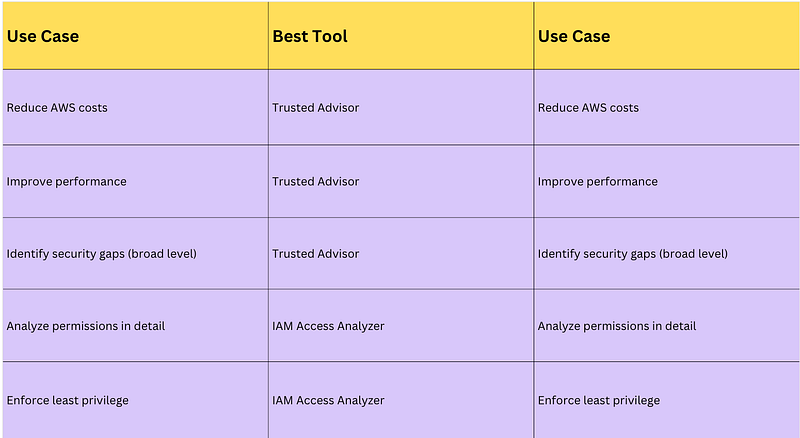
When to Use Each Tool
Putting It All Together
These tools are most powerful when used together:
- Trusted Advisor gives you a high-level view of your AWS health
- IAM Access Analyser dives deep into access control and permissions
Together, they help you build:
- Cost-efficient systems
- High-performing applications
- Secure cloud environments