AWS Organizations Explained: Simplify Multi-Account Management at Scale
A beginner-friendly guide to managing multiple AWS accounts, improving security, and optimising costs
As organisations grow, their cloud environments often become more complex. Multiple teams, projects, and departments start using separate AWS accounts, and suddenly, managing everything feels overwhelming.
This is where AWS Organisations comes into play.
In this guide, you’ll learn what AWS Organisations is, why it matters, and how it helps you manage multiple AWS accounts efficiently — all explained in simple terms.
What is AWS Organisations?
AWS Organisations is a service that allows you to centrally manage and govern multiple AWS accounts.
Instead of handling each account individually, you can group them under a single structure and apply rules, permissions, and policies across all of them at once.
Think of it as a control center for your entire AWS environment.
Why Do You Need AWS Organisations?
As your company scales, you might create separate AWS accounts for:
- Different teams (engineering, marketing, finance)
- Different projects
- Security isolation
- Billing separation
Managing each account manually becomes difficult. AWS Organisations solves this by giving you centralised control.
Key Benefits of AWS Organizations
Let’s break down the major advantages:
1. Easy Scaling with Automated Account Creation
You can create new AWS accounts programmatically.
Example:
A growing startup hires a new team. Instead of manually setting up everything, you automatically create a new AWS account with predefined settings.
2. Centralised Permission Management
You can define permissions using Service Control Policies (SCPs) and apply them across multiple accounts.
Example:
Your company wants to restrict access to certain AWS services for compliance reasons. Instead of configuring each account separately, you apply a policy once — and it works everywhere.
3. Cost Optimization Across Accounts
You can monitor and manage costs across all accounts from a central place.
Example:
Finance teams can track which department is using more resources and optimise spending accordingly.
4. Better Governance and Security
It helps enforce rules and maintain consistency across all accounts.
Example:
Security teams can ensure that only approved services are used across the organisation.
Common Use Cases
Here are some real-world scenarios where AWS Organisations is useful:
1. Automating Account Setup
Instead of manual work, you can automatically create and configure accounts for new teams or projects.
2. Supporting Security Teams
Security teams can get centralised visibility and control over all accounts, making it easier to enforce policies.
3. Controlling Access to Services
You can restrict access to specific AWS services across accounts.
4. Sharing Resources Across Accounts
Some resources (like tools or services) can be shared across multiple accounts, reducing duplication.
How AWS Organisations Works
To understand how it functions, let’s look at its structure.
1. Organisation Structure
An organisation is a collection of AWS accounts arranged in a hierarchy.
At the top, you have:
- Root (the main container)
Below that:
- Organisational Units (OUs) (groups of accounts)
Inside OUs:
- Individual AWS accounts
2. Tree-Like Hierarchy
The structure looks like a tree:
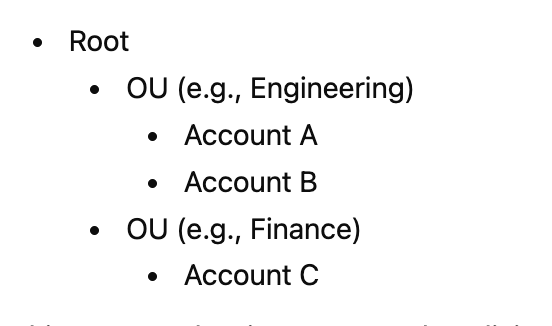
This setup makes it easy to apply policies to groups instead of individual accounts.
3. Organisational Units (OUs)
OUs help you group accounts based on:
- Business needs
- Security requirements
- Regulatory requirements
Example:
You might create separate OUs for:
- Production
- Development
- Testing
4. Service Control Policies (SCPs)
SCPs define what actions are allowed or denied across accounts.
They act as a guardrail, ensuring no account can exceed defined permissions.
Designing Your AWS Organisation
When setting up AWS Organisations, it’s important to plan your structure carefully.
Consider:
- Business requirements (teams, departments)
- Security policies
- Compliance regulations
Example Approach:
- Create OUs for departments (Engineering, HR, Finance)
- Apply different policies based on needs
- Group similar workloads together
A well-designed structure makes management easier as your system grows.
Quick Knowledge Check
Which identities and resources can SCPs be applied to?
Correct answers:
- ✅ An individual member account
- ✅ An organisational unit (OU)
SCPs are not applied directly to IAM users, groups, or roles — they work at the account or OU level.
Final Thoughts
Managing multiple AWS accounts doesn’t have to be complicated. AWS Organisations gives you the tools to simplify governance, improve security, and scale efficiently.
Whether you’re a startup growing rapidly or a large enterprise managing complex systems, this service helps you stay in control without increasing operational overhead.