Part 16: AWS Databases Made Simple
Choosing the Right Database for Modern, Scalable Applications
If you’ve ever felt confused looking at AWS’s database options, you’re not alone.
Relational, NoSQL, graph, in-memory, ledger, time-series…
It can feel overwhelming at first. But here’s the good news: AWS isn’t trying to complicate things. It’s actually giving you the freedom to choose the perfect database for your exact use case.
Let’s break it down in a simple, practical way — without heavy jargon.
The Big Picture: What Makes AWS Databases Different?
AWS offers a wide ecosystem of fully managed database services. That means:
- No manual patching
- Automatic backups
- Built-in high availability
- Seamless failover
- Easy scalability
Instead of spending hours managing infrastructure, you focus on building features.
By 2026, AWS will have introduced improvements like:
- Database Savings Plans (cost optimization)
- More powerful serverless options
- Tighter AI/ML integrations
The Goal?
Performance + scalability + cost control — without operational headaches.
The 8 Types of AWS Databases
AWS groups its databases into eight categories so developers can match the right tool to the right problem.
Let’s walk through each one.
1. Relational Databases (SQL-Based)
If your app needs structured data and strong consistency (like payments or orders), relational databases are ideal.
Main services:
- Amazon RDS
- Amazon Aurora
When to Use:
- E-commerce platforms
- CRM systems
- ERP software
- Banking applications
Why Aurora Stands Out
Aurora is AWS’s cloud-native version of MySQL and PostgreSQL. It’s designed for high performance and durability.
Compared to traditional MySQL:
- Up to 5x faster
- Storage auto-scales up to 128TB
- Failover in about 30 seconds
- 6-way replication across 3 Availability Zones
In short: it’s built for production-grade applications at scale.
2. Key-Value Databases (Ultra-Fast & Scalable)
Main service:
- Amazon DynamoDB
This is where speed matters.
DynamoDB provides single-digit millisecond latency, no matter how large your dataset grows.
Best For:
- Session management
- Real-time gaming apps
- Shopping carts
- Leaderboards
It supports both:
- Key-value models
- Document-style storage
It also offers:
- Serverless capacity mode
- On-demand scaling
- Global Tables (multi-region replication)
If you’re building globally distributed apps, DynamoDB handles it without you managing infrastructure.
3. Document Databases (Flexible Schema)
Main service:
- Amazon DocumentDB
If your data looks like JSON and evolves frequently, document databases are your friend.
Perfect For:
- User profiles
- Content management systems
- Product catalogs
- IoT telemetry
It’s MongoDB-compatible, so teams familiar with MongoDB can migrate easily.
4. Graph Databases (Connected Data)
Main service:
- Amazon Neptune
Graph databases are built for relationships.
Think:
- Fraud detection systems
- Social networks
- Recommendation engines
- Knowledge graphs
Neptune supports:
- Gremlin (property graphs)
- SPARQL (RDF models)
If your application depends on relationships between entities, graph databases outperform relational ones significantly.
5. Time-Series Databases
Main service:
- Amazon Timestream
Designed specifically for time-stamped data.
Best For:
- IoT devices
- Monitoring systems
- Application logs
- DevOps metrics
Timestream automatically moves older data to cheaper storage tiers — helping reduce long-term costs without manual effort.
6️⃣ In-Memory Databases
Main service:
- Amazon ElastiCache
Powered by Redis and Memcached, this service is about speed.
Used for:
- Caching
- Real-time analytics
- Session stores
- Reducing database load
It delivers microsecond-level latency.
If your primary database feels slow under heavy traffic, adding caching can dramatically improve performance.
7. Wide Column Databases
DynamoDB also supports wide-column storage patterns, allowing massive horizontal scaling for large datasets.
This model is useful for:
- Analytics workloads
- Large-scale distributed systems
8. Ledger Databases
Main service:
- Amazon QLDB
QLDB provides immutable, cryptographically verifiable transaction logs.
Ideal for:
- Financial systems
- Audit trails
- Supply chain tracking
If you need tamper-proof records, this is purpose-built for that.
Smarter Databases with AI Integration
One major shift in recent years is tighter integration between databases and AI/ML workflows.
This means:
- Easier model training on live data
- Real-time analytics pipelines
- Scalable inference systems
Instead of exporting data manually, AWS services integrate directly with analytics and ML tools.
So… How Do You Choose?
Here’s a simple decision mindset:
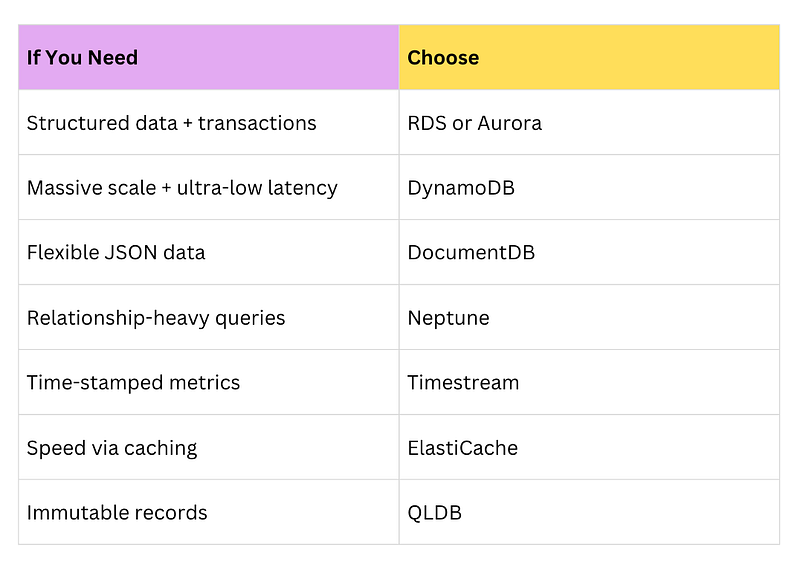
The real power of AWS lies in alignment — matching the database to the workload instead of forcing everything into one model.
The Real Side of It
Many teams start with one database for everything. It works… until scale hits.
Suddenly:
- Queries slow down
- Costs increase
- Infrastructure gets messy
AWS’s ecosystem exists so you don’t have to stretch one database beyond its limits.
It’s not about using all eight types.
It’s about using the right one at the right time.
Final Thoughts
Modern applications demand:
- Scalability
- Reliability
- Security
- Cost efficiency
- Real-time performance
AWS’s database ecosystem provides purpose-built solutions for each scenario.
When you understand the strengths of each database type, architecture decisions become clearer — and your applications become more resilient.
Instead of asking, “Which database is best?”
Ask, “Which database fits this workload best?”
That shift alone can transform your system design.
At Dev Simplified, We Value Your Feedback 📊
👉 Follow us not to miss any updates.
👉 Have any suggestions? Let us know in the comments!