Part 13: Mastering AWS VPC: Public, Private, and Secure Networking Foundations
Day 13 of AWS Cloud Essentials from Beginners to Advanced Level
Introduction: Why Network Isolation Truly Matters
Ever accidentally expose a database to the public internet?
Big Blunder🤯 Right?
That moment of panic when you realise anyone could access your backend!! If you haven’t, that’s great, but consider this scenario: what would happen if your backend were exposed?
Security and reliability are the must-haves for production-ready applications. That’s where Amazon Virtual Private Cloud (VPC) comes into play: it gives you full control over networking in AWS.
What’s the Problem? — Overexposed Services and Poor Segmentation
Every application has two kinds of components:
- Public-facing parts (like web servers or APIs, websites)
- Sensitive backend systems (like databases, servers or internal tools)
If everything lives in a single open network:
- Sensitive services might get exposed
- Attack surface increases
- Access control becomes unmanageable
VPC solves this by providing network isolation and logical boundaries.
Quiz #1: Public or Private?
You’re designing a system with the following components:
- A frontend web app hosted on EC2
- An admin dashboard used internally by your ops team
- A PostgreSQL database
- A metrics collector for internal use only
Which of these should be deployed in a public subnet?
A. Web app only
B. Web app and admin dashboard
C. Web app and metrics collector
D. All of them
💬 Drop your answer in the comments as Q1 (A,B,C,D) — and feel free to share why you picked your option! Let’s learn while reading!
How to Solve It — Understanding VPC, Subnets, and Gateways
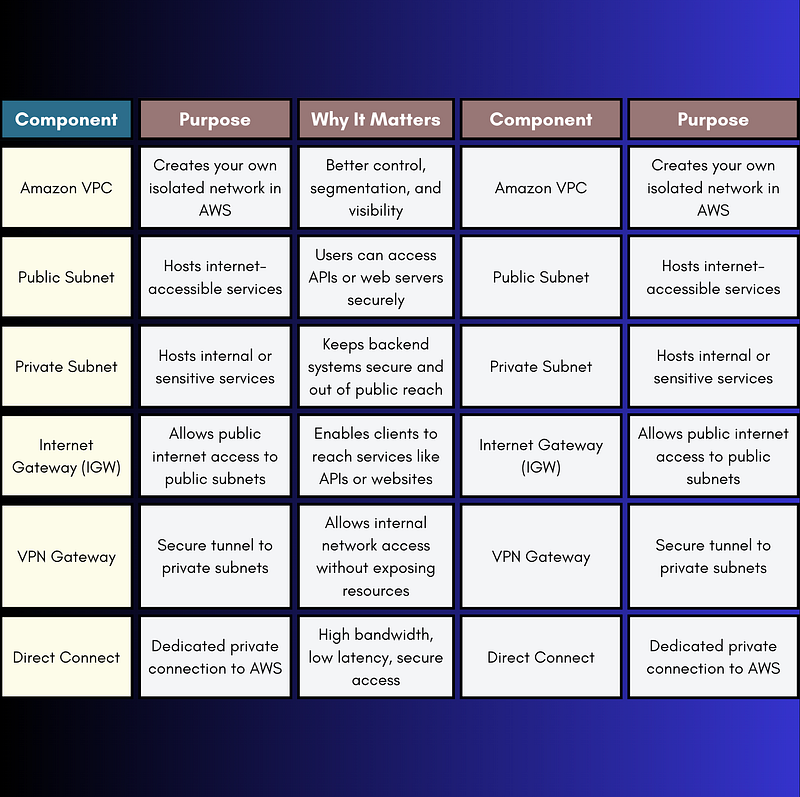
Amazon VPC
A VPC is like your private cloud within AWS. It’s logically isolated from other users’ resources, giving you full control over IP ranges and routing.
Subnets — Network Segmentation
Inside a VPC, you create subnets (virtual network segments), which can be:
- Public subnets — reachable from the internet (for web-facing services).
- Private subnets — no inbound internet access (for databases or internal services).
This prevents public users from directly interacting with backend resources.
Gateways — Connectors to Your VPC
- Internet Gateway (IGW) — Enables access from the internet to your public subnet.
- VPN Gateway — Secure tunnels from corporate networks to private subnets.
- Direct Connect — Dedicated fibre for private, high-speed connections to AWS.
Real-World Example — Separating Public APIs from Private Databases
Here’s a common architecture:
- Public Subnet: EC2 instance running your Node.js REST API
- Private Subnet: RDS instance (MySQL, PostgreSQL, etc.)
- Internet Gateway: Lets users access your public-facing API
- Database Access: Only API servers can talk to the DB (internal routing only)
Flow:
User → (internet) → IGW → EC2 API instance (public subnet)
 EC2 API instance → (internal network) → RDS DB (private subnet)
Quiz #2: Gateway Matchup
Match the gateway to its main purpose:
- Internet Gateway
- Virtual Private Gateway
- AWS Direct Connect
Purposes:
A. Private high-speed fibre link to AWS
B. Enables internet access for public subnets
C. Creates encrypted VPN tunnels to on-prem networks
💬 Comment below with your match like this: 1-B, 2-C, 3-A.
5. Pro Tips & Insights for Developers
✅ Deploy databases and stateful services in private subnets
✅ Spread your infrastructure across multiple Availability Zones
✅ Use Network ACLs for subnet-level rules and Security Groups for instance-level filtering
✅ Automate provisioning with CloudFormation or Terraform
✅ Monitor traffic using VPC Flow Logs for visibility into what’s allowed or denied
Quick Reference Table
Deep Dive: When to Use VPN vs Direct Connect
VPN (Virtual Private Gateway)
- ✅ Fully managed, scalable, encrypted
- ✅ Great for secure access from office networks or remote teams
- ⚠️ Shared internet bandwidth may cause fluctuations
Direct Connect
- ✅ Bypasses the internet for more consistent latency
- ✅ Ideal for data-intensive or real-time apps
- 🚧 Requires setup with AWS or third-party provider (not ideal for quick setups)
Summary
You now know how to:
- Use VPCs to isolate and secure your infrastructure
- Design subnets for segmentation and security
- Pick the right gateway based on latency, security, and throughput needs
💬 Want more hands-on tutorials? Let me know what you’d like next:
- CLI walkthrough?
- Terraform module examples?
- Flow Logs + alerting setup?
I read every comment 👀 — let’s level up your AWS skills together!
If this blog helped you, let me know in the comments…
Your words might seem small, but they’re the reason I keep writing more🤗
At Dev Simplified, We Value Your Feedback 📊
👉 Follow us to not miss any updates.
👉 Have any suggestions? Let us know in the comments!