Part 12: Designing Highly Available AWS Architectures: Multi-AZ, Multi-Region, and Edge Services
Day 12 of AWS Cloud Essentials from Beginners to Advanced Level
If you’ve been in IT long enough, you know that downtime is a developer’s worst nightmare. Whether it’s a database crash, a region-wide outage, or a spike in traffic you didn’t anticipate, users don’t care about your excuses — they just want your app to work.
“You remember if anytime WhatsApp or Google went down?” Twitter/X gets flooded
The good news?
AWS gives you tools to build highly available, fault-tolerant architectures — even if you’re not an infrastructure geek.
In this guide, we’ll break down:
✅ Multi-AZ and Multi-Region deployments (and why they’re your safety net)
✅ How AWS Edge locations & CloudFront make apps lightning fast
✅ When to use Outposts for ultra-low latency
✅ Key AWS concepts: High Availability, Agility, and Elasticity
By the end, you’ll know how to design cloud architectures that survive failures and keep users happy.
1. Why High Availability Matters (The Problem)
Imagine you’re running a meme-sharing app. One morning, your database in a single AWS Availability Zone (AZ) goes down. Suddenly, users can’t upload memes, and the app is flooded with 1-star reviews.
All because you relied on a single AZ.
High availability isn’t just for big enterprises — it’s essential for any production app. AWS gives you three levels of redundancy:
- Multiple Availability Zones (Multi-AZ)
- Multiple Regions (Multi-Region)
- Edge locations for content delivery
Let’s break these down.
2. Multi-AZ Deployments — Your First Line of Defence
What It Is
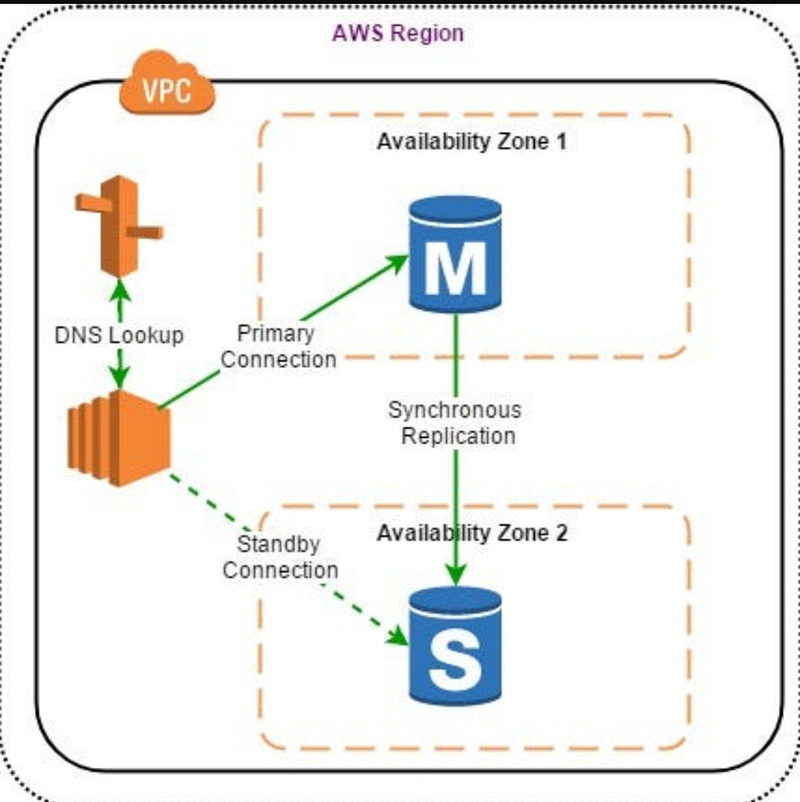
An Availability Zone (AZ) is essentially a data centre (or a group of them) within an AWS Region. When you deploy across multiple AZs, if one fails, traffic automatically shifts to the healthy AZ.
Think of it as RAID for your infrastructure — if one disk fails, your system keeps running.
Quick Example — Deploying a Multi-AZ Database
For example, when creating an Amazon RDS database:
aws rds create-db-instance \
 --db-instance-identifier mydb \
 --db-instance-class db.t3.micro \
 --engine mysql \
 --multi-az \
 --allocated-storage 20
✅ If AZ-1 fails, RDS automatically switches to a standby in AZ-2.
✅ Your users won’t even notice.
Real-World Scenario
E-commerce platforms like Shopify use Multi-AZ setups to keep checkouts running during failures. Imagine losing transactions during a sale — unacceptable, right?
When to Use It?
✅ Any production database (RDS, DynamoDB global tables)
✅ Web apps hosted on Elastic Beanstalk or ECS
✅ APIs with strict uptime SLAs
Pro Tip for Mid-Level Devs
- Combine Multi-AZ with auto-scaling groups for web servers.
- Use health checks in Elastic Load Balancer (ELB) to route traffic automatically.
3. Multi-Region Deployments — Surviving Regional Outages
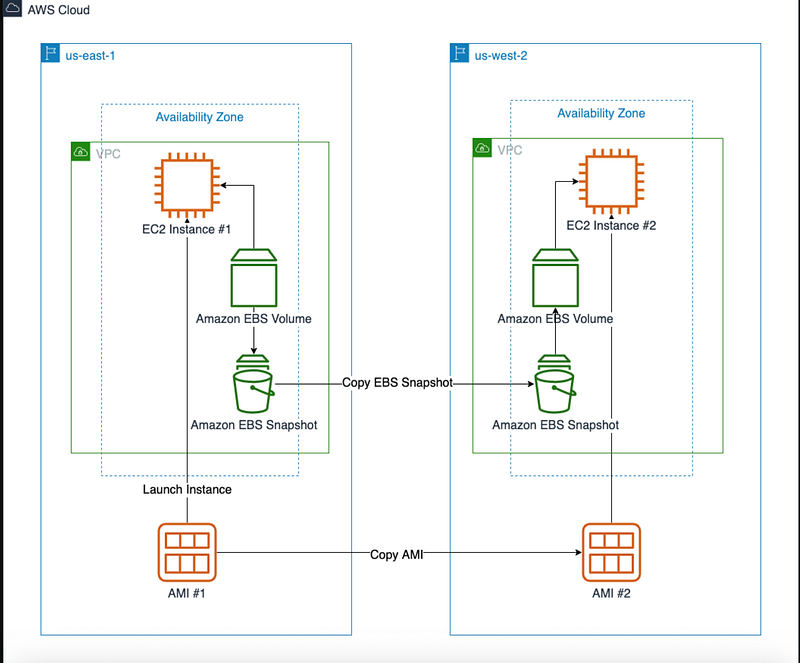
Multi-AZ protects you from data centre failures, but what if an entire AWS Region goes down? (Yes, it happens — though rare.)
A Multi-Region architecture lets you failover to another Region entirely.
Example — Multi-Region with Route 53
You can configure Amazon Route 53 (AWS’s DNS service) for automatic failover:
{
 "Comment": "Failover routing for my app",
 "Changes": [
 {
 "Action": "CREATE",
 "ResourceRecordSet": {
 "Name": "app.example.com",
 "Type": "A",
 "SetIdentifier": "Primary",
 "Failover": "PRIMARY",
 "TTL": 60,
 "ResourceRecords": [{"Value": "11.22.33.44"}]
 }
 },
 {
 "Action": "CREATE",
 "ResourceRecordSet": {
 "Name": "app.example.com",
 "Type": "A",
 "SetIdentifier": "Secondary",
 "Failover": "SECONDARY",
 "TTL": 60,
 "ResourceRecords": [{"Value": "55.66.77.88"}]
 }
 }
 ]
}
If Region A fails, traffic is routed to Region B automatically.
When to Use It?
✅ Apps with global users
✅ Businesses needing disaster recovery
✅ Finance, healthcare, or mission-critical SaaS
Pro Tip for Mid-Level Devs
- Use active-active Multi-Region (both regions handle traffic) for global apps.
- Store data in S3 Cross-Region Replication to keep backups in sync.
4. CloudFront & Edge Locations — Speeding Up Content Delivery
Your app might be available, but is it fast for users worldwide?
Enter Amazon CloudFront, AWS’s Content Delivery Network (CDN).
How It Works
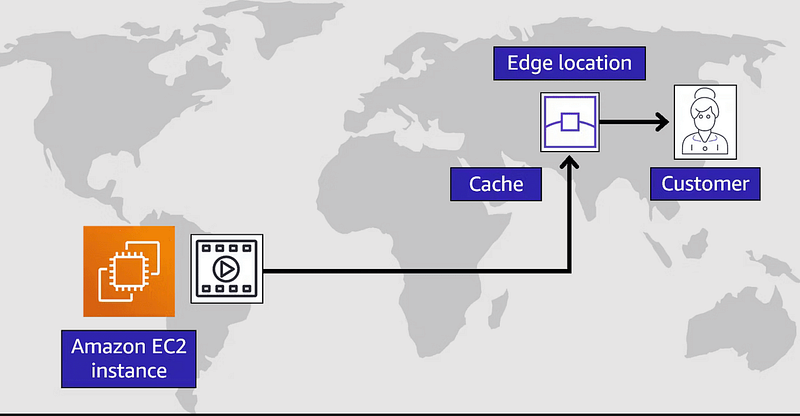
- CloudFront caches images, videos, or APIs at Edge locations (AWS’s global network).
- Instead of fetching from a distant Region, users get data from the nearest edge.
Think “mini AWS data centres placed closer to users”.
Example — Caching Memes with CloudFront
{
 "CallerReference": "unique-string",
 "Comment": "My meme CDN",
 "DefaultCacheBehavior": {
 "TargetOriginId": "myS3BucketOrigin",
 "ViewerProtocolPolicy": "redirect-to-https",
 "AllowedMethods": ["GET", "HEAD"],
 "ForwardedValues": {"QueryString": false},
 "MinTTL": 3600
 },
 "Origins": [
 {
 "Id": "myS3BucketOrigin",
 "DomainName": "my-meme-bucket.s3.amazonaws.com",
 "S3OriginConfig": {}
 }
 ],
 "Enabled": true
}
Now your users in India won’t wait 5 seconds to load a meme hosted in the US.
Real-World Scenario
Netflix uses CDNs heavily. Without them, streaming would be unbearably slow in regions far from main servers.
When to Use It?
✅ Static assets (images, videos, CSS, JS)
✅ Global apps with latency-sensitive content
Pro Tip for Mid-Level Devs
- Combine CloudFront + Lambda@Edge to run small functions at edge locations (e.g., personalising content based on user’s location).
5. Outposts — AWS in Your Data Centre
Sometimes, even CloudFront and Multi-Region aren’t enough. You might need ultra-low latency or have compliance requirements forcing you to keep data on-premises.
This is where AWS Outposts comes in.
How It Works
AWS ships racks to your data center running AWS services locally.
✅ Same AWS APIs & tools
✅ Perfect for financial trading, healthcare, or manufacturing
Real-World Scenario
A hospital can process sensitive patient data on-prem with Outposts while syncing non-sensitive analytics to AWS.
6. Key AWS Global Infrastructure Concepts (Simplified)
Let’s quickly define three key terms:
- High Availability — Your app survives failures without downtime.
- Agility — You can roll out new features fast (spin up servers, deploy updates quickly).
- Elasticity — AWS automatically scales resources based on demand.
If you’re new, focus on high availability first — no amount of agility helps if your app keeps crashing.
7. Quick Recap & Actionable Tips
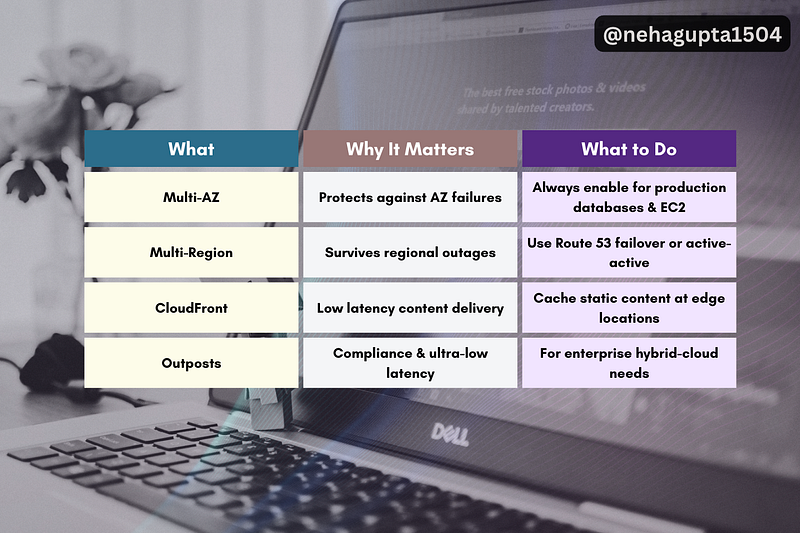
Conclusion — Start Small, Scale Smart
You don’t need to build a Netflix-level Multi-Region architecture on day one.
Start with Multi-AZ, then add CloudFront as your user base grows.
Once you’re comfortable, experiment with Route 53 failover or even Outposts if your use case demands it.
Your Turn
👉 Which one will you try first: Multi-AZ, Multi-Region, or CloudFront?
If this blog helped you, let me know in the comments…
Your words might seem small, but they’re the reason I keep writing more🤗
At Dev Simplified, We Value Your Feedback 📊
👉 Follow us to not miss any updates.
👉 Have any suggestions? Let us know in the comments!