Part 10: “It Works on My Machine!” — How Containers (and AWS) Fix This Developer Nightmare
Day 10 of AWS cloud essentials — From beginners to advanced
Have you ever faced the issue “Where your code works perfectly on your machine/laptop but breaks in production or other environments?”
Maybe you’ve heard (or said) the classic dev excuse: “But it works on my machine!”

Well, containers are here to save you from that headache — and AWS makes running them at scale surprisingly easy.
Let’s break it down in a simple, no-jargon way first, and then we’ll go deeper for those who want to know how the magic works.
The Problem: Why Does Code Break Outside Your Laptop?
Different environments = different problems.
- Your laptop has Node.js v16, production has v18.
- You installed some libraries globally; staging doesn’t.
- Local config works with SQLite; production uses PostgreSQL.
Result?
- Deployments fail
- Debugging takes forever
and you pull all-nighters fixing “environment issues” instead of writing actual features or sleeping.
The Solution: Containers to the Rescue
What Are Containers? (Quick Version)
Think of a container as a lunchbox for your app.
You pack everything inside — your code, runtime, dependencies, even config. Wherever you run that lunchbox, it behaves the same.
You must have heard of kitchen example too, where you have all your materials and then you can go anywhere and cook your delicious dish.
✅ Works on your laptop?
✅ Works on staging?
✅ Works on production?
Same lunchbox, same result.
In technical terms, containers:
- Package your app and dependencies into one portable unit.
- Run in isolated environments, so no conflicts with other apps.
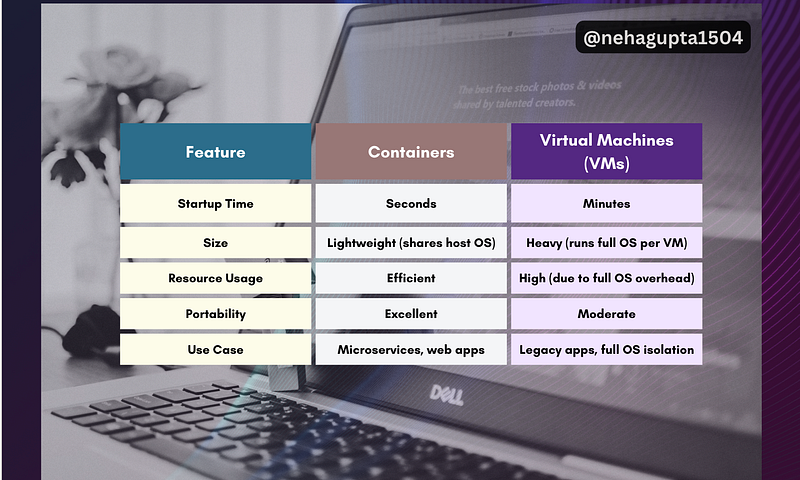
- Are lightweight (unlike bulky virtual machines).
Containers vs Virtual Machines (VMs)
Running Containers on AWS — The Big Picture
So, you’ve packaged your app in a container. But where do you run it? And how do you manage hundreds of them when traffic spikes?
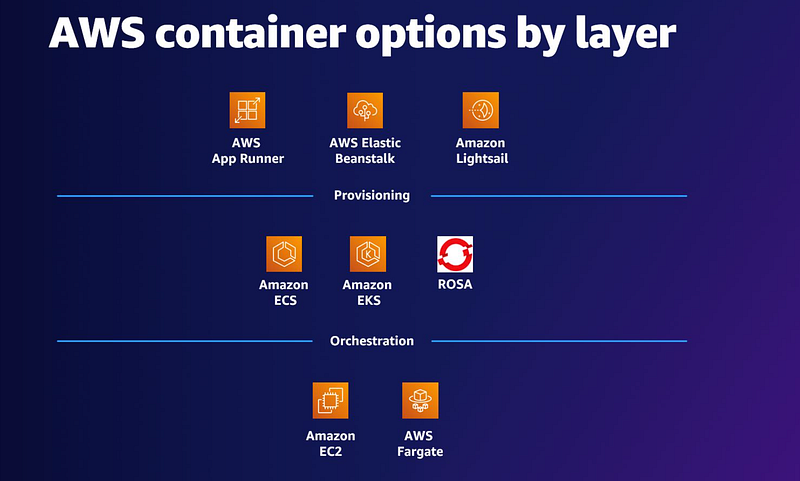
On AWS, the container workflow looks like this:
- Store container images → Amazon ECR
- Run & manage containers → ECS or EKS (orchestration)
- Choose your compute → EC2 (manual) or Fargate (serverless)
Let’s break each piece.
1. Storing Container Images: Amazon ECR
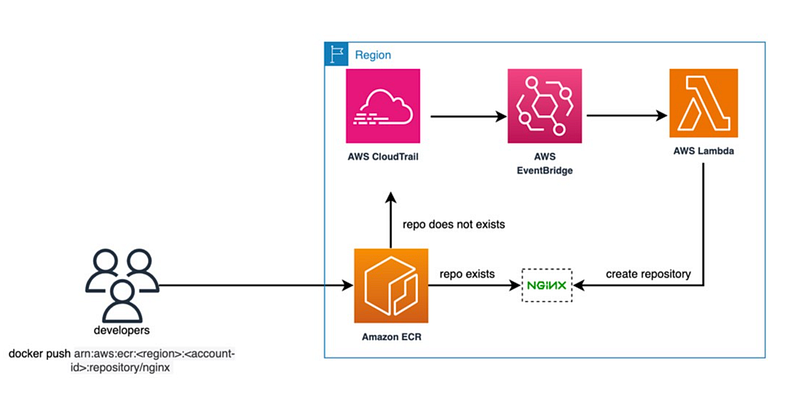
Think of Amazon Elastic Container Registry (ECR) as GitHub for your container images.
- You push your built container image to ECR.
- AWS orchestration services (ECS/EKS) pull it whenever they need to run it.
Quick Example:
# Authenticate with ECR
aws ecr get-login-password --region us-east-1 | \
docker login --username AWS --password-stdin <account-id>.dkr.ecr.us-east-1.amazonaws.com
# Build and push your container
docker build -t myapp .
docker tag myapp:latest <account-id>.dkr.ecr.us-east-1.amazonaws.com/myapp:latest
docker push <account-id>.dkr.ecr.us-east-1.amazonaws.com/myapp:latest
Now your container is securely stored and ready for deployment.
2. Orchestrating Containers: ECS vs EKS
Running one or two containers? Easy.
Running hundreds across multiple servers that scale automatically? That’s hard — unless you use orchestration.
AWS gives you two options:
✅ Amazon ECS (Elastic Container Service) — AWS-Managed Simplicity
- Perfect if you want AWS to handle most of the heavy lifting.
- You define basic settings (container image, CPU/memory, scaling rules).
- AWS places containers on servers, restarts failed ones, and scales automatically.
Think of it as:
“I trust AWS to run my containers. Just tell me how many and when to scale.”
When to use ECS?
- Small to medium apps.
- Teams without Kubernetes expertise.
- Prefer tight AWS integration.
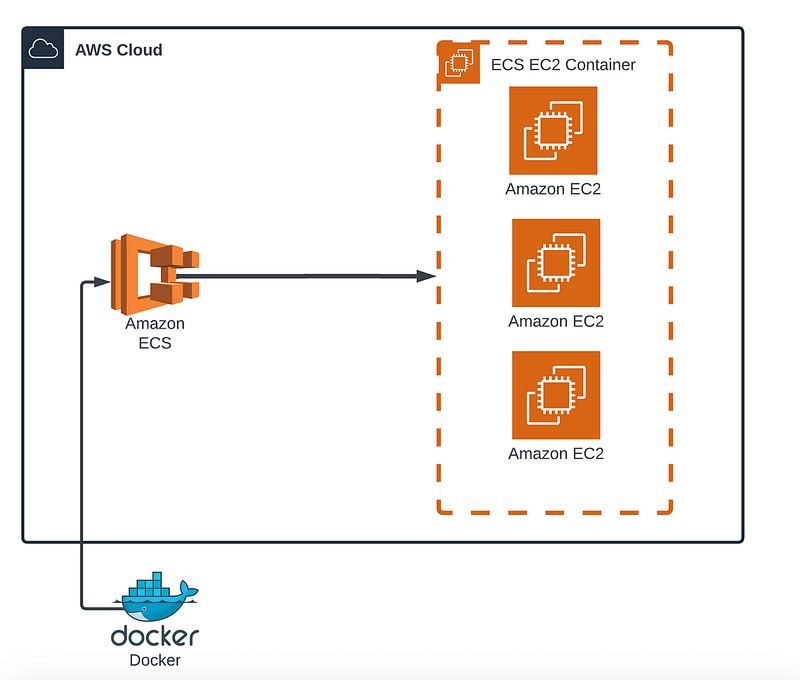
✅ Amazon EKS (Elastic Kubernetes Service) — Kubernetes Power
- For devs who want Kubernetes flexibility but don’t want to manage Kubernetes from scratch.
- Perfect for hybrid/multi-cloud or complex workloads.
Think of it as:
“I want full control and Kubernetes’ power, but AWS can manage the cluster for me.”
When to use EKS?
- Large-scale, enterprise apps.
- Already using Kubernetes elsewhere.
- Need custom networking or multi-cloud setups.
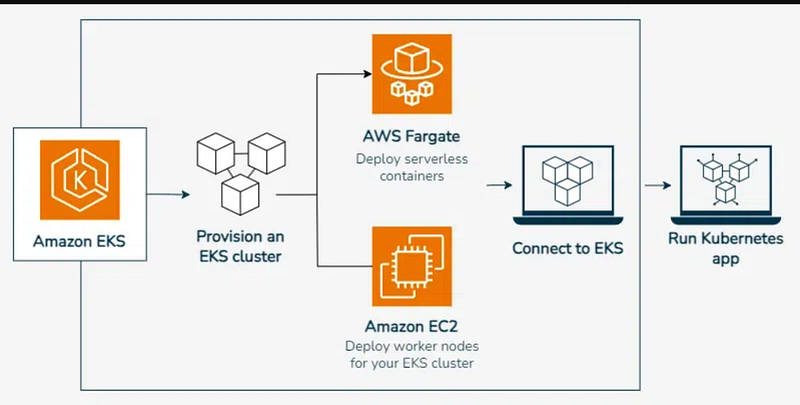
3. Compute Options: EC2 vs Fargate
Where do these containers actually run?
Option 1 — EC2 (Manual Control)
- You run containers on EC2 instances (virtual machines).
- You manage the infrastructure, patch servers, and scale manually.
- Best if you need specific hardware or OS tweaks.
Option 2 — Fargate (Serverless Simplicity)
- No servers to manage.
- You only define container CPU & memory. AWS handles scaling.
- Pay only for running containers.
Think of Fargate as “containers-as-a-service” — you focus on the app, AWS handles the servers.
Putting It All Together (A Real-World Example)
Scenario:
You’re building a small e-commerce app. Traffic is unpredictable (sale days spike massively). You don’t want to babysit servers.
Here’s What You Do:
- Package the app in a container
- Example:
Dockerfilewith Node.js + dependencies.
2. Push to ECR
- Your secure container registry.
3. Pick Orchestration
- ECS (since you want simplicity, not full Kubernetes complexity).
4. Choose Compute
- Fargate (serverless, auto-scales when sale traffic surges).
Now, when Black Friday hits, AWS automatically spins up more containers, handles failures, and scales down when traffic cools.
Quick Tips & Pro Insights
✅ For Beginners
- Start with ECS + Fargate — simplest way to get started.
- Learn Docker basics before diving into AWS orchestration.
✅ For Experienced Devs
- Use EKS if you need custom networking, hybrid deployments, or already use Kubernetes elsewhere.
- Combine CloudWatch + ECS events to auto-heal or alert on container failures.
- Optimise costs by setting right-sized CPU/memory in Fargate (over-provisioning = $$$ burn).
✅ Debugging Tip
When containers fail, check logs directly:
aws logs get-log-events --log-group-name /ecs/my-app \
--log-stream-name ecs/my-app/123456
Conclusion — Focus on Building, Not Babysitting Servers
Containers remove the infamous “works on my machine” problem. AWS makes running them at scale almost boringly easy (and that’s a good thing).
If you’re just starting: ECS + Fargate + ECR is your best combo.
If you’re scaling big: Consider EKS with EC2 for full control.
So, here’s my question for you:
👉 Are you still manually managing servers, or is it time to let AWS handle the boring stuff while you ship features faster?
Complete Series link
If you want to go through the complete series of AWS cloud essentials, You can read it here.
At Dev Simplified, We Value Your Feedback 📊
👉 Follow us to not miss any updates.
👉 Have any suggestions? Let us know in the comments!