How We Went From 4-Second Queries to 40ms Without Buying a Single New Server
The two boring, well-known database techniques that fixed our slow checkout page — indexing and read replicas, explained step by step.
How We Went From 4-Second Queries to 40ms Without Buying a Single New Server
A few months back, our checkout page started timing out.
Nothing new had launched. Traffic hadn’t spiked. The database was just slow. CPU maxed out. Queries that used to take milliseconds were taking seconds.
We didn’t buy a bigger server. We fixed two things: how we search for data (indexing), and how we spread out the load (read replicas). Both are old ideas, well documented, not flashy. But most “database is slow” problems come down to one of these two.
Below is each concept, one at a time, with plain language, diagrams, and real code.
Quick question before we start — has a query that always worked fine suddenly started timing out on you? Curious how common this is.
Learning Objectives
By the end of this, you’ll understand:
What database indexing is and why it matters
How to spot a slow query and fix it with an index
The over-indexing trap
What database replication is
Primary vs read replica
Why read scaling matters
How data flows from primary to replica
Synchronous vs asynchronous replication
Replication lag
Read/write splitting in Node.js
Real-world examples of when this is used
Best practices
Part 1: Indexing
1. What database indexing is and why it matters
Think of a textbook with 500 pages and no index at the back. Someone asks you to find every mention of “mitochondria.” You’d flip through every single page, start to finish, checking each one.
That’s what a database does without an index. It’s called a sequential scan — it reads every row in the table, one by one, to find what matches your query. On a table with a hundred rows, that’s instant. On a table with five million rows, that’s the difference between milliseconds and seconds.
Now imagine the same book with an index at the back. You flip to “M,” see “mitochondria — page 45, 112,” and go straight there. No flipping through the other 498 pages. That’s what a database index does.
Most relational databases use a structure called a B-tree for this. A B-tree keeps values sorted in a tree shape, so instead of checking every row, the database can narrow down the search step by step — similar to how you’d find a word in a dictionary by jumping to the right section instead of reading page one first.
Indexes aren’t only for single columns either. You can index a combination of columns together — called a composite index — if your queries usually filter by more than one field at once:
CREATE INDEX idx_orders_customer_status ON orders(customer_id, status);This helps a query like WHERE customer_id = 123 AND status = 'shipped' far more than two separate single-column indexes would.
2. Spotting a Slow Query and Fixing It
Say we have an orders table with 5 million rows, and this query runs constantly on our checkout and order-history pages:
SELECT * FROM orders WHERE customer_id = 48213;Instead of guessing whether it’s slow, we can ask Postgres directly what it’s doing:
sql
EXPLAIN ANALYZE
SELECT * FROM orders WHERE customer_id = 48213;
EXPLAIN ANALYZE doesn't just run the query — it shows you the exact plan the database used, and how long each step actually took. Before we had an index, the output looked like this:
Seq Scan on orders  (cost=0.00..98234.00 rows=12 width=64)
  Filter: (customer_id = 48213)
Execution Time: 3842.671 ms
“Seq Scan” is the key phrase to watch for. It means Postgres is reading the whole table, row by row, to find the 12 rows that match. Almost 4 seconds, just to fetch one customer’s orders.
Now we add the index:
CREATE INDEX idx_orders_customer_id ON orders(customer_id);Same query, run again:
Index Scan using idx_orders_customer_id on orders  (cost=0.43..8.45 rows=12 width=64)
  Index Cond: (customer_id = 48213)
Execution Time: 0.041 ms
“Index Scan” instead of “Seq Scan.” 40 milliseconds instead of 3.8 seconds. One line of SQL, and the query became close to 100 times faster.
This is usually the very first thing worth checking when a query feels slow — before touching infrastructure, before adding caching, before anything else.
3. The Over-Indexing Trap
Once you see a fix like that, the instinct is to add indexes everywhere. That instinct is wrong, and it’s a mistake I made early on.
Here’s why: An index isn’t free.
Every time you INSERT a new row or UPDATE an existing one, the database has to update every index on that table too, not just the table itself. So a table with 10 indexes means every write does 11 pieces of work instead of one. More indexes also means more disk space used, since an index is essentially a second copy of that column's data, kept sorted for fast lookup.
What happens when you index something which is rarely used?
I once added an index on a logs table that got thousands of writes per minute but was rarely queried. Reads didn't get noticeably faster, since almost nobody was searching that table — but writes slowed down measurably, because every single insert now had extra index bookkeeping to do. That index gave us cost without benefit.
How to find out what to index?
A simple rule that’s served me well: index columns that actually show up in your WHERE, JOIN, or ORDER BY clauses frequently — not every column that might be useful someday.
Check with EXPLAIN ANALYZE before assuming an index will help, and check again after adding one to confirm the database is actually using it. Sometimes it won't, especially on small tables, and that's fine too.
Part 2: Read Replicas
Indexing made individual queries cheaper. It didn’t fix the real problem — too many queries hitting one single server.
4. What is Database replication?
Replication means keeping live copies of your database on other servers. One server, the primary, handles all writes (INSERT, UPDATE, DELETE). One or more other servers, the replicas, copy those changes and handle read-only queries (SELECT).
Most apps see traffic like this:
1000 requests
   ↓
950 reads   (search, profile views, browsing)
   ↓
50 writes   (checkout, sign-up, settings update)
Most traffic is reads. So why make reads compete with writes on the same server?
Instead of one server doing everything, you now have one server dedicated to writes, and as many servers as you need dedicated to reads. That’s the entire idea. It sounds simple because it is — the complexity is mostly in the details, which we’ll get into below.
5. Primary vs Read Replica
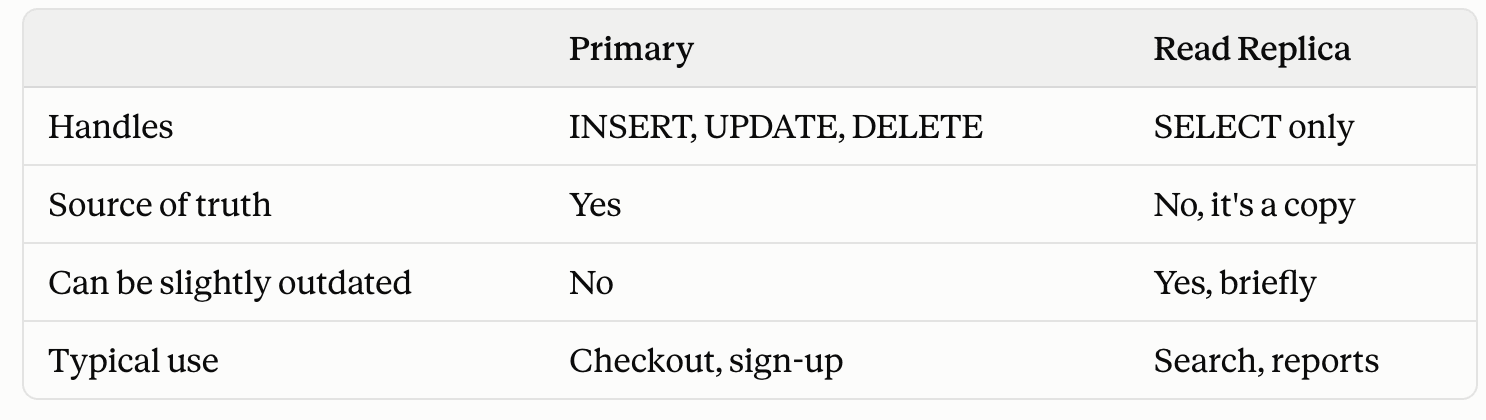
Primary vs Read Replica
Your application code needs to know the difference too. Writes must always go to the primary — replicas typically won’t even accept a write, and even if they technically could, allowing it would break the whole model. Reads, on the other hand, can go to whichever replica is available and has the least load.
6. Why read scaling matters
As we have already seen most traffic on the server are of reads, so why not spread read across multiple replica and free th primary server to focus on writes, and no single server is doing all the work.
1000 requests
   ↓
950 reads   (search, profile views, browsing)
   ↓
50 writes   (checkout, sign-up, settings update)
7. How data moves from primary to replica
In Postgres, every change is first written to a Write-Ahead Log (WAL). Replicas read this log and replay it to stay in sync.
Client writes an order
      ↓
Primary writes to WAL
      ↓
WAL streams to Replica
      ↓
Replica replays the log
      ↓
Replica matches Primary
MySQL does the same thing, just calls it a binlog.
8. Synchronous vs Asynchronous replication
Synchronous: primary waits for the replica to confirm before telling the app “success.”
App → Primary: update
Primary → Replica: here's the change
Replica → Primary: confirmed
Primary → App: success
Strong consistency, but every write is only as fast as your slowest replica.
Asynchronous: primary doesn’t wait.
App → Primary: update
Primary → App: success (right away)
Primary → Replica: change sent in background
Writes are fast, but there’s a short window where the replica has old data.
9. Replication lag
A user updates their profile photo, refreshes, and sees the old one. Did the save fail? No — the write succeeded on the primary, but the page read from a replica that hadn’t caught up yet.
That short delay is replication lag. Usually milliseconds to a couple seconds.
The fix: right after a user writes something, read it back from the primary, not a replica. For anything else — browsing, search, someone else’s data — a replica is fine.
10. Read/Write splitting in Node.js
Here’s a simple version using pg with two connection pools:
const { Pool } = require('pg');
// Handles all writes
const primaryPool = new Pool({
  host: process.env.DB_PRIMARY_HOST,
  database: 'shop',
});
// Handles read-only traffic
const replicaPool = new Pool({
  host: process.env.DB_REPLICA_HOST,
  database: 'shop',
});
// Reads go to the replica
async function getOrderHistory(customerId) {
  const result = await replicaPool.query(
    'SELECT * FROM orders WHERE customer_id = $1',
    [customerId]
  );
  return result.rows;
}
// Writes go to the primary
async function placeOrder(customerId, items) {
  const result = await primaryPool.query(
    'INSERT INTO orders (customer_id, items) VALUES ($1, $2) RETURNING *',
    [customerId, JSON.stringify(items)]
  );
  return result.rows[0];
}
// Right after a write, read it back from primary - not the replica
async function placeOrderAndConfirm(customerId, items) {
  const order = await placeOrder(customerId, items);
  const confirmed = await primaryPool.query(
    'SELECT * FROM orders WHERE id = $1',
    [order.id]
  );
  return confirmed.rows[0];
}
That’s the whole pattern: writes to primary, reads to replica, and reads right after a write also go to primary.
11. Where this pattern shows up
I’m using these as examples of how this idea is generally applied — not describing how these companies are actually built internally.
E-commerce: placing an order and updating inventory are writes — primary. Product search and recommendations are reads — replica.
Streaming apps: updating watch progress is a write. Browsing the catalog or trending shows is a read.
Ride-hailing: booking a ride is a write. Trip history is a read.
Banking: money transfers always go to primary — staleness here isn’t just annoying, it’s risky. Viewing exchange rates or old statements is fine on a replica.
Simple rule: if stale data is dangerous or confusing, use primary. If stale data is harmless, use a replica.
Managed services like Amazon Aurora simplify this further — one writer, multiple readers, and it distributes read traffic automatically.
12. Best Practices
Never send writes to a replica
Run
EXPLAIN ANALYZEbefore adding an indexDon’t index every column — only what you actually query on
Monitor replication lag (
pg_stat_replicationin Postgres shows this)Read a user’s own write from the primary, not a replica
Use connection pooling instead of opening a new connection per request
Spread replicas across different availability zones
Closing Thoughts
If you’re building something small, you probably don’t need read replicas yet. Start with indexing — it solves most “why is my database slow” problems on its own.
Replication becomes worth it when the issue isn’t one slow query anymore, but too many queries hitting one server at once.
Two old, simple ideas — make each query cheap, and don’t make one server do everything — solved most of what was slowing us down.
Where’s your database at right now? Curious what’s actually breaking for people reading this.