CDN Explained: The System Design Concept Every Developer Should Understand
How edge servers, caching, and intelligent routing make websites faster, reduce backend load, and protect applications.

CDN Explained: The System Design Concept Every Developer Should Understand
Imagine you’re sitting in a system design interview.
The interviewer asks you a simple question:
“You have a website hosted on a server in India. Now, users from the US, Europe, and Australia start visiting it. How would you make the website faster for everyone?”
What’s your first thought?
Maybe you’d upgrade the server, add more backend instances, or optimize your JavaScript code.
Those solutions might help. But there’s another problem you need to consider: the distance between your server and your users.
Even if your server responds quickly, the request and response still need to travel across networks. And that takes time.
So, how do companies like Netflix, Amazon, and other large websites deliver content to users across the world without sending every request to one central server?
One important part of the answer is a CDN.
Let’s understand how it works, why developers use it, and what actually happens when someone opens a website.
1. First, What Is a CDN?
CDN stands for Content Delivery Network.
In simple words, a CDN is a network of servers distributed across different geographical locations. These servers help deliver website content to users from locations closer to them.
But let’s understand this with a real-world example.
Imagine you own a company that sells products online.
Initially, you have one warehouse in India. Whenever a customer orders something, you ship the product from that warehouse.
Now imagine customers start ordering from the US, Europe, and Australia.
Every product still has to travel from India. Delivery takes longer, and your central warehouse has to handle every order.
What could you do?
You could open smaller warehouses in different countries and keep copies of your most popular products there.
Now customers can receive frequently ordered products from a nearby warehouse instead of waiting for a shipment from India.
A CDN works on a similar principle, but instead of physical products, it delivers digital content.
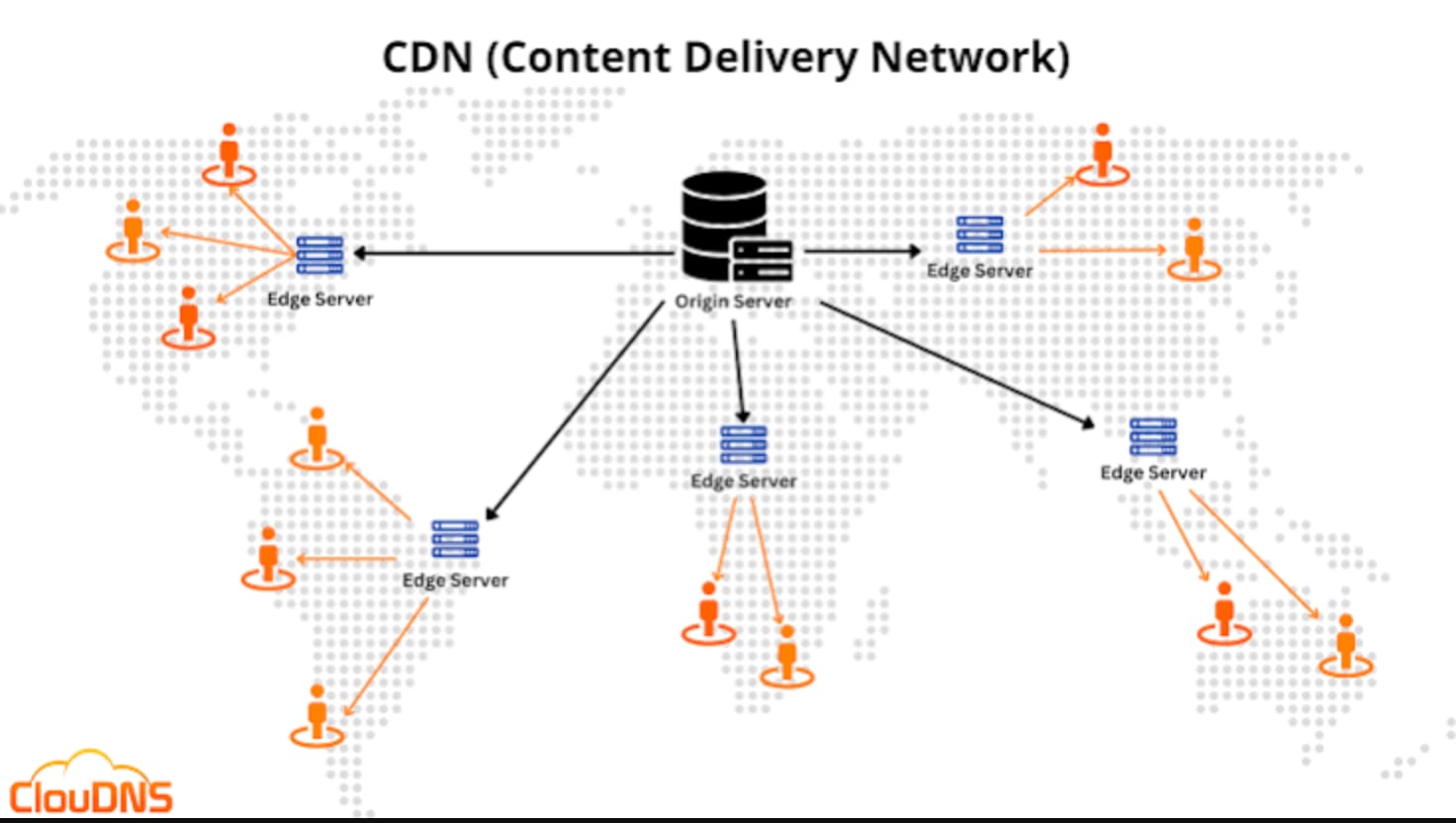
Image By CloudDNS
This content can include:
Images and videos
JavaScript and CSS files
Fonts and other static assets
Certain API responses, when caching is appropriate
Instead of every user downloading the same image from your origin server, a CDN can serve a cached copy from a nearby location.
That’s the basic idea.
2. Why Does Distance Matter in System Design?
Let’s say your application is hosted on a server in Mumbai.
A user in Mumbai requests an image. Another user requests the same image from California.
Both users request the same file, but their experiences might be different.
Why?
Because data travels through networks, and network latency depends on more than just how quickly your server processes a request.
The request has to travel from the user to the server, and the response has to travel back.
The farther apart the endpoints are, the more network latency can become a problem.
For example, imagine the following simplified situation:
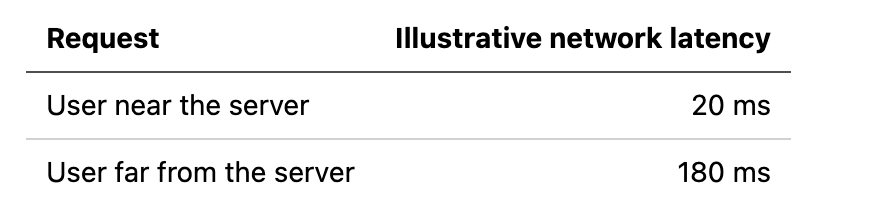
Request vs network Latency
These numbers are hypothetical, not measurements from a real application.
Now imagine a page needs 30 images, several JavaScript files, and multiple API responses.
If those requests involve network round trips, latency can add up. Actual page loading time depends on browser caching, parallel requests, connection reuse, server processing, and many other factors.
Upgrading your server might improve processing time, but it doesn’t automatically solve the distance problem.
This is where a CDN becomes useful.
Instead of making every user communicate with your origin server for every static asset, you can distribute copies of those assets across multiple locations.
The user can then retrieve the content from a nearby CDN edge server.
3. How Does a CDN Actually Work?
To understand a CDN, you need to know three terms.
Origin server: The original server where your website’s content comes from.
2. Point of Presence (PoP): A physical location where a CDN has deployed networking infrastructure and servers.
3. Edge server: A server at or near a PoP that can handle user requests and serve cached content.
Modern CDNs operate infrastructure across many locations around the world.
When a user requests content, the CDN routes the request to an appropriate edge location.
Let’s walk through an example.
Suppose your website has a product image: https://techbynehagupta.com/images/image-1.jpg
A user in the US requests this image.
Scenario A: The CDN already has the image
The edge server checks its cache and finds a valid copy of the image.
It returns the image directly to the user.
This is called a cache hit.
The CDN doesn’t need to fetch the image from your origin server for that request.
Scenario B: The CDN doesn’t have the image
The edge server checks its cache but cannot find a valid copy.
It requests the image from the origin server. Depending on the CDN’s caching configuration and the origin’s response headers, the CDN may store a copy for future requests.
It then returns the image to the user.
This is called a cache miss.
Here’s the simplified flow:
              User requests an image
                         |
                         v
                  CDN Edge Server
                         |
                  Is it cached?
                    /        \
                  Yes         No
                   |           |
                   v           v
             Return image   Fetch from origin
                   |           |
                   |       Cache if allowed
                   |           |
                   v           v
                 User <--- Return image
The first request might still need to reach the origin. But subsequent requests can often be served from the edge cache.
This reduces repeated work for your origin server.
And here’s an important detail: not every cache miss results in the content being stored. Caching depends on the CDN configuration, cache headers, content type, request method, and other rules.
4. How Does the CDN Know Which Server to Use?
You might be wondering something.
If a CDN has servers in hundreds of locations, how does a user reach the appropriate one?
Two common approaches are DNS-based routing and Anycast.
DNS-based routing
DNS translates a domain name into an IP address.
With DNS-based CDN routing, the CDN’s DNS infrastructure can return an address associated with an appropriate edge location based on factors such as the user’s location, network conditions, and the CDN’s configuration.
For example:
User in India
      |
      v
CDN DNS lookup
      |
      v
Appropriate edge location in India
A user in another region might be directed to a different location.
However, DNS resolution doesn’t always select the geographically closest server. DNS caching, resolver location, network conditions, and routing policies can influence the result.
Anycast
Anycast is another way to route traffic.
With Anycast, the same IP address is announced from multiple locations. Internet routing directs traffic toward a location according to routing decisions and network topology.
A simplified illustration:
                 Same IP address
                       |
              +--------+--------+
              |        |        |
           Location A Location B Location C
              ^        ^        ^
              |        |        |
            User A   User B   User C
Different users may reach different locations even though they connect to the same IP address.
Anycast is particularly useful for distributing traffic across a large network, including during certain types of attacks.
The key takeaway is that DNS-based routing and Anycast are different techniques, and CDNs may use one or both as part of their infrastructure.
5. How Developers Can Use a CDN
Let’s move away from theory and look at something familiar: a frontend application.
Imagine you’re building an e-commerce website.
Your frontend contains files like these:
index.html
app.js
styles.css
logo.png
product-image.webp
Every time a user visits the website, the browser may need to download these assets.
Without a CDN, those requests might go directly to your origin server.
With a CDN, you can configure your application to serve suitable static assets through a CDN hostname.
For example:
const script = document.createElement("script");
script.src =
  "https://cdn.example.com/assets/app.a82f31.js";
document.head.appendChild(script);
Here, cdn.example.com represents a CDN endpoint configured for your application.
When the browser requests the JavaScript file, the CDN can return a cached copy if one is available and valid. Otherwise, it may fetch the file from the origin.
You don’t have to change your entire application architecture to benefit from a CDN. Often, you can start with static files such as images, stylesheets, JavaScript bundles, and fonts.
Of course, the CDN must be configured correctly, and the assets must be accessible through that endpoint.
What about image optimization?
Some CDNs also provide image optimization.
For example, suppose your website stores a large image in JPEG format.
A CDN with image optimization capabilities might deliver a WebP or AVIF version to a compatible browser.
It may also resize the image according to the requested dimensions.
Similarly, some CDN platforms offer JavaScript and CSS optimization features.
These features depend on the provider and configuration. A CDN doesn’t automatically minify every JavaScript bundle or optimize every image.
But when configured properly, these optimizations can reduce the amount of data the browser downloads.
6. Understanding HTTP Cache-Control Headers
Now comes a practical concept that every web developer should understand: Cache-Control.
A CDN needs to know whether content can be cached and for how long.
HTTP response headers can provide caching instructions.
For example, imagine your application generates a versioned JavaScript file: app.a82f31.js
The server could return this response header:
HTTP/1.1 200 OK
Content-Type: application/javascript
Cache-Control: public, max-age=31536000, immutable
Let’s break it down.
public
The response can be stored by shared caches, such as CDN caches, subject to the applicable caching rules.
max-age=31536000
The response is considered fresh for 31,536,000 seconds, which is one year.
immutable
The content isn’t expected to change while it remains fresh.
Why would you cache a JavaScript file for an entire year?
Because the filename contains a version identifier.
When you change the JavaScript code, your build process can generate a new filename, such as app.b93c72.js.
The browser then requests the new file instead of reusing the old one.
This technique is called content fingerprinting or asset versioning.
It lets you cache static assets for a long time without serving old versions after a new deployment, assuming your build and deployment process handles filenames correctly.
Should you cache every API response?
Absolutely not.
Consider these two requests:
GET /images/company-logo.png
GET /api/account/balance
The company logo is generally the same for every user.
An account balance is different for each user and can change frequently.
Caching a public logo is usually straightforward.
Caching a user’s account balance in a shared cache can expose private information if the response is configured incorrectly.
For personalized or sensitive data, you need a deliberate caching policy. Responses may need private or no-store, depending on the requirements.
For example:
Cache-Control: private, no-storeThis tells compliant caches not to store the response.
Also remember that browser caching and CDN caching are not the same thing. They are separate caching layers, and their behavior depends on the response headers and CDN configuration.
7. Why Do Some Applications Send Dynamic Requests Through a CDN?
At this point, you might be thinking:
“If my API response cannot be cached, why should the request go through a CDN at all?”
That’s a reasonable question.
Caching is only one of the things a modern CDN can do.
Other capabilities can include TLS termination, traffic routing, request filtering, and protection against certain attacks.
TLS termination
When you visit an HTTPS website, your browser establishes an encrypted connection using TLS.
Establishing a new connection can involve network round trips, especially when a new TCP connection is needed.
A CDN can terminate the user’s TLS connection at an edge location, rather than requiring the user’s connection to terminate directly at the origin server.
This can reduce the network distance involved in establishing the client-facing connection.
The CDN may then communicate with the origin over a separate connection.
However, the CDN-to-origin connection also needs appropriate security configuration. TLS termination at the edge doesn’t mean that every connection between the CDN and origin is automatically encrypted.
And it doesn’t eliminate all latency: the request might still need to travel from the edge to the origin to retrieve dynamic data.
DDoS protection
A Distributed Denial of Service (DDoS) attack attempts to overwhelm a service by sending a large volume of traffic or requests.
A CDN with a large, distributed network can help absorb and distribute traffic across its infrastructure. It may also filter malicious traffic before it reaches the origin.
This makes it harder for some attacks to overwhelm a single origin server.
But a CDN isn’t a guarantee against every attack. Application-level attacks, misconfigurations, and attacks that bypass the CDN may require additional protection.
Improved availability
Imagine your origin server becomes temporarily unavailable.
If a CDN has valid cached copies of certain files, it may continue serving those files even while the origin is having problems.
For example, users might still be able to load a cached logo, stylesheet, or image.
Whether this works depends on the CDN’s configuration and its stale-content serving policies.
Dynamic requests that require the origin may still fail.
This is why a CDN can improve resilience, but it shouldn’t be treated as a complete replacement for origin redundancy, database availability, or proper disaster recovery.
8. CDN vs Reverse Proxy vs Load Balancer
These three concepts often appear together in system design interviews, but they serve different primary purposes.

CDN vs Reverse Proxy vs Load Balancer
A CDN edge server often behaves like a reverse proxy and can include load-balancing capabilities.
So these concepts aren’t necessarily competing technologies. They can work together in the same architecture.
For example:
                 Users
                   |
                   v
                  CDN
                   |
                   v
           Load Balancer
                   |
             +-----+-----+
             |     |     |
             v     v     v
           API 1  API 2  API 3
In this simplified architecture, the CDN handles edge delivery and other configured edge services. Requests that need the backend are forwarded to the load balancer, which distributes them across the application instances.
Static assets might never reach the load balancer at all if the CDN can serve them from cache.
9. What Are the Limitations of a CDN?
CDNs provide several benefits, but they also introduce some challenges.
1. Cache invalidation
Imagine you update the company logo, but users continue seeing the old one.
Why?
Because the CDN might still have the previous version cached.
You can solve this with cache purging, appropriate TTLs, or versioned filenames.
For static assets, versioned filenames are often easier to manage than repeatedly clearing caches.
2. Cache misses
If the CDN doesn’t have a valid cached copy, it may need to fetch the content from the origin.
If many requests arrive at once for uncached content, the origin could still experience high traffic.
Some CDNs support request collapsing, origin shielding, and other mechanisms to reduce repeated origin requests.
3. Dynamic and personalized content
Not every response should be cached.
Account details, payment information, and personalized API responses require careful caching policies.
Incorrect cache keys or cache rules can cause one user’s response to be delivered to another user.
Security-sensitive responses deserve special attention.
4. Cost and configuration
CDNs can reduce origin bandwidth and improve performance, but they can also introduce costs, configuration complexity, and dependence on a provider.
You need to consider bandwidth charges, cache hit rates, origin traffic, security requirements, and the complexity of debugging issues across multiple caching layers.
A CDN is a tool, not a substitute for understanding your application’s requirements.
10. When Should You Use a CDN?
Let’s return to the system design interview question from the beginning.
You have a website hosted in India, and users around the world are experiencing slow loading.
Would you immediately add more backend servers?
Not necessarily.
First, understand what is slow.
If the problem is large images, JavaScript bundles, CSS files, or other frequently requested static assets, a CDN may help significantly.
If the problem is slow database queries or inefficient backend processing, a CDN alone won’t solve it.
If your users need personalized API responses, you may still benefit from edge routing, TLS termination, or security features, but those requests might still need to reach the origin.
In a real application, you’d investigate several things:
Where is the latency coming from?
How much of the page consists of static assets?
What is the CDN cache hit ratio?
How much traffic reaches the origin?
Are cache headers configured correctly?
Are dynamic requests or database queries the actual bottleneck?
These questions help you decide where a CDN fits into the architecture.
Conclusion: A CDN Is More Than a Cache
When I think about CDNs from a system design perspective, I don’t see them as just a way to cache images.
I see them as a way to move parts of the delivery process closer to the user.
They can reduce the distance content travels, reduce repeated requests to the origin, optimize supported assets, terminate TLS connections at the edge, and help absorb certain types of attacks.
But the benefits depend on the content you’re serving and how the CDN is configured.
The important lesson is that making a website faster isn’t always about making your server more powerful. Sometimes, it’s about making the server less involved in requests that don’t need to reach it.
The next time you’re designing a web application, ask yourself:
“Does every request really need to reach my origin server?”
That one question can lead you toward better decisions about caching, network architecture, and performance.
I’d love to hear your thoughts: Have you ever configured a CDN for a project? What was the biggest challenge you faced: cache invalidation, debugging stale content, or understanding cache headers?
Share your experience in the comments. Your example might help another developer understand the concept better.
From Tech By Neha Gupta
👏 Enjoyed the article? Don’t forget to leave a clap.
💬 Have thoughts or questions? Share them in the comments.