Everyone’s Talking About AI Agents — But Most Developers Still Don’t Get Them
AI chatbot, workflow, or agent? Here’s the simplest explanation developers actually need — with real examples and practical intuition.

You’ve probably seen this everywhere lately:
“We built an AI agent.”
But then you open the product…
…and it’s just a chatbot with a fancy UI.
Or a hardcoded automation pipeline.
Or worse — a glorified API call wrapped in hype.
Here’s the problem:
Most developers are using the word “AI agent” for anything involving an LLM.
That creates confusion.
Because a chatbot, a workflow, and an agent are three completely different things.
And once you understand the difference, AI systems suddenly start making a lot more sense.
Let’s simplify it.
The Big Confusion Around AI Agents
A lot of developers imagine agents like this:
“An AI that thinks like a human and does everything automatically.”
Not exactly.
The easiest way to understand it is this:
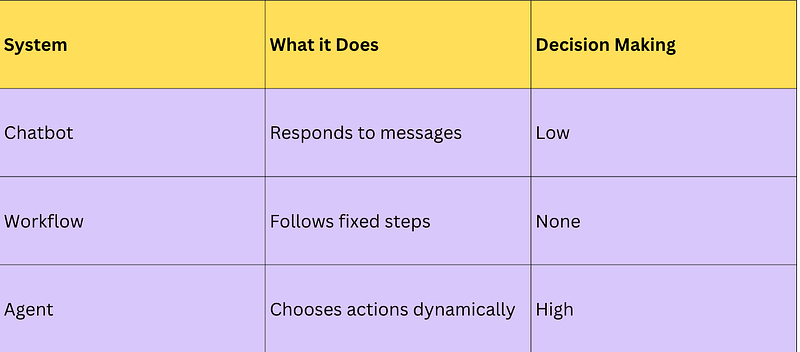
That single distinction changes everything.
Workflow
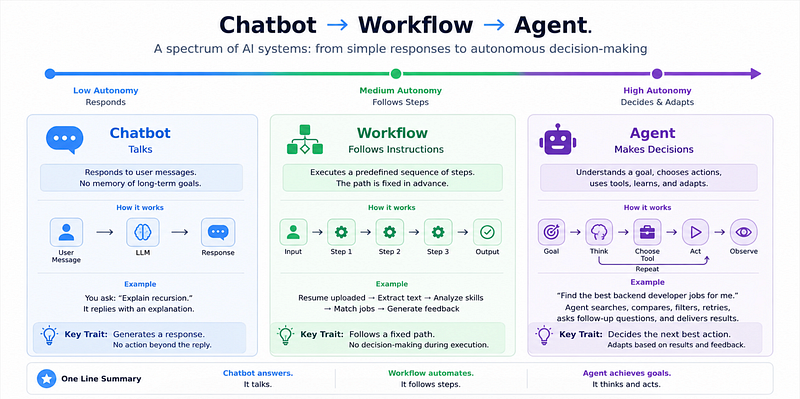
1. What Is an AI Chatbot?
A chatbot is the simplest category.
You ask something.
It replies.
That’s it.
Think of it as:
Input → Response
Example
You ask:
“Explain recursion in JavaScript.”
It answers.
You ask:
“Write a React component.”
It writes one.
But notice something important:
The model is not deciding what to do.
It’s simply generating the next best response.
Simple Chatbot Flow
User Message
 ↓
LLM
 ↓
Response
Example Code (Basic Chatbot)
async function chatbot(prompt) {
 const response = await openai.chat.completions.create({
 model: "gpt-4.1",
 messages: [
 {
 role: "user",
 content: prompt
 }
 ]
 });
 return response.choices[0].message.content;
}
What this does
- Takes user input
- Sends it to an LLM
- Returns a response
What it does NOT do
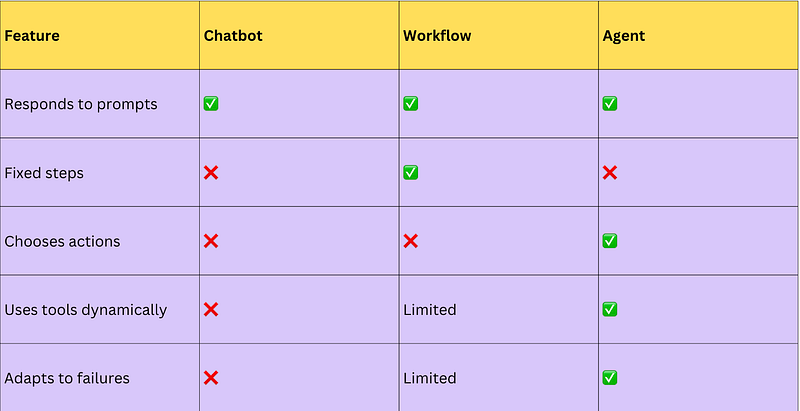
❌ Make decisions
❌ Use tools automatically
❌ Plan tasks
❌ Take multiple actions
That’s why not every LLM app is an agent.
Common Developer Mistake
Many developers think:
“I added memory and chat history, so now it’s an agent.”
Nope.
That’s still just a smarter chatbot.
2. What Is an AI Workflow?
Now let’s level up.
A workflow is automation with predefined steps.
Instead of just responding, the system executes a sequence.
Example:
User uploads resume →
- Extract text
- Analyze skills
- Match jobs
- Generate feedback
The key thing:
The steps are already decided.
The AI is not choosing what happens next.
You are.
Example Workflow Code
async function resumeWorkflow(resume) {
 const extractedText = extractText(resume);
 const skills = await analyzeSkills(extractedText);
 const matchedJobs = await findJobs(skills);
 return generateSuggestions(matchedJobs);
}
Looks smart.
But it’s still not an agent.
Why?
Because the logic is fixed.
No matter what happens:
Step A → Step B → Step C
Always.
Real-World Examples of Workflows
- Resume screening
- Ticket classification
- Customer support routing
- Email summarization
- Automated reporting
These are powerful.
And honestly?
Most businesses don’t even need agents.
A workflow is often enough.
That’s a surprising truth many people miss.
3. What Actually Makes Something an AI Agent?
This is where things get interesting.
An AI agent can decide what to do next.
Instead of following fixed instructions, it:
- Understands the goal
- Makes a plan
- Chooses tools
- Evaluates results
- Adjusts if needed
Think:
Goal → Reasoning → Action → Observation → Retry
Not:
Fixed Step 1 → Step 2 → Step 3
Example Scenario
Imagine this prompt:
“Find the best backend developer jobs for me and summarize the top opportunities.”
A chatbot would say:
“You can check LinkedIn.”
A workflow might:
- Open predefined job sites
- Fetch listings
- Summarize results
But an agent could:
- Decide which sites to search
- Compare relevance
- Retry failed searches
- Filter bad matches
- Ask follow-up questions
That’s the difference.
The system is making decisions.
Beginner-Friendly Agent Pseudocode
while (!goalCompleted) {
 const nextAction = decideWhatToDo(context);
 const result = await execute(nextAction);
 context.update(result);
}
Why this matters
The agent can adapt.
If one tool fails?
Try another.
Missing information?
Ask the user.
Bad output?
Retry.
That flexibility is what makes an agent feel “intelligent.”
The Easiest Way to Remember This
Here’s the simplest mental model:
Chatbot = Talks
Question → AnswerWorkflow = Follows Instructions
Step 1 → Step 2 → Step 3Agent = Makes Decisions
Goal
 ↓
Think
 ↓
Act
 ↓
Observe
 ↓
Repeat
A Mistake Developers Make When Building “Agents”
Here’s what usually happens:
Developers build this:
Prompt → API Call → OutputThen market it as:
“AI Agent Platform”
But if there’s no planning, no tool selection, and no dynamic decision-making…
…it’s probably just a workflow.
And that’s okay.
Because workflows are easier to debug, cheaper to run, and often more reliable.
Comparison Table
The Surprising Payoff: Most Products Don’t Need Agents
Here’s the counterintuitive insight:
Developers are overusing the word “agent.”
In reality:
- 70% of use cases → workflow
- 20% → chatbot
- 10% → true agent
Why?
Because agents introduce:
- higher cost
- unpredictability
- debugging complexity
- slower execution
Sometimes a boring workflow is the better engineering decision.
That’s not less innovative.
That’s just practical.
Final Takeaway
If you remember only one thing from this article, remember this:
A chatbot responds. A workflow follows steps. An agent makes decisions.
Before building “AI agents,” ask:
Does this system actually need dynamic decision-making?
Because sometimes the smartest solution…
is not an agent at all.