PostgreSQL Internals Explained Pages, Tuples, Indexes, and MVCC
What actually happens when PostgreSQL stores, updates, and finds a row — and why the same row can exist in multiple versions.
You write:
SELECT price
FROM items
WHERE item_id = 100;
It looks almost too simple.
Postgres finds item_id = 100, gets the row, and returns the price.
But what actually happens underneath?
- Where does that row live?
- What exactly is an index pointing to?
- Why does Postgres create another version of a row when you update it?
And if the old version is no longer needed, why doesn’t Postgres immediately delete it?
These questions sound like “database internals” until you start debugging slow queries, database bloat, vacuum problems, or strange behaviour around long-running transactions.
The good news is that we don’t need to understand all of Postgres to build the right mental model.
We only need to understand a few things:
pages → tuples → heap → CTID → indexes → MVCC → vacuum
Let’s build that model from scratch.
First: What does a Postgres table actually look like?
Imagine we create this table:
CREATE TABLE items (
 item_id INT,
 category TEXT,
 price INT
);
Then we insert:
INSERT INTO items VALUES (100, 'electronics', 10);
INSERT INTO items VALUES (200, 'books', 5);
As developers, we think about the table like this:
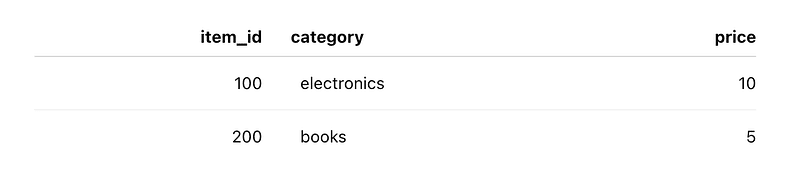
That’s the logical view.
Postgres has a physical representation underneath.
At a high level, a table is stored as a collection of fixed-size pages.
By default, a Postgres page is 8 KB.
You can roughly imagine the table as:
Table file┌────────────┐
│ Page 0 │ 8 KB
├────────────┤
│ Page 1 │ 8 KB
├────────────┤
│ Page 2 │ 8 KB
├────────────┤
│ Page 3 │ 8 KB
├────────────┤
│ ... │
└────────────┘
So instead of thinking:
“My table is a collection of rows.”
For Postgres internals, it’s more useful to think:
“My table is a collection of pages, and those pages contain row versions.”
That small change in mental model makes everything else easier.
What is a page?
A page is simply a fixed-size block of storage.
The default size is:
8 KBPages are numbered:
Page 0
Page 1
Page 2
...
If Postgres needs more space for a table, more pages are allocated.
So if our table grows, we might eventually have:
Page 0 → Page 1 → Page 2 → Page 3 → ...The important part is that Postgres knows which page it needs to access.
This matters because databases are constantly moving data between disk and memory.
Postgres also has a memory area called shared buffers.
Very roughly:
Disk
 │
 │ read page
 ▼
Shared Buffers
 │
 ▼
Postgres works with the data
So when we talk about “reading a row”, underneath that operation Postgres is usually working with a page containing that row.
But where is the row?
This is where the word tuple comes in.
In everyday database conversations, you can think of a tuple as a row.
But there’s an important detail:
A Postgres tuple is really a row version.
That distinction becomes extremely important when we talk about updates.
For now, imagine this tuple:
item_id = 100
category = electronics
price = 10
Postgres stores this tuple inside a page.
But it also needs a way to locate that tuple inside the page.
That’s where the line pointer comes in.
You can simplify the idea like this:
Page 0┌──────────────────────────────┐
│ line pointer 0 ──────────────┼──► tuple
│ line pointer 1 ──────────────┼──► tuple
│ line pointer 2 ──────────────┼──► tuple
│ │
│ actual tuples │
└──────────────────────────────┘
The line pointer tells Postgres where the tuple is located inside that page.
This gives us an important address.
Meet CTID
Postgres exposes something called ctid.
You can see it yourself:
SELECT ctid, item_id, price
FROM items;
You might get something like:
ctid | item_id | price
-------+---------+------
 (0,0) | 100 | 10
 (0,1) | 200 | 5
A CTID looks like:
(page, position)So:
(0,0)roughly means:
Page 0
Line pointer 0
And:
(0,1)means:
Page 0
Line pointer 1
This gives Postgres a very direct way to locate a tuple.
Think of it like a physical address:
CTID
 │
 ├── Page number
 │
 └── Position inside that page
And this is one reason Postgres can locate physical data efficiently.
Now let’s talk about indexes
Suppose we frequently run:
SELECT price
FROM items
WHERE item_id = 100;
We don’t want Postgres to scan every page looking for 100.
So we create an index:
CREATE INDEX idx_items_item_id
ON items(item_id);
At a high level, think of the index as answering:
"Where can I find item_id = 100?"For a typical B-tree index, the structure is a tree that helps Postgres quickly navigate toward the required key.
You don’t need to visualize the entire B-tree yet.
For our mental model, simplify it to:
item_id → CTIDFor example:
100 → (0,0)
200 → (0,1)
So the query becomes roughly:
Index
 │
 ▼
 item_id = 100
 │
 ▼
 CTID (0,0)
 │
 ▼
 Page 0
 │
 ▼
 Tuple
 │
 ▼
 price = 10
This is the key relationship:
The index can help Postgres find the tuple, while the heap contains the actual row data.
What exactly is the heap?
The word “heap” sounds more complicated than it is.
In this context, the heap is the table storage containing the actual tuples.
So you can think:
Index
 │
 │ points toward
 ▼
Heap
 │
 ├── Page 0
 │ ├── Tuple
 │ ├── Tuple
 │ └── ...
 │
 ├── Page 1
 │ ├── Tuple
 │ └── ...
 │
 └── Page 2
 └── ...
So when someone says:
“The index points to the heap.”
That’s the mental model they’re talking about.
Now things get interesting: UPDATE
Suppose our database currently has:
item_id = 100
price = 10
Now we run:
UPDATE items
SET price = 20
WHERE item_id = 100;
A natural assumption is:
“Postgres finds the row and changes10to20."
But that’s not how PostgreSQL’s MVCC model works.
Postgres generally creates a new row version instead of simply overwriting the old tuple in place.
Conceptually:
Before:
(0,0) → item 100, price 10

After UPDATE:
(0,0) → item 100, price 10 old version
(0,2) → item 100, price 20 new version
Now we have two physical tuples representing two versions of what we logically think is the same row.
And this is where PostgreSQL’s concurrency model starts becoming interesting.
Why keep the old version?
Because another transaction might still need it.
Imagine this sequence:
Transaction A
 │
 ├── starts
 │
 ├── reads price = 10
 │
 └── keeps running...

Transaction B
 │
 ├── UPDATE price = 20
 └── COMMIT
Should Transaction A suddenly see 20?
Not necessarily.
Depending on the transaction’s snapshot and isolation rules, it may still need to see the version that existed when its snapshot was taken.
That’s the basic idea behind MVCC — Multi-Version Concurrency Control.
Instead of having one physical version of every row, Postgres can have multiple versions:
Logical row: item 100┌───────────────┐
│ version 1 │ price = 10
└───────────────┘
│
▼
┌───────────────┐
│ version 2 │ price = 20
└───────────────┘
Different transactions may see different versions.
How does Postgres know which version I should see?
This is where the tuple’s transaction metadata matters.
Every tuple has system-maintained information associated with it, including transaction IDs such as:
xminxmax
You can think about them roughly as:
xmin = transaction that created this tuple
xmax = transaction that ended/deleted this tuple
For example:
Old tuple
price = 10
xmin = 1
xmax = 7
This means, conceptually:
Transaction 1 created this tuple.
Transaction 7 later ended this version.
The new tuple might look conceptually like:
New tuple
price = 20
xmin = 7
xmax = 0
Meaning:
Transaction 7 created this version.
It has not been ended yet.
xmax has additional uses, including locking, so don't think of it as nothing more than a "delete transaction" field. But for learning MVCC, this simplified model is useful.
So what happens during a SELECT?
Suppose we run:
SELECT price
FROM items
WHERE item_id = 100;
The index might lead us to multiple tuple versions:
100 → (0,0)
100 → (0,2)
Now Postgres can’t simply say:
“I found two. Return both.”
It has to determine which version is visible to the current transaction.
So the process is roughly:
SELECT
 │
 ▼
 Search the index
 │
 ▼
 Find tuple locations
 │
 ▼
 Go to the heap
 │
 ▼
 Check tuple visibility
 │
 ┌───────┴────────┐
 ▼ ▼
 Invisible Visible
 │ │
 ignore return
This is the important part:
Finding a tuple is not the same thing as deciding whether your transaction is allowed to see that tuple.
A simple example
Suppose we have:
Old version:
CTID = (0,0)
price = 10
xmin = 1
xmax = 7

New version:
CTID = (0,2)
price = 20
xmin = 7
xmax = 0
Now imagine a transaction with a snapshot that should see changes committed before transaction 10.
The old version may be invisible because transaction 7 ended it before this snapshot.
The new version may be visible because transaction 7 created it and is already visible to this transaction.
So we return:
20But imagine an older transaction whose snapshot predates transaction 7.
That transaction may still need to see:
10- Same logical row.
- Different physical version.
- Different transaction snapshot.
This is one of the most important ideas to understand when learning PostgreSQL internals.
And now we have a problem: dead tuples
If an UPDATE creates a new tuple, what happens to the old one?
It doesn’t disappear immediately.
Eventually, an old version may become invisible to every transaction.
At that point, the tuple can be considered dead and become eligible for cleanup.
This is where VACUUM comes in.
Conceptually:
UPDATE
 │
 ▼
New tuple created
 │
 │
Old tuple remains
 │
 ▼
Old transaction versions become unnecessary
 │
 ▼
VACUUM can clean them up
This is why PostgreSQL databases can contain dead tuples.
And this is also why long-running transactions can be problematic.
Why can a long-running transaction cause bloat?
Imagine:
Transaction A
──────────────────────────────────────────────
starts
 │
 │
 │ UPDATE happens
 │ │
 │ ▼
 │ old tuple
 │ new tuple
 │
 │
 └─────────────── still running
The old tuple might still be required by Transaction A’s snapshot.
So Postgres cannot simply clean it up.
Now imagine this happens repeatedly:
old version
old version
old version
old version
new version
The table can accumulate dead tuples.
That contributes to table bloat.
So when you see a production database with unexpectedly large tables, the question isn’t always:
“Why did we insert so much data?”
Sometimes the better question is:
“Why couldn’t Postgres clean up the old row versions?”
And that can lead you toward long-running transactions, vacuum behaviour, and transaction ID management.
One more important detail: the index can contain multiple entries
This is another place where beginners can get confused.
After an update, you might conceptually have:
Index
100 → (0,0)
100 → (0,2)
Why two entries for the same item_id?
Because there are two physical tuple versions.
The index helps find candidate tuples.
The heap and MVCC visibility rules help determine which version should actually be returned.
So the complete mental model is:
Query
 │
 ▼
 Index
 │
 finds candidate
 tuple IDs
 │
 ▼
 Heap
 │
 read tuple versions
 │
 ▼
 MVCC visibility check
 │
 ▼
 visible version
 │
 ▼
 Result
Once you understand this flow, a lot of PostgreSQL terminology starts to connect.
A practical experiment
You don’t have to just memorize this.
Open psql and try it.
Create a table:
CREATE TABLE items (
 item_id INT,
 price INT
);
Insert a row:
INSERT INTO items VALUES (100, 10);Check its CTID:
SELECT ctid, item_id, price
FROM items;
Then update it:
UPDATE items
SET price = 20
WHERE item_id = 100;
Check again:
SELECT ctid, item_id, price
FROM items;
You may notice the physical location has changed.
You can also inspect the system columns:
SELECT
 ctid,
 xmin,
 xmax,
 item_id,
 price
FROM items;
Don’t worry if the exact values aren’t what you expected.
The important thing is to observe that PostgreSQL stores transaction metadata along with the tuple and that the physical representation is different from the logical model we normally work with.
The whole thing in one picture
If I had to reduce everything above to one diagram, I’d draw it like this:
SQL Query
 │
 ▼
 WHERE item_id = 100
 │
 ▼
 Index
 ┌──────────┐
 │ 100 │
 └────┬─────┘
 │
 candidate CTIDs
 ┌──────┴──────┐
 ▼ ▼
 (0,0) (0,2)
 │ │
 └──────┬──────┘
 ▼
 Heap
 │
 ┌──────┴──────┐
 ▼ ▼
 Tuple 1 Tuple 2
 price=10 price=20
 │ │
 └──────┬──────┘
 ▼
 MVCC visibility
 │
 ▼
 version visible
 to my snapshot
 │
 ▼
 price
And after the old version is no longer needed:
Old tuple
 │
 ▼
Dead tuple
 │
 ▼
VACUUM
 │
 ▼
Space becomes reusable
The mental model I would keep
You don’t need to memorize every PostgreSQL internal structure.
Start with these seven words:
1. Page
An 8 KB block by default.
Table → Pages2. Tuple
A physical row version.
Page → Tuples3. Heap
The table’s main storage containing those tuples.
Heap → Pages → Tuples4. CTID
A physical identifier roughly represented as:
(page, line pointer)5. Index
A structure that helps find candidate tuples efficiently.
Index → CTID → Heap6. MVCC
Allows different transactions to see the appropriate version of a row.
One logical row
 ↓
Multiple physical versions
7. VACUUM
Cleans up tuple versions that are no longer needed.
Old versions → dead tuples → VACUUM → cleanupPut all of those together and PostgreSQL starts looking much less mysterious.
The part that changed how I think about Postgres
The biggest takeaway for me isn’t actually CTID or pages.
It’s this:
A database row is a logical concept. PostgreSQL’s storage engine deals with physical row versions.
That distinction explains a surprising number of things.
- Why can an UPDATE create more physical data?
- Why can a table become much larger than the amount of “current” data suggests?
- Why does VACUUM matter?
- Why can long-running transactions prevent cleanup?
- Why does an index scan sometimes still need to visit the heap?
- And why can’t we simply think of an UPDATE as changing bytes in one place?
Once you stop thinking:
UPDATE rowand start thinking:
create a new row version
 ↓
maintain indexes
 ↓
decide visibility per transaction
 ↓
eventually clean old versions
Postgres internals become much easier to reason about.
And honestly, that’s the kind of mental model I prefer over memorising database terminology.
The next time you see someone mention heap, tuple, page, CTID, MVCC, or vacuum, ask yourself:
“Which physical row version are we talking about, where does it live, and which transaction is allowed to see it?”
That question alone gets you surprisingly far.
From Tech By Neha Gupta
- 👏 Enjoyed the article? Don’t forget to leave a clap.
- 💬 Have thoughts or questions? Share them in the comments.
Before you go
- Please take a moment to like the post and follow the writer!
- Did you know that over 400,000 developers share what they’re building, learning, and discovering across our platforms every month? Learn how you can contribute here