AWS Config vs AWS Audit Manager: A Beginner-Friendly Guide to Cloud Compliance
Learn how to monitor configurations, automate audits, and stay compliant in AWS — without the headache
When working with cloud platforms like AWS, building applications is only half the job. The other half? Making sure everything follows your organization’s rules and industry regulations.
But how do you actually track, audit, and prove compliance?
That’s where two powerful AWS services come in: AWS Config and AWS Audit Manager.
In this guide, we’ll break them down in simple terms, explore when to use each, and look at real-world examples to help you understand how they fit into your workflow.
Why Compliance in AWS Matters
Every organization has its own set of rules — these could be internal policies, security standards, or industry regulations.
For example:
- A fintech company must ensure secure handling of transactions.
- A healthcare company must protect sensitive patient data.
- A startup may want to control costs by restricting certain resource types.
The challenge isn’t just setting these rules — it’s continuously ensuring that your cloud resources follow them.
What is AWS Config?
Think of it as your “configuration watchdog”
AWS Config helps you monitor and evaluate how your AWS resources are set up.
It continuously tracks changes in your infrastructure and checks whether those changes follow your defined rules.
Key Benefits
- Continuous monitoring
Keeps an eye on your resources 24/7. - Custom compliance rules
Define what “correct” looks like for your setup. - Automatic alerts
Get notified when something goes out of compliance. - Remediation support
Automatically fix issues or trigger actions. - Historical tracking
See how configurations changed over time.
Real-World Example
Let’s say your company only allows certain cost-effective EC2 instance types.
With AWS Config:
- You create a rule specifying allowed instance types.
- If a developer launches a disallowed instance, Config flags it.
- You get notified — or even automatically stop that instance.
This helps maintain both cost control and standardization.
Common Use Cases
- Security monitoring and compliance checks
- Change tracking for infrastructure
- Troubleshooting configuration issues
- Enforcing company-wide standards
What is AWS Audit Manager?
Your “proof generator” for audits
While AWS Config helps you stay compliant, AWS Audit Manager helps you prove it.
It automatically collects evidence of your AWS activity so you can demonstrate compliance during audits.
Key Benefits
- Automated evidence collection
Reduces manual work across teams. - Pre-built compliance frameworks
Supports industry standards and regulations. - Centralized audit data
Everything in one place for easy access. - Collaboration support
Helps teams work together during audits. - Read-only evidence storage
Ensures data integrity.
Real-World Example
Imagine a healthcare company preparing for an audit.
Instead of manually gathering logs and screenshots:
- AWS Audit Manager collects relevant data automatically.
- It maps your resources to compliance requirements.
- You generate audit-ready reports with minimal effort.
This saves time, effort, and reduces human error.
Common Use Cases
- Automating compliance evidence collection
- Preparing for regulatory audits
- Performing internal risk assessments
- Managing audit workflows across teams
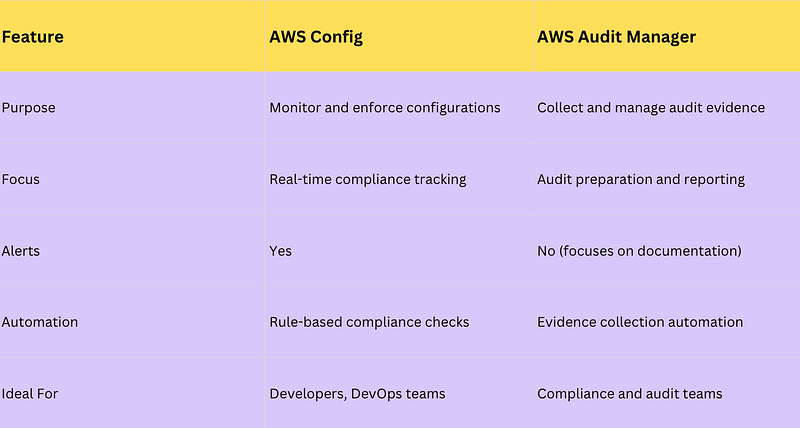
AWS Config vs AWS Audit Manager: What’s the Difference?
How They Work Together
These two services are not competitors — they complement each other.
- AWS Config ensures your infrastructure stays compliant.
- AWS Audit Manager proves that it has been compliant.
Together, they create a complete compliance strategy:
- Define rules → (AWS Config)
- Monitor and fix issues → (AWS Config)
- Collect evidence → (AWS Audit Manager)
- Generate audit reports → (AWS Audit Manager)
Practical Scenario
Let’s say you’re part of a large enterprise team:
- You want developers to use only approved EC2 instances → Use AWS Config
- You need to show auditors that policies were followed → Use AWS Audit Manager
So if the question is:
Which service ensures developers follow configuration guidelines?
✅ Answer: AWS Config
Key Takeaways
AWS Config
- Tracks and evaluates resource configurations
- Helps enforce compliance rules in real time
- Ideal for developers and operations teams
AWS Audit Manager
- Automates evidence collection for audits
- Helps generate audit-ready reports
- Ideal for compliance and audit teams
Together
- Config ensures compliance
- Audit Manager proves compliance
Final Thoughts
Cloud compliance isn’t a one-time task — it’s an ongoing process.
By using AWS Config and AWS Audit Manager together, you can:
- Reduce manual effort
- Improve security and governance
- Stay audit-ready at all times
If you’re working with AWS in a professional environment, understanding these two services can make a significant difference in how efficiently your team handles compliance.