4 Practical AI Agents Every Software Engineer Should Use
The 4 AI Agents That Quietly Saved Me 10+ Hours Every Week (And Changed How I Work)
AI is everywhere, but most people still use it like a search engine or a chatbot — asking one question at a time.
Before I discovered the 4C Framework, I thought I was using AI effectively.
I used it to write code, answer questions, and summarize text — but I was still doing most of the heavy lifting myself.
I was missing something much bigger: AI wasn’t meant to be just another chatbot; it could become a system that manages tasks, organizes information, sparks ideas, and even coaches me through important conversations.
Once I started using these four AI agents, my workflow changed completely. If you feel like you’re using AI every day but still not getting its full value, this article is for you.
We Don’t Need Faster Typing.
We Need Better Thinking.
Most people use AI like this.
Human
 │
 ▼
Ask Question
 │
 ▼
AI gives Answer
That’s useful.
But it is also very limited.
An AI agent works differently.
Task
 │
 ▼
Think
 │
 ▼
Take Action
 │
 ▼
Check Result
 │
 ▼
Improve
 │
 ▼
Return Final Output
Instead of answering one question…
it performs an entire job.
This approach is inspired by the ReAct (Reason + Act) pattern, where the AI reasons about the task, uses tools, evaluates results, and repeats the process until it reaches a useful outcome.
Once I understood this difference, I stopped asking AI random questions.
I started assigning it responsibilities.
Agent 1: The Coordination Agent
This is probably the easiest place to start.
Let’s be honest.
How many times have you opened Gmail just to reply to one email…
…and 30 minutes later you’re reading newsletters that you never intended to open?
It happens to almost everyone.
Research has shown that office workers are interrupted frequently throughout the day, and every interruption comes with a “switching cost.” Your brain needs time to get back into deep work after changing tasks. That constant context switching hurts productivity.
Instead of manually checking everything, imagine starting your day with something like this.
Good Morning 👋

Urgent Emails (3)
------------------
✓ Client waiting for reply
✓ Production alert
✓ Interview confirmation

Information (9)
------------------
• Weekly newsletter
• Team updates
Ignore (14)

------------------
Marketing emails
Now imagine another section.
Calendar Conflict
Meeting: 2 PM
Deployment: 2:30 PM
⚠ High Risk
You immediately know what matters.
No searching.
No guessing.
No wasting time.
A Prompt Structure That Actually Works
Most people write prompts like this.
Summarize my emails.Too vague.
Instead, define the agent’s job clearly.
Role:
Executive Assistant
Task:
Review unread Gmail emails.
Categories:
- Urgent
- Information
- Ignore
Output:
Summarize each category.
Draft replies for urgent emails.
Boundary:
Never send any email without my approval.
Notice the last line.
Never send without approval.
That one sentence builds trust.
And trust is important when AI starts interacting with your real work.
Start Small
One mistake I see people making is trying to automate everything on Day 1.
Don’t.
Use this progression instead.
Observe
↓
Organize
↓
Suggest
↓
Automate
↓
Delegate
AI should earn your trust.
Not demand it.
Agent 2: The Creativity Agent
This one surprised me.
Most people think AI creates ideas.
I don’t think that’s true.
AI expands ideas.
There is a huge difference.
Imagine you have messy meeting notes.
• Increase revenue
• Reduce infrastructure cost
• New pricing
• Investors meeting Friday
Looks incomplete.
Now ask AI:
“Turn these notes into an 8-slide presentation for the CFO. Ask questions if information is missing.”
Instead of immediately generating slides, a good agent first asks questions.
That is exactly what you want.
Because bad input creates bad output.
Good AI doesn’t guess.
It clarifies.
Only after understanding the context should it generate:
- presentation structure
- speaker notes
- visuals
- action items
Think of AI as your designer…
not your decision maker.
AI Multiplies Whatever You Give It
This became obvious after using AI for months.
If your thinking is clear…
AI becomes incredibly helpful.
If your thinking is messy…
AI makes the mess bigger.
A simple example.
Bad request:
Write documentation.Better request:
Audience:
Backend developers
Goal:
Explain Redis caching.
Reading time:
5 minutes
Include:
Code example
Common mistakes
Architecture diagram
The second version almost always produces dramatically better results.
Agent 3: The Clarity Agent
This is probably the most underrated AI workflow.
Developers don’t just write code.
We read a lot.
- Documentation.
- API contracts.
- Legal agreements.
- Cloud pricing.
- Technical proposals.
- RFCs.
- Research papers.
Instead of asking:
“Summarize this.”
Ask much better questions.
For example:
Extract:
• Deadlines
• Hidden fees
• Responsibilities
• Risks
• Questions I should ask
Suddenly AI stops giving generic summaries.
It becomes an analyst.
Telescope Mode vs Microscope Mode
I really liked this idea.
Telescope Mode
When you want the big picture.
Example:
You’re joining a startup.
Ask AI to research:
- company background
- funding
- recent news
- competitors
- customer reviews
Within minutes, you understand the company much better than simply reading the homepage.
Microscope Mode
Now zoom in.
Instead of reading a 30-page contract…
ask AI to produce this table.
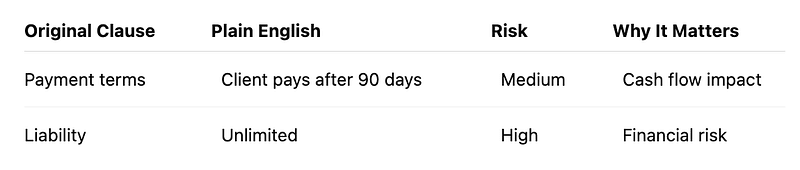
Much easier.
Even for someone without legal knowledge.
One Small Habit That Improved My Results
Whenever AI gives an answer, ask one more question.
“Can you verify this?”
Then ask another.
“Is there anything I should double-check?”
That habit alone catches surprising mistakes.
I also compare important answers across different AI models when the decision is important.
Not because one model is always better…
but because agreement increases confidence.
Agent 4: The Coaching Agent
This is the one I recommend to every software engineer preparing for interviews.
Instead of reading interview questions…
simulate the interview.
Upload:
- resume
- job description
- company information
Then say:
“Act as a skeptical engineering manager.”
Now things become interesting.
- AI interrupts you.
- Challenges your answers.
- Asks follow-up questions.
Exactly what happens in a real interview.
After the interview, switch roles.
Ask AI:
- Where did I hesitate?
- Which answer sounded weak?
- Which project should I explain differently?
- Give me one revision sheet.
That feedback loop is incredibly valuable.
Voice conversations make this feel even more realistic because you practice speaking instead of typing.
A Simple Comparison
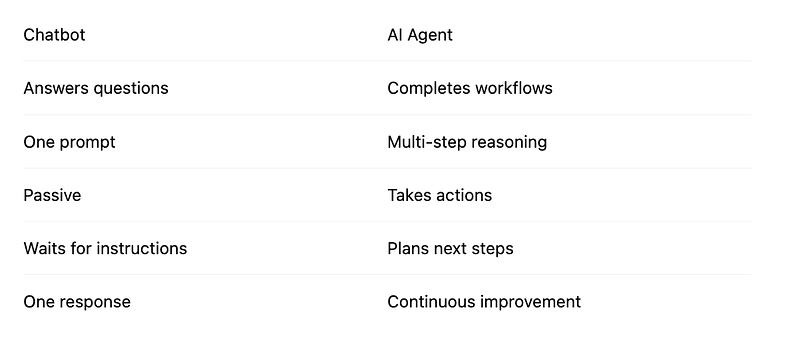
That mindset shift is everything.
Does the AI Tool Matter?
People often ask:
“Should I use ChatGPT?”
“Is Claude better?”
“What about Gemini?”
Honestly…
the framework matters more than the tool.
Tools will continue changing.
The workflow won’t.
Learn how to think.
The interface is secondary.
One Thing I Would Never Automate Immediately
Suppose your AI can send emails.
Should you let it?
Not yet.
Start with read-only access.
Let it summarize.
Let it draft.
Review every suggestion.
Only after weeks of consistent accuracy should you allow actions like sending emails or updating your calendar.
Automation should grow with confidence.
A Question Worth Thinking About
Imagine two software engineers.
Both have access to the exact same AI.
One uses it to generate code snippets.
The other uses it to plan projects, prepare interviews, summarize research, organize work, review contracts, create presentations, and coach communication skills.
Who do you think becomes more productive over the next five years?
The difference isn’t the AI.
It’s how they use it.
What do you think?
I’d genuinely like to hear your answer in the comments.
Final Thoughts
When AI first became popular, I thought its biggest strength was writing code.
Now I think I was looking at the wrong problem.
Code is only one small part of a developer’s day.
- Planning.
- Reading.
- Writing.
- Communicating.
- Learning.
- Making decisions.
- Preparing for meetings.
- Reviewing documents.
These activities consume far more time than most people realize.
That is where AI agents create the biggest impact.
The biggest lesson I took from this framework is simple.
Don’t try to replace your thinking.
Use AI to remove repetitive work so your thinking becomes more valuable.
Technology changes every year.
Good judgment doesn’t.
And that might be the most future-proof skill any of us can build.
One final question before you leave:
If you could automate one part of your daily work tomorrow, what would it be?
I’m curious to know whether your answer is coding… meetings… emails… or something completely different.
From Tech By Neha Gupta
- 👏 Enjoyed the article? Don’t forget to leave a clap.
- 💬 Have thoughts or questions? Share them in the comments.
Before you go
- Please take a moment to like the post and follow the writer!
- Did you know that over 400,000 developers share what they’re building, learning, and discovering across our platforms every month? Learn how you can contribute here