React Vite: Supercharge Your React Development with Vite
A Beginner-Friendly Guide to Faster Builds, Instant Updates, and Modern React Tooling
If you’ve ever worked with React projects using older tooling, you may remember waiting for the development server to start or refreshing the browser repeatedly to see small changes. Those delays might seem minor at first, but they add up over time and slow down productivity.
That’s where Vite comes in.
Vite is a modern build tool designed to make frontend development significantly faster and simpler. It offers near-instant server startup, lightning-fast updates, and a streamlined development workflow. For React developers, Vite provides a powerful alternative to traditional setups such as Create React App.
Let’s explore how Vite works with React and why many developers are switching to it.
What is Vite?
Vite is a next-generation frontend build tool created to improve the development experience. Instead of bundling the entire application before starting the dev server, it uses native browser ES modules during development.
This design leads to two major advantages:
- Extremely fast development server startup
- Instant updates when you modify code
For example, the development server in Vite can start in around 825 milliseconds, while traditional setups may take several seconds to initialise.
This means less waiting and more time focused on building features.

Why Vite is Popular for React Development
React developers benefit greatly from Vite because it integrates smoothly with modern React workflows.
The official plugin @vitejs/plugin-react provides important capabilities such as:
- Fast Refresh for instant UI updates
- Automatic JSX runtime support
- Compatibility with React 16.9 and later
Fast Refresh is particularly useful. It updates components instantly in the browser without losing application state, which makes development smoother and more interactive.
Getting Started: Creating a React App with Vite
Setting up a React project with Vite takes only a few commands.
Step 1: Create the Project
Run the following command:
npm create vite@latest my-react-app -- --template reactThis command generates a new project and automatically configures React support.
Step 2: Install Dependencies
Navigate to the project folder and install the required packages:
npm installStep 3: Start the Development Server
Run the development server:
npm run devWithin seconds, your React application will be running locally.
During setup, you can also choose between JavaScript and TypeScript variants depending on your project needs.

Understanding the Vite Configuration
Every Vite project includes a configuration file called vite.config.js (or .ts).
A minimal React configuration looks like this:
import { defineConfig } from 'vite'
import react from '@vitejs/plugin-react'
export default defineConfig({
 plugins: [react()]
})
This simple setup enables React support, Fast Refresh, and JSX transformation.
Optional Configuration Settings
You can customise the plugin with additional options:
- include / exclude — Define which files should be processed (such as
.jsxor.tsx) - jsxRuntime — Choose between
"automatic"(default) or"classic" - jsxImportSource — Use custom JSX libraries
- reactRefreshHost — Configure Fast Refresh behaviour
These options allow teams to tailor Vite to their project architecture.
Development Performance: Vite vs Traditional React Tooling
One of the biggest reasons developers adopt Vite is performance.
Here is a simplified comparison:
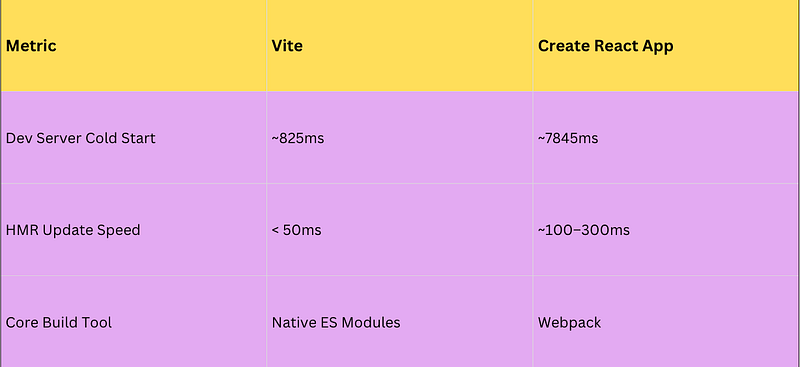
Instead of bundling the entire application during development, Vite serves files directly using the browser’s module system. This significantly reduces startup time and speeds up updates.
For developers working on large applications, this difference becomes very noticeable.
Project Structure in a Vite + React App
A typical Vite React project is clean and easy to understand.
Important files include:
index.html
The entry HTML file, where the application starts.
src/main.jsx
The main JavaScript file is responsible for rendering the React app.
src/App.jsx
The root component of the application.
src/style.css
Global styling for the app.
vite.config.js
Configuration for Vite and its plugins.
Static Assets
Static files such as images should be placed inside the public/ folder.
For example:
public/logo.pngThis file becomes accessible in the browser at:
/logo.pngThis simple structure keeps projects organised and easy to maintain.
Testing React Apps with Vite
For testing React applications in a Vite environment, Vitest is the recommended test runner.
Vitest integrates directly with Vite and supports modern testing libraries.
Install Testing Dependencies
npm install -D vitest @testing-library/react @testing-library/jest-dom jsdomConfigure Testing
Add the following configuration:
test: {
 environment: 'jsdom',
 setupFiles: ['./src/setupTests.ts']
}
This setup enables:
- DOM testing
- Jest-style assertions
- Global test utilities
For teams familiar with Jest and React Testing Library, this environment feels very familiar.
Why Developers Are Moving to Vite
Many development teams are transitioning to Vite because it simplifies workflows and reduces waiting time during development.
Some practical advantages include:
- Faster iteration when building features
- Easier project configuration
- Strong plugin ecosystem
- Compatibility with existing React applications
For freelancers, startups, and large engineering teams alike, faster feedback loops lead to improved productivity and developer satisfaction.
Key Takeaways
- Vite is a modern build tool designed to improve frontend development speed.
- React projects integrate easily using
@vitejs/plugin-react. - Projects can be created quickly using a single command.
- Vite provides instant server startup and faster Hot Module Replacement.
- The project structure is clean and beginner-friendly.
- Vitest offers seamless testing integration for React applications.
- Teams adopting Vite often benefit from faster workflows and simpler configurations.
If you like this article, please do support me by clapping on this article, For you it might take some seconds for me it provides me huge motivation to keep writing more.
At Dev Simplified, We Value Your Feedback 📊
👉 To read more such articles on React, visit here
👉 Follow us not to miss any updates.
👉 Have any suggestions? Let us know in the comments!