Good Commit vs. Your Commit: Why It Matters More Than You Think
Good commits make rollbacks easy; bad commits make them risky.
Are you using Git every day but still treating commit messages like an afterthought? Yes, I was the same at some point in time. If your commit history also looks like “First commit”, “bug fix”, “fix,” “final fix,” or “really final fix,”, “revert-1”, or “revert-2” this article is for you.
My Embarrassing Git Story (and What I Learned)
Sometime back, I was working on a project with a team that took code quality very seriously.
One day, my team lead asked me to roll back a feature I had implemented a week earlier. No problem, right? 🥲
Except my blunder (commit history) looked something like this:
commit a1b2c3d - final changes
commit d4e5f6g - fixed stuff
commit h7i8j9k - again commiting changes
Yeah… not exactly helpful.
It took me hours to resolve my mess.
That was the day I realized:
Writing good commit messages is not optional — it’s a lifesaver and rollback too😅.
What Makes a Bad Commit Message?
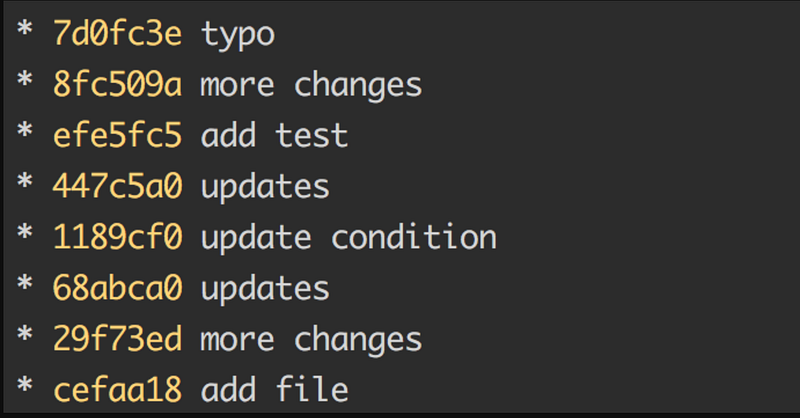
If you’ve ever written any of these commits, don’t worry — you’re not alone:
❌ “Fixed bug” — Which bug? How it was fixed?
❌ “Updated file” — That’s literally what Git is for, What file? and Why.
❌ “Refactored code” — What did you refactor? Why?
Bad commit messages make
- Debugging harder
- Slow down collaboration
- Turn version control into version chaos🥲.
How to Write a Perfect Git Commit Message
Follow this simple formula:
- Start with a short summary (40-50 chars max)
- Example:
Fix page load when clicking 'Submit' button
2. Use the imperative mood (like a command- like you’re doing it)
- Bad:
Fixed login issue - Good:
Fix login issue
3. Add context if needed (but keep it short)
- Example:
Fix login issue on Safari The login form was not submitting due to a JS error. Added a fallback to prevent crashes on older browsers.
4. Use prefixes for clarity (if your team has a convention)
feat:for new featuresfix:for bug fixeschore:for minor changesdocs:for documentation updates
5. Keep it concise, but meaningful
- “Improve search function” → ✅
- “Fixed some stuff in search.js” → ❌
Why This Matters (Real-World Benefits)
- Easier Debugging — When something breaks, you can quickly understand through your commit messages what went wrong.
- Better Collaboration — Teammates (and future-you) will thank you.
- Cleaner Code History — No more sitting and thinking “what the heck did I do here?”.
- Professionalism — Good commit messages make you look like a professional and experienced developer.
Final Thoughts
Next time you push a commit, take an extra 30–60 seconds to write something useful. Your future self — and your team — will appreciate it.
If you don’t have a commit structure so far then it’s a priority that needed to be discussed within a team where you can come up with a common structure which everyone follows.
💬 Your Turn: Have you written any such commit messages? Drop your commit message writing method in the comments! and let’s have some comments over commits👇
Interested in joining a like-minded set of peers, Connect with us
👉 Join our free WhatsApp community on Career Guidance. Here you’ll get access to job openings, community guidance, updates on the latest technology and many more.
At Dev Simplified, We Value Your Feedback 📊
👉 If you like the article, then please support us by clapping for this article.
👉 Have any suggestions? Let us know in the comments!